

Light Up the Roads
Light Up the Roads is made and published by Stanley Lam. AppBrain is an independent app data site and isn't affiliated with Stanley Lam. The app name, icon, screenshots and description belong to Stanley Lam and are shown as published on the App Store.
AppBrain's verdict
- Last updated
- January 13, 2025
Rankings
App Store top chartsApp Store Rankings for Light Up the Roads
Competitors
Similar apps and more from Stanley LamAlternatives to Light Up the Roads





More from Stanley Lam




Releases
Updates seen on the App Store- Version
- 1.1
- Launched
- December 2024
No changelog data
User feedback
Ratings and reviews on the App StoreComments on Light Up the Roads for iOS
We don't have enough comments to show example comments. Please check back later.
Technology
Found in the app by AppBrain- Price
- Free
- App size
- 147.2 MB
- Content rating
- Everyone
Technologies used by Light Up the Roads
About the app and developer
About Light Up the Roads
Light Up the Roads is a games app developed by Stanley Lam.
User Ratings
The app has no ratings yet.
App Information
Light Up the Roads is freely available from the App Store. The app size is 147.21 MB. The latest version available is 1.1. The last update was on January 13, 2025.
Technical Requirements
The app has a content rating of Everyone. The app has been available on the App Store since December 2024.
Developer information for Stanley Lam
Address:
Store listing
By Stanley Lam, from the App Store


Description by Stanley Lam Written by the developer, not by AppBrain. Click to read.
Rule
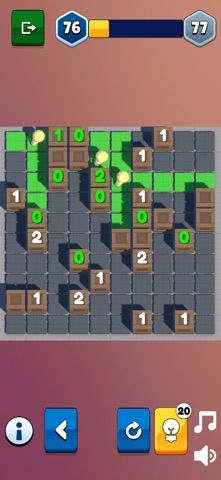
The goal is to place light bulbs in empty cells such that no two bulbs shine on each other, until the entire grid is lit up. A block cell may have a number on it from 0 to 4, indicating how many bulbs must be placed adjacent to its four sides. An unnumbered block cell may have any number of light bulbs adjacent to it, or none.
**** Light Up the Roads features ****
# Content
- 3 difficulty levels
- Unlimited levels of puzzles
# Features
- Record the latest level for each difficulty
- Long press to place markers