

LightCompass: Photo Planner
LightCompass: Photo Planner is made and published by JI HOON LEE. AppBrain is an independent app data site and isn't affiliated with JI HOON LEE. The app name, icon, screenshots and description belong to JI HOON LEE and are shown as published on the App Store.
AppBrain's verdict
- Last updated
- August 18, 2026
Rankings
App Store top chartsApp Store Rankings for LightCompass: Photo Planner
Competitors
Similar apps and more from JI HOON LEEAlternatives to LightCompass: Photo Planner


Releases
Updates seen on the App Store- Version
- 1.0
- Launched
- August 2026
No changelog data
User feedback
Ratings and reviews on the App StoreComments on LightCompass: Photo Planner for iOS
We don't have enough comments to show example comments. Please check back later.
Technology
Found in the app by AppBrain- Price
- Free
- App size
- 9.27 MB
- Content rating
- Medium
Technologies used by LightCompass: Photo Planner
About the app and developer
About LightCompass: Photo Planner
LightCompass: Photo Planner is a photo & video app developed by JI HOON LEE.
User Ratings
The app has no ratings yet.
App Information
LightCompass: Photo Planner is freely available from the App Store. The app size is 9.27 MB. The latest version available is 1.0. The last update was on August 18, 2026.
Technical Requirements
The app has a content rating of Medium Maturity. The app has been available on the App Store since August 2026.
Developer information for JI HOON LEE
Address:
Store listing
By JI HOON LEE, from the App Store




Description by JI HOON LEE Written by the developer, not by AppBrain. Click to read.
LightCompass shows you exactly where the sun, the moon, and the Milky Way will be for any place, any date, any time. Drop a pin, scrub the timeline, and plan the shot before you leave home. No manual to study: open the map and you are planning within minutes.
PLAN ON THE MAP
- Sun and moon paths drawn over the exact spot you are going to shoot, for any date and time
- Sunrise, sunset, moonrise, moonset, twilight, golden hour, and blue hour at a glance
- Moon phase and illumination, plus Milky Way arch and Galactic Center visibility
- A time slider to scrub through the day and watch the light move
SEE IT IN AR
- Point your iPhone at the scene and preview the sun and moon paths over the live camera image
- Compass calibration flow for reliable on-location alignment
TRUST THE TERRAIN (Terrain 3D pack)
- Real elevation data builds the actual horizon around you
- Sunrise and sunset corrected for the ridgeline, so you know when the light clears the mountain - not the flat horizon
- A 3D terrain map with sunrise and sunset direction lines from where you stand
FIND THE ALIGNMENT (Alignment pack)
- Reverse search: choose where you want the sun or moon to appear, and LightCompass finds the dates and times it will be exactly there
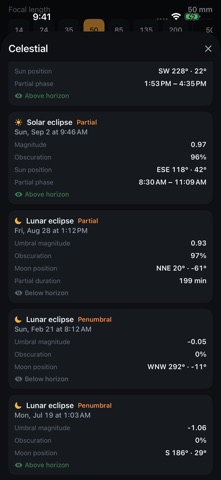
CATCH THE EVENTS (Celestial pack)
- Solar and lunar eclipse details
- Meteor shower calendar
- Star trail planning
CALCULATE THE SHOT
- Depth of field, hyperfocal distance, and field of view calculators
- Camera settings guidance for the scene you are planning
- Meters or feet, your choice
SAVE AND REMEMBER
- Save locations and shooting plans
- Add a plan to your calendar with a reminder, so you are on location before the light is
SIMPLE, HONEST PRICING
- The core app is a single one-time purchase
- Three optional expansion packs - Alignment, Celestial, and Terrain 3D - are one-time purchases too, with a complete bundle available
- No subscription. Ever.
PRIVATE BY DESIGN
- No account, no sign-up, no analytics, no ads
- Every astronomical calculation runs on your device
- The only network requests fetch public map and elevation data, which is cached for offline use
Whether you are chasing golden hour in the city, waiting for moonrise behind a peak, or lining up the Galactic Center over a lighthouse, LightCompass tells you where the light will be - so you can be there first.