

Lightning Notes - AI Recorder
Lightning Notes - AI Recorder is made and published by Chihiro Otsuki. AppBrain is an independent app data site and isn't affiliated with Chihiro Otsuki. The app name, icon, screenshots and description belong to Chihiro Otsuki and are shown as published on the App Store.
AppBrain's verdict
- Last updated
- October 31, 2026
- Size
- 56.3 MB
User feedback
Ratings and reviews on the App StoreComments on Lightning Notes - AI Recorder for iOS
We don't have enough comments to show example comments. Please check back later.
Store listing
By Chihiro Otsuki, from the App Store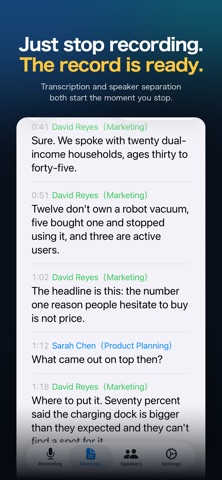


Description by Chihiro Otsuki Written by the developer, not by AppBrain. Click to read.
Transcription and speaker separation run entirely on your iPhone — no audio ever leaves your device. Stop the recording and on-device AI works out who said what, producing a speaker-labeled transcript. Then choose local AI or Cloud AI to write the meeting notes. Supported by ads, with all core features available without a subscription.
------------------------
Key Features
------------------------
■ Accurate Transcription — On-Device
Apple's speech recognition engine processes your audio entirely on-device. Meetings, lectures, interviews — transcribed without sending audio anywhere, and reliable even for long recordings.
■ Automatic Speaker Separation
Speaker separation runs automatically on your iPhone once recording stops, identifying who said what across multi-participant conversations. Voice fingerprints are learned over time, so names get assigned automatically in later meetings. Manual editing is always available.
■ AI Meeting Notes — Your Choice of AI
· On-device AI: No internet required; nothing leaves your iPhone. Needs 6 GB RAM or more (iPhone 13 Pro and later).
· Cloud AI: DeepSeek V4-Flash via OpenRouter, streamed in real time. API data is not used for model training, and only Zero Data Retention (ZDR) endpoints are used, so the provider does not store your data to disk.
■ Speaker Summaries & Person Profiles (Cloud AI)
See each participant's role, key points, and behavior in the meeting. Across up to 30 past meetings, AI builds a profile of a person's role, communication style, and projects.
■ Action Items, Extracted (Cloud AI)
Cloud AI meeting notes also pull each person's action items into the Tasks tab. Set yourself among your people to see your tasks apart from everyone else's. Each task keeps the line it came from and links back to its meeting; move it from Needs confirmation to In progress to Completed, also right on the meeting's screen. Tasks stay on your device.
■ Dictionary Correction (Custom Terms)
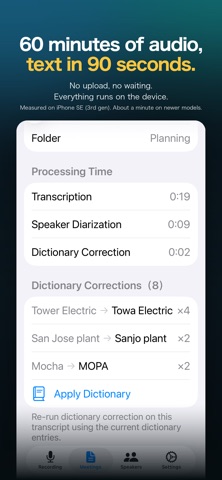
Register company names, product names, and jargon, and the app fixes where speech recognition misheard them — "Tower Electric" becomes "Towa Electric". An on-device language model checks each fix reads naturally in context, so unrelated passages are left alone. Fixes can be reviewed, reverted one at a time, and applied to past meetings.
■ Audio & Video File Import
Import external audio or video recordings and run them through the same transcription and speaker separation pipeline.
■ Share & Export
Export as PDF, choosing which sections to include (summary, speaker summaries, transcript). Speaker colors and tables are preserved. Text and audio sharing are also supported.
■ Privacy-First Architecture
Transcription, speaker separation, and local summarization all run on-device. Cloud AI is opt-in — leave it off and no recording content ever leaves your iPhone.
■ Folder Organization
Organize meetings into folders by project, client, or topic.
■ Full-Text Search
Search titles, summaries, and transcripts. Find any meeting by keyword in seconds.
■ Edit Transcripts
Fix recognition errors directly in the app and save an accurate record.
■ Control From the Lock Screen
Elapsed time appears on the Lock Screen and Dynamic Island while recording, with pause, resume, and stop right there. Add the Control Center button to start recording without launching the app.
■ Backup & Restore
Export meetings, transcripts, and speaker data to a file and restore it on another device or after reinstalling. You keep the file; nothing goes to an external server.
------------------------
Requirements
------------------------
· Transcription, speaker separation, file import: iPhone 12 or later (A14 chip), or iPad with M1 or later
· Local AI summarization: 6 GB RAM or more (iPhone 13 Pro, iPhone 14 series, iPhone 15 and later)
· Audio/video formats: WAV, M4A, MP3, MP4, and other common formats
---
Take back your meetings. No subscription required.
Safety and technology
Found in the app by AppBrain- Price
- Free
- App size
- 56.3 MB
- Content rating
- Everyone
Technologies used by Lightning Notes - AI Recorder
Releases
Updates seen on the App Store- Version
- 1.25.3
- Launched
- April 2026
No changelog data
Alternatives
Similar apps and more from Chihiro OtsukiAlternatives to Lightning Notes - AI Recorder


More from Chihiro Otsuki

Rankings
App Store top chartsApp Store Rankings for Lightning Notes - AI Recorder
About the app and developer
About Lightning Notes - AI Recorder
Lightning Notes - AI Recorder is a productivity app developed by Chihiro Otsuki.
User Ratings
The app has no ratings yet.
App Information
Lightning Notes - AI Recorder is freely available from the App Store. The app size is 56.33 MB. The latest version available is 1.25.3. The last update was on October 31, 2026.
Technical Requirements
The app has a content rating of Everyone. The app has been available on the App Store since April 2026.
Developer information for Chihiro Otsuki
Address:
Frequently asked questions about Lightning Notes - AI Recorder
Is Lightning Notes - AI Recorder free?
Yes. Lightning Notes - AI Recorder is free on the App Store.
Is Lightning Notes - AI Recorder still available?
Yes. Lightning Notes - AI Recorder is on the App Store, and the last update we saw was on October 31, 2026.
How large is Lightning Notes - AI Recorder?
Lightning Notes - AI Recorder is 56.33 MB.
Is Lightning Notes - AI Recorder suitable for children?
App Store rates the content of Lightning Notes - AI Recorder as suitable for everyone.
Who made Lightning Notes - AI Recorder?
Lightning Notes - AI Recorder was developed by Chihiro Otsuki. It is listed in the productivity category on the App Store.
What are the best alternatives to Lightning Notes - AI Recorder?
People looking at Lightning Notes - AI Recorder also look at these productivity apps: シンプル録音文字起こし, 文字起こしメーカー, VoiLog, シンプル文字起こし, SmaVoi: AI Voice Recorder.