

Lightroom: AI Photo Editor
Lightroom: AI Photo Editor is made and published by Adobe Inc. AppBrain is an independent app data site and isn't affiliated with Adobe Inc. The app name, icon, screenshots and description belong to Adobe Inc. and are shown as published on the App Store.
AppBrain's verdict
EstablishedLoved by usersTop 10- Best rank
- #6
- Top Free, Saudi Arabia
- Rating on App Store
- 4.77
- 337,116 ratings
- Last updated
- October 12, 2026
Users love it: 4.8 stars from 337,116 ratings. Its best ranking is #6 in Top Free, Photo & Video in Saudi Arabia.
Rankings
App Store top charts- Highest rank
- #6
- Chart
- Top Free
- Photo & Video
- Country
- Saudi Arabia
App Store Rankings for Lightroom: AI Photo Editor
Top rankings
| Rank | Country | Category | List |
|---|---|---|---|
| 11 | United States | Photo & Video | Top Grossing |
| 10 | Canada | Photo & Video | Top Grossing |
| 10 | Germany | Photo & Video | Top Grossing |
| 10 | France | Photo & Video | Top Grossing |
| 16 | United States | Photo & Video | Top Free |
| 6 | Saudi Arabia | Photo & Video | Top Free |
| 13 | Japan | Photo & Video | Top Grossing |
| 8 | Finland | Photo & Video | Top Grossing |
| 8 | India | Photo & Video | Top Grossing |
| 9 | Czech Republic | Photo & Video | Top Grossing |
Ranking history in United States
Competitors
Similar apps and more from Adobe Inc.Alternatives to Lightroom: AI Photo Editor


More from Adobe Inc.






Releases
Updates seen on the App Store- Version
- 11.6.10
- Launched
- June 2014
No changelog data
User feedback
Ratings and reviews on the App StoreComments on Lightroom: AI Photo Editor for iOS
We don't have enough comments to show example comments. Please check back later.
Technology
Found in the app by AppBrain- Price
- Free
- App size
- 349.8 MB
- Content rating
- Medium
Technologies used by Lightroom: AI Photo Editor
About the app and developer
About Lightroom: AI Photo Editor
Lightroom: AI Photo Editor is a photo & video app developed by Adobe Inc.
What is the rating of Lightroom: AI Photo Editor?
Lightroom: AI Photo Editor is rated 4.77 out of 5 stars, based on 340 thousand ratings.
Is Lightroom: AI Photo Editor free?
Lightroom: AI Photo Editor is free. The app size is 349.84 MB. The latest version available is 11.6.10. The last update was on October 12, 2026.
What are the requirements for Lightroom: AI Photo Editor?
The app has a content rating of Medium Maturity. The app has been available on the App Store since June 2014.
Developer information for Adobe Inc.
Address:
Frequently asked questions about Lightroom: AI Photo Editor
Is Lightroom: AI Photo Editor free?
Yes. Lightroom: AI Photo Editor is free on the App Store.
Is Lightroom: AI Photo Editor still available?
Yes. Lightroom: AI Photo Editor is on the App Store, and the last update we saw was on October 12, 2026.
How large is Lightroom: AI Photo Editor?
Lightroom: AI Photo Editor is 349.84 MB.
Is Lightroom: AI Photo Editor suitable for children?
App Store gives Lightroom: AI Photo Editor a medium maturity rating, so it is not meant for young children.
How do people rate Lightroom: AI Photo Editor?
Lightroom: AI Photo Editor scores 4.77 out of 5 stars, from 337,116 ratings on the App Store.
Who made Lightroom: AI Photo Editor?
Lightroom: AI Photo Editor was developed by Adobe Inc. It is listed in the photo & video category on the App Store.
What are the best alternatives to Lightroom: AI Photo Editor?
People looking at Lightroom: AI Photo Editor also look at these photo & video apps: Presets for Lightroom - Editor, Snapseed: Photo Editor, Camera, Presets for Lightroom - FLTR, RNI Films: Photo & RAW Editor, Presets & Filters - Koloro.
Store listing
By Adobe Inc., from the App Store




Description by Adobe Inc. Written by the developer, not by AppBrain. Click to read.
Whether you’re snapping pics on the go or curating your social feed, Lightroom puts powerful AI photo editor tools in your pocket to make quick edits easy and fun. Adobe Lightroom is here to help you create photos you’re proud to share.
PHOTO EDITOR THAT EASILY MAKES YOUR PHOTOS LOOK AMAZING
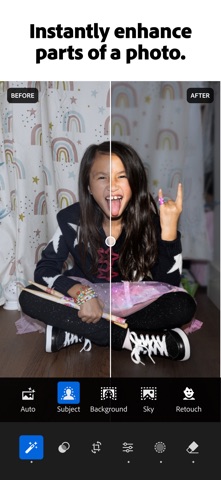
Adobe Lightroom’s one-tap features like Quick Actions and Adaptive Presets let you retouch and enhance photo quality in seconds. These AI photo editor tools suggest the best edits for your images. Perfect for quick photo fixes or adding a unique vibe, no experience required. Use it as your go-to photo editor.
REMOVE DISTRACTIONS AND BLUR BACKGROUND
Adobe Lightroom gives you professional photo editing tools that are easy to use. Blur the photo background for a polished look, adjust finer details, or use AI Generative Remove as an object eraser in photos.
POWERFUL EDITS WITH ZERO HASSLE
Use photo lighting tools to tweak exposure, highlights, and shadows. Fix photos with presets, photo effects, color grading, hue, saturation, or add a blurry bokeh effect to match your vibe.
GET INSPIRATION FROM THE COMMUNITY
Not sure where to start? Browse photo filters, templates, and presets shared by creators around the world. From vintage photo effects to retro photo filters and presets to match your aesthetic kick off your edits in a tap. Whether you’re looking to make bold edits with AI photo editor tools or subtle tweaks for polished portrait edits, find a look that matches your style. Save your favorites and make every photo feel like you.
EDIT ONCE, APPLY EVERYWHERE
Snapped a whole concert, travel day, or family gathering? Instead of editing each shot one by one, make quick edits with AI photo editor tools. Fix photos in batches to keep your photo edits looking consistent.
WHY ADOBE LIGHTROOM?
• It’s for every moment: whether editing photos for fun, capturing memories, gaining confidence, or sharing on social media.
• It’s flexible: start with simple photo editing and grow into a better photographer along the way. Fix photos, crop and resize images, blur background elements, or remove distractions with our object eraser — the editing options are endless with Adobe Lightroom.
• It’s an AI photo editor designed to help build confidence, spark creativity, and showcase your authentic style.
PHOTO EDITOR TOOLS YOU'LL LOVE
• Quick Actions: Fix photos with suggested edits tailored to your pics.
• Preset Edits: Discover filters or make your own signature look.
• Background Blur: Create depth with a blurry background effortlessly.
• Generative Remove Edits: Take out the things you didn’t want with this AI photo eraser.
• Video Editing: Bring the same creative energy to your clips with tools for light, color, and presets.
FOR EVERY KIND OF PHOTOGRAPHER
Photo editing has never been easier. Lightroom is here to empower you - to capture sunsets, family moments, or your latest foodie find. With tools to fix pictures, enhance photo quality, and edit videos, Adobe Lightroom gives you the right balance of ease and control.
Download Adobe Lightroom today.
Terms & Conditions:
Your use of this application is governed by the Adobe General Terms of Use http://www.adobe.com/go/terms_linkfree_en and the Adobe Privacy Policy http://www.adobe.com/go/privacy_policy_linkfree_en
Do not sell or share my personal information www.adobe.com/go/ca-rights-linkfree