

Lightune: AI Filter Match
Lightune: AI Filter Match is made and published by 杨杨 戴. AppBrain is an independent app data site and isn't affiliated with 杨杨 戴. The app name, icon, screenshots and description belong to 杨杨 戴 and are shown as published on the App Store.
AppBrain's verdict
- Last updated
- May 9, 2026
Rankings
App Store top chartsApp Store Rankings for Lightune: AI Filter Match
Competitors
Similar apps and more from 杨杨 戴Alternatives to Lightune: AI Filter Match


More from 杨杨 戴




Releases
Updates seen on the App Store- Version
- 1.10
- Launched
- September 2024
No changelog data
User feedback
Ratings and reviews on the App StoreComments on Lightune: AI Filter Match for iOS
We don't have enough comments to show example comments. Please check back later.
Technology
Found in the app by AppBrain- Price
- Free
- App size
- 232.3 MB
- Content rating
- Everyone
Technologies used by Lightune: AI Filter Match
About the app and developer
About Lightune: AI Filter Match
Lightune: AI Filter Match is a photo & video app developed by 杨杨 戴.
User Ratings
The app has no ratings yet.
App Information
Lightune: AI Filter Match is freely available from the App Store. The app size is 232.32 MB. The latest version available is 1.10. The last update was on May 9, 2026.
Technical Requirements
The app has a content rating of Everyone. The app has been available on the App Store since September 2024.
Developer information for 杨杨 戴
Address:
Store listing
By 杨杨 戴, from the App Store



Description by 杨杨 戴 Written by the developer, not by AppBrain. Click to read.
From AI Color Match, depth blur, photo repair, and Magic Sky to filters, effects, local adjustments, and advanced color tools, Lightune is designed around local processing. Your photos stay yours, and you can keep editing even offline.
Local AI, privacy first
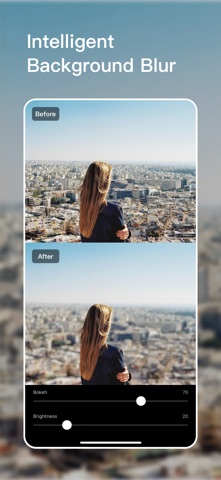
• All AI features run on device: AI Color Match, background blur, photo repair, Magic Sky, and more.
• No photo upload required: your images do not need to be sent to cloud servers during editing.
• Works offline: keep editing without an internet connection.
• Protect creative privacy: ideal for personal photos, portraits, and private materials.
AI and smart creative tools
• AI Color Match: analyze the color, lighting, and mood of a reference image, then apply a similar look to your photo.
• Depth Blur: manually adjust the blur center and style to make the subject stand out naturally.
• Photo Repair: remove blemishes, spots, and distracting elements for a cleaner image.
• Magic Sky: replace the sky with clear skies, sunsets, starry scenes, and more.
• Auto Enhance: quickly improve exposure, color, and overall image balance.
Professional editing tools
• 300+ filters and 100+ effects, including film, vintage, portrait, landscape, light leaks, grain, and glow.
• Local adjustments with radial, linear, and brush controls.
• Black & white, HSL, curves, texture, tone, chromatic aberration, vignette, optical correction, and skin tone protection.
• Undo and draft editing state, so you can continue editing or restore the original look.
Try Lightune and create professional photo edits with private, on-device AI.
Subscription notice:
Unless you cancel your subscription at least 24 hours before the end of the current period, it will automatically renew at the agreed price and duration. Your Apple ID will be charged within 24 hours before the end of the current period. You can manage or cancel your subscription in your App Store account settings. If you purchase a subscription, any unused portion of a free trial or promotional period, if offered, may be forfeited. By subscribing, you agree to our Terms of Service and Privacy Policy.
Privacy Policy: https://t15ehm6hgj9.feishu.cn/docx/Op86dE0i2ovOY1xXPwfcvu6lnVg
Terms of Service: https://t15ehm6hgj9.feishu.cn/docx/OArodZ4OXoUiXOxFgIrcplsXn6e