

Likz Drop: File Transfer
Likz Drop: File Transfer is made and published by Ngan Kim. AppBrain is an independent app data site and isn't affiliated with Ngan Kim. The app name, icon, screenshots and description belong to Ngan Kim and are shown as published on the App Store.
AppBrain's verdict
- Rating on App Store
- 5.00
- 5 ratings
- Last updated
- September 17, 2026
It doesn't have enough ratings yet to judge what users think.
Rankings
App Store top chartsApp Store Rankings for Likz Drop: File Transfer
Competitors
Similar apps and more from Ngan KimAlternatives to Likz Drop: File Transfer


More from Ngan Kim


Releases
Updates seen on the App Store- Version
- 1.0.10
- Launched
- July 2026
No changelog data
User feedback
Ratings and reviews on the App StoreComments on Likz Drop: File Transfer for iOS
We don't have enough comments to show example comments. Please check back later.
Technology
Found in the app by AppBrain- Price
- Free
- App size
- 68.7 MB
- Content rating
- Everyone
Technologies used by Likz Drop: File Transfer
About the app and developer
About Likz Drop: File Transfer
Likz Drop: File Transfer is an utilities app developed by Ngan Kim.
User Ratings
Likz Drop: File Transfer is rated 5.00 out of 5 stars. The rating is based on 5 ratings.
App Information
Likz Drop: File Transfer is freely available from the App Store. The app size is 68.72 MB. The latest version available is 1.0.10. The last update was on September 17, 2026.
Technical Requirements
The app has a content rating of Everyone. The app has been available on the App Store since July 2026.
Developer information for Ngan Kim
Address:
Store listing
By Ngan Kim, from the App Store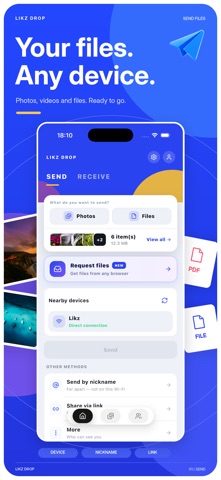



Description by Ngan Kim Written by the developer, not by AppBrain. Click to read.
PHOTO AND FILE TRANSFER
Send original photos, large videos and project folders without compression.
NEARBY OR ACROSS NETWORKS
Transfer directly over the same Wi-Fi network without using the internet. Send by nickname when devices are on different networks.
OFFLINE SHARING
Share between supported iPhone and Android devices without an internet connection. Follow the in-app connection setup and grant the required permissions.
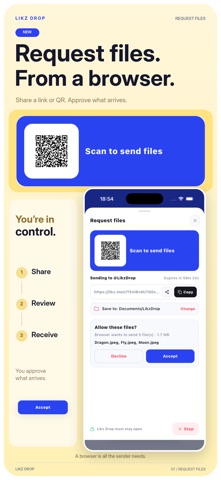
SHARE BY LINK
Let recipients download in a browser without installing Likz Drop. Keep the sender online and approve each live download.
PHOTO BACKUP
Choose photos to copy to your own signed-in Mac or PC. Originals stay on your phone. You choose when to start the backup.
PRIVATE LIVE TRANSFERS
Live transfers use end-to-end encryption and are not kept as cloud files. Across networks, an encrypted relay may be used when a direct connection is unavailable.
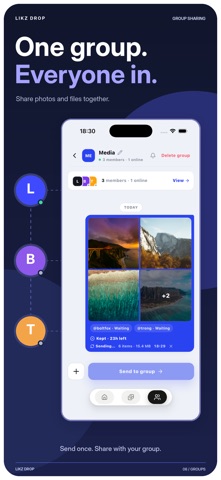
GROUP SHARING
Send files to a group. Optional Keep 24h stores an encrypted copy temporarily and has plan-based storage limits.
START IN GUEST MODE
No account is needed to start. Sign in to link your devices and access account-based features.
Personal, non-commercial use is free. Commercial use requires Pro.
Terms of Use (EULA): https://www.apple.com/legal/internet-services/itunes/dev/stdeula/