

LimitWatch is made and published by 圣宝 蔡. AppBrain is an independent app data site and isn't affiliated with 圣宝 蔡. The app name, icon, screenshots and description belong to 圣宝 蔡 and are shown as published on the App Store.
AppBrain's verdict
- Rating on App Store
- 1.00
- 1 ratings
- Last updated
- July 15, 2026
It doesn't have enough ratings yet to judge what users think.
Rankings
App Store top chartsApp Store Rankings for LimitWatch
Competitors
Similar apps and more from 圣宝 蔡Alternatives to LimitWatch


Releases
Updates seen on the App Store- Version
- 1.0.1
- Launched
- April 2026
No changelog data
User feedback
Ratings and reviews on the App StoreComments on LimitWatch for iOS
We don't have enough comments to show example comments. Please check back later.
Technology
Found in the app by AppBrain- Price
- Free
- App size
- 81.8 MB
- Content rating
- Everyone
Technologies used by LimitWatch
About the app and developer
About LimitWatch
LimitWatch is an overall app developed by 圣宝 蔡.
What is the rating of LimitWatch?
LimitWatch is rated 1.00 out of 5 stars, based on one rating ratings.
Is LimitWatch free?
LimitWatch is free. The app size is 81.76 MB. The latest version available is 1.0.1. The last update was on July 15, 2026.
What are the requirements for LimitWatch?
The app has a content rating of Everyone. The app has been available on the App Store since April 2026.
Developer information for 圣宝 蔡
Address:
Frequently asked questions about LimitWatch
Is LimitWatch free?
Yes. LimitWatch is free on the App Store.
Is LimitWatch still available?
Yes. LimitWatch is on the App Store, and the last update we saw was on July 15, 2026.
How large is LimitWatch?
LimitWatch is 81.76 MB.
Is LimitWatch suitable for children?
App Store rates the content of LimitWatch as suitable for everyone.
How do people rate LimitWatch?
LimitWatch has one rating of 1.00 stars on the App Store.
Who made LimitWatch?
LimitWatch was developed by 圣宝 蔡. It is listed in the overall category on the App Store.
What are the best alternatives to LimitWatch?
People looking at LimitWatch also look at these overall apps: Model Usage, TokenBar Mobile, Codexex, CodexBar - Usage of AI, GitLabourer.
Store listing
By 圣宝 蔡, from the App Store




Description by 圣宝 蔡 Written by the developer, not by AppBrain. Click to read.
KEY FEATURES
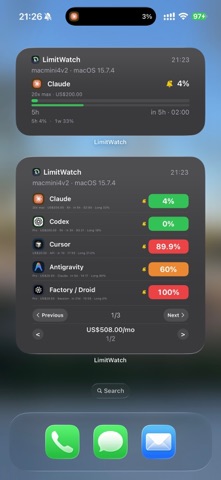
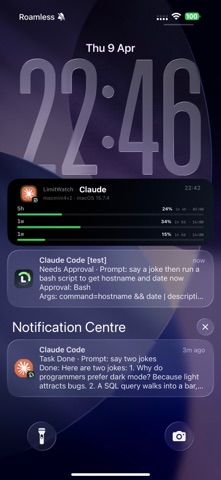
• Live Activity & Dynamic Island — See your AI session status at a glance: active tool, token usage, approval requests, and session progress.
• Push Notifications — Get notified when sessions complete, tools need approval, errors occur, or quotas run low. Never miss an important event.
• Multi-Source Monitoring — Track multiple AI tools simultaneously. See which sessions are active, waiting, or completed across all your coding agents.
• Approval Flow — Approve or deny tool execution requests directly from your iPhone or Apple Watch. No need to switch back to your Mac.
• Quota & Usage Tracking — Monitor your API usage, spending, and remaining quotas across providers like Anthropic, OpenAI, and Google.
• Widget & Watch Support — Home Screen widgets and Apple Watch complications keep your AI usage visible without opening the app.
• Session Archive — Browse past sessions, review transcripts, and export session data for analysis.
• Privacy First — Your canonical AI usage and session data stays on your devices and syncs through Apple iCloud/CloudKit under your own Apple Account. Purpose-separated minimal backends handle only subscription validation and push delivery (device tokens, preferred push locale, pseudonymous account/pairing identifiers, and subscription identifiers/status). Compact notification text required for delivery is processed transiently and is never stored by our push backend. See our privacy policy for full details.
LimitWatch works with Claude Code, OpenAI Codex, Google Gemini CLI, Cursor, GitHub Copilot, Droid (Factory), OpenCode, and more. The Mac companion app (free) installs lightweight hooks into your AI tools, syncs canonical data through iCloud, and delivers compact realtime alerts through APNs.
Free tier includes basic monitoring for one source. Upgrade to Lite for the full mobile experience, or Pro for unlimited sources, session archive, automation, and export tools.
Terms of Use (EULA): https://www.apple.com/legal/internet-services/itunes/dev/stdeula/