

LingoFile: PDF Translator AI
LingoFile: PDF Translator AI is made and published by UMIT CAN ATAS. AppBrain is an independent app data site and isn't affiliated with UMIT CAN ATAS. The app name, icon, screenshots and description belong to UMIT CAN ATAS and are shown as published on the App Store.
AppBrain's verdict
- Last updated
- August 20, 2026
- Size
- 21.7 MB
User feedback
Ratings and reviews on the App StoreComments on LingoFile: PDF Translator AI for iOS
We don't have enough comments to show example comments. Please check back later.
Store listing
By UMIT CAN ATAS, from the App Store


Description by UMIT CAN ATAS Written by the developer, not by AppBrain. Click to read.
— INSTANT NARRATION —
A menu in Rome. A form in Tokyo. A page from a book you can't read. Point the camera, tap once, and LingoFile reads the whole page and tells you what it says — out loud, in your language, the way a friend would explain it, not word by word. Pick the language you want to hear it in, or let your phone decide.
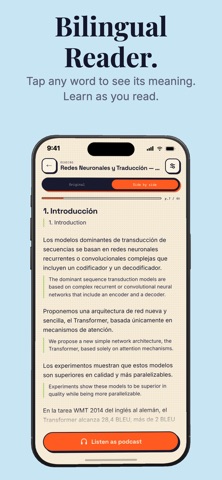
— BILINGUAL READER —
Open a foreign-language PDF, DOCX, or TXT and read it the way you always wished you could: each original paragraph on top, its translation right below. Prefer columns, or translation only? Switch layouts anytime. Tap any word for its meaning, its pronunciation, and an example sentence. Turn on Focus mode and translations stay hidden until you tap — so you try to understand it yourself first. Pick any of 20 target languages, and listen to the same document as a podcast right from the reader.
— DOCUMENT TRANSLATION —
Drop a PDF, DOCX, or TXT and pick a target language. We translate with neural engines and rebuild the file with the original design preserved. Tables, columns, headers — they stay where they belong.
— CHAT WITH YOUR DOCUMENTS —
Open a PDF, Word, or text file and just ask. "Summarize this," "what does this section say?", "what are the numbers?" Lingo answers in your language and cites the exact page each answer came from — tap a citation to jump straight there.
— AI STUDY CARDS —
Turn any document into a deck of question-and-answer study cards, written for you from your own PDF, paper, or textbook. Choose 20, 40, or 60 cards, or let LingoFile size the deck to your document.
— AI DOCUMENT SCANNER —
Snap a paper, receipt, contract, or whiteboard. Our AI vision engine reads handwriting, complex tables, and faded text — even in low light. Multi-page edge detection turns stacks of paper into clean PDFs in seconds.
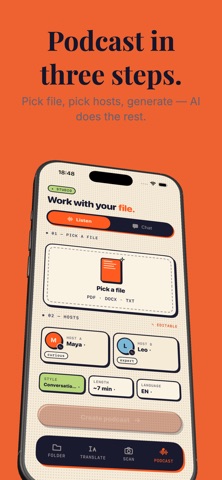
— AI PODCAST STUDIO —
Pick a document, choose 3, 7, or 12 minutes, and turn your reading into a real conversation between two AI hosts. Choose from 8 voices and four styles — Conversational, Academic, News, or Playful. Long documents are covered end to end, not just the first pages. Listen with lock-screen controls, AirPlay, Bluetooth, and live transcripts.
WHAT YOU GET
• Instant Narration — point at any page, hear it explained aloud in your language
• Bilingual Reader — translation under every paragraph, in columns, or on its own
• Tap any word — meaning, pronunciation, example sentence — plus Focus mode
• Format-preserving PDF, DOCX, and TXT translation
• Chat with your documents — answers with tap-to-open page citations
• AI study cards — auto-generated question-and-answer decks
• 20 languages: English, Turkish, German, Spanish, French, Italian, Portuguese (BR), Russian, Dutch, Polish, Swedish, Indonesian, Vietnamese, Thai, Hindi, Arabic, Japanese, Korean, Chinese (Simplified & Traditional)
• AI vision OCR — handwriting, tables, receipts
• Two-host AI podcast — 8 voices, 4 styles, 3 / 7 / 12 minutes
• Live transcript, background playback, lock screen, AirPlay, Bluetooth
• One library — searchable, shareable, exportable
FREE & PRO
Start free: translate your first page and hear one narration a day. Pro unlocks unlimited narration, unlimited document pages, the Bilingual Reader, multi-page scanning, Chat with your documents, AI Study Cards, and AI Podcast Studio, with monthly credits. Cancel anytime.
LingoFile — hear it, read it in two languages, translate, chat, scan, study, and listen. All in one quiet app.
Terms: https://atasumt.github.io/lingofile-legal/terms.html
Privacy: https://atasumt.github.io/lingofile-legal/privacy.html
Safety and technology
Found in the app by AppBrain- Price
- Free
- App size
- 21.7 MB
- Content rating
- Everyone
Technologies used by LingoFile: PDF Translator AI
Releases
Updates seen on the App Store- Version
- 2.1.8
- Launched
- April 2026
No changelog data
Rankings
App Store top chartsApp Store Rankings for LingoFile: PDF Translator AI
About the app and developer
About LingoFile: PDF Translator AI
LingoFile: PDF Translator AI is a productivity app developed by UMIT CAN ATAS.
User Ratings
The app has no ratings yet.
App Information
LingoFile: PDF Translator AI is freely available from the App Store. The app size is 21.75 MB. The latest version available is 2.1.8. The last update was on August 20, 2026.
Technical Requirements
The app has a content rating of Everyone. The app has been available on the App Store since April 2026.
Developer information for UMIT CAN ATAS
Address:
Frequently asked questions about LingoFile: PDF Translator AI
Is LingoFile: PDF Translator AI free?
Yes. LingoFile: PDF Translator AI is free on the App Store.
Is LingoFile: PDF Translator AI still available?
Yes. LingoFile: PDF Translator AI is on the App Store, and the last update we saw was on August 20, 2026.
How large is LingoFile: PDF Translator AI?
LingoFile: PDF Translator AI is 21.75 MB.
Is LingoFile: PDF Translator AI suitable for children?
App Store rates the content of LingoFile: PDF Translator AI as suitable for everyone.
Who made LingoFile: PDF Translator AI?
LingoFile: PDF Translator AI was developed by UMIT CAN ATAS. It is listed in the productivity category on the App Store.