

LingRoll lite is made and published by Yipeng Huang. AppBrain is an independent app data site and isn't affiliated with Yipeng Huang. The app name, icon, screenshots and description belong to Yipeng Huang and are shown as published on the App Store.
AppBrain's verdict
- Rating on App Store
- 4.00
- 4 ratings
- Last updated
- October 21, 2026
- Size
- 54.0 MB
It doesn't have enough ratings yet to judge what users think.
User feedback
Ratings and reviews on the App StoreComments on LingRoll lite for iOS
We don't have enough comments to show example comments. Please check back later.
Store listing
By Yipeng Huang, from the App Store


Description by Yipeng Huang Written by the developer, not by AppBrain. Click to read.
Detailed Features
1. File Support
• Supports TXT, DOC, DOCX, EPUB, MOBI, AZW3, PDF. DRM-protected files are not supported
• Auto-detects text encoding and supports manual encoding selection
• Extracts encrypted or unencrypted RAR, ZIP, and 7Z archives
• PDF text extraction and OCR for scanned documents
• Import via iTunes File Sharing, iCloud Drive, or WiFi transfer
2. Listening
• Built-in iOS TTS voices
• Narration and dialogue detection with separate voices
• TTS text replacement for pronunciation, terms, and symbols
• Long-paragraph optimization for smoother playback
• Auto skip trailing silence
• Custom background music, speed, pitch, and volume
• Sleep timer
• Listen while reading, scroll freely, or follow the playing paragraph
• Home screen display during background playback
• Progress styles: highlight, underline, line-by-line highlight, sentence underline
• Headphone controls and custom lock screen display
• Pre-download full-book audio
3. Reading
• System fonts and custom font installation
• Adjustable spacing, margins, first-line indent, hanging indent, and more
• Custom background image with optional scroll-follow effect
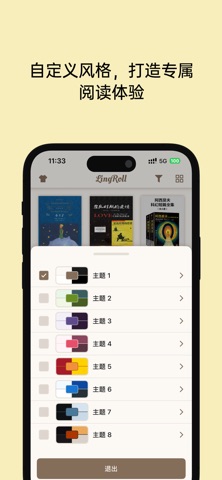
• Custom themes with RGBA colors
• Chinese conversion between Simplified, Traditional, Hong Kong Traditional, and Taiwan Traditional
• Tencent Translation API support
• Auto scroll/auto page turn with adjustable speed
• Auto reading modes: pixel scroll, line-by-line display, sentence underline
• TOC parsing for TXT, EPUB, MOBI, and AZW3
• Original annotation display for EPUB/MOBI/AZW3
• Portrait and landscape layouts, rotation controls, and a page-curl option
4. Bookmarks and Notes
• Categorized bookmarks
• Notes with underline, wavy line, dashed line, double strikethrough, redaction line, border, and background color
• Custom color for each note
• Tap bookmarks or notes to jump
• Export notes as Markdown or TXT
5. File Management
• Real folder-based book management
• Sort by name, size, date, type, or reading duration
• Pin files and set folders to top, bottom, or hidden
• Read covers from EPUB/MOBI/AZW3, or update via web search/photos
• Rename files using built-in book titles
• Search files, folders, and full text while reading
• Recent imports for quick access
• Browse WebDAV folders; upload from your library or iCloud; download to a chosen folder
• Batch download/delete, rename, and move remote items
6. Format Conversion
• Convert EPUB/MOBI/AZW3/PDF to TXT
• Convert TXT to EPUB
• Supports Chinese conversion and encoding selection
• Preserves original TOC structure
7. Statistics
• Daily reading/listening duration
• Reading heatmap
• Book progress
8. Security
• Password and Touch ID/Face ID protection
9. Migration and Sync
• Export/import reading history and personal settings
• Export single or multiple themes
• Add multiple WebDAV accounts and choose the active account
• Sync the latest 100 reading records; choose a sync frequency or manual sync
• Prompt to jump to a newer reading position from another device
• Reading sync excludes books; transfer them with WebDAV file management
Lite vs. Pro: The following features require Pro:
• Microsoft Azure/Edge and MiMo TTS
• Narration/dialogue detection and separate voices
• Language-aware voice selection
• TTS audio export
• Offline TTS duration stats
• Optimized long-paragraph playback
• Automatic trailing-silence skip
• Custom listening background music
• Line-by-line highlights and sentence underlines
• Font import and installation
• TXT-to-EPUB conversion
• Chinese conversion (Simplified, Traditional, Hong Kong, Taiwan)
• Text translation and Tencent Translation
• Reading statistics
• Password and Touch ID/Face ID protection
• WebDAV sync and file management
• Backup/import of reading history, personal settings, theme colors
Safety and technology
Found in the app by AppBrain- Price
- Free
- App size
- 54.0 MB
- Content rating
- Everyone
Technologies used by LingRoll lite
Releases
Updates seen on the App Store- Version
- 2.0.9
- Launched
- August 2025
No changelog data
Alternatives
Similar apps and more from Yipeng HuangAlternatives to LingRoll lite


More from Yipeng Huang


Rankings
App Store top chartsApp Store Rankings for LingRoll lite
About the app and developer
About LingRoll lite
LingRoll lite is a books app developed by Yipeng Huang.
User Ratings
LingRoll lite is rated 4.00 out of 5 stars. The rating is based on 4 ratings.
App Information
LingRoll lite is freely available from the App Store. The app size is 54.03 MB. The latest version available is 2.0.9. The last update was on October 21, 2026.
Technical Requirements
The app has a content rating of Everyone. The app has been available on the App Store since August 2025.
Developer information for Yipeng Huang
Address:
Frequently asked questions about LingRoll lite
Is LingRoll lite free?
Yes. LingRoll lite is free on the App Store.
Is LingRoll lite still available?
Yes. LingRoll lite is on the App Store, and the last update we saw was on October 21, 2026.
How large is LingRoll lite?
LingRoll lite is 54.03 MB.
Is LingRoll lite suitable for children?
App Store rates the content of LingRoll lite as suitable for everyone.
How do people rate LingRoll lite?
LingRoll lite scores 4.00 out of 5 stars, from 4 ratings on the App Store.
Who made LingRoll lite?
LingRoll lite was developed by Yipeng Huang. It is listed in the books category on the App Store.
What are the best alternatives to LingRoll lite?
People looking at LingRoll lite also look at these books apps: Snippo, Stamio: Photo Border & Collage, Bob Chinese, Revilio, 子衿听书-TXT,PDF,EPUB电子书AI配音阅读神器.