

LinkLab: Save, Share & QR Code
LinkLab: Save, Share & QR Code is made and published by MUDDASSIR IQBAL. AppBrain is an independent app data site and isn't affiliated with MUDDASSIR IQBAL. The app name, icon, screenshots and description belong to MUDDASSIR IQBAL and are shown as published on the App Store.
AppBrain's verdict
- Last updated
- October 21, 2026
Rankings
App Store top chartsApp Store Rankings for LinkLab: Save, Share & QR Code
Competitors
Similar apps and more from MUDDASSIR IQBALAlternatives to LinkLab: Save, Share & QR Code


More from MUDDASSIR IQBAL

Releases
Updates seen on the App Store- Version
- 1.3.0
- Launched
- September 2026
No changelog data
User feedback
Ratings and reviews on the App StoreComments on LinkLab: Save, Share & QR Code for iOS
We don't have enough comments to show example comments. Please check back later.
Technology
Found in the app by AppBrain- Price
- Free
- App size
- 2.36 MB
- Content rating
- Medium
Technologies used by LinkLab: Save, Share & QR Code
About the app and developer
About LinkLab: Save, Share & QR Code
LinkLab: Save, Share & QR Code is a productivity app developed by MUDDASSIR IQBAL.
User Ratings
The app has no ratings yet.
App Information
LinkLab: Save, Share & QR Code is freely available from the App Store. The app size is 2.36 MB. The latest version available is 1.3.0. The last update was on October 21, 2026.
Technical Requirements
The app has a content rating of Medium Maturity. The app has been available on the App Store since September 2026.
Developer information for MUDDASSIR IQBAL
Address:
Store listing
By MUDDASSIR IQBAL, from the App Store




Description by MUDDASSIR IQBAL Written by the developer, not by AppBrain. Click to read.
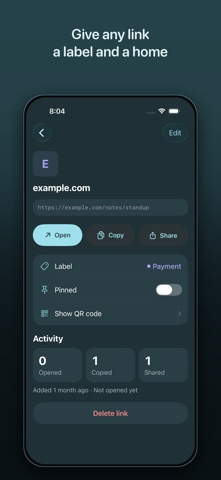
LinkLab is one place for all of them. Share a link into LinkLab from whatever app you're in, give it a name you'll actually recognise, and it's there when you need it — on your device, offline, in a list you can search.
SAVE A LINK FROM ANY APP, IN TWO TAPS
Hit Share in Safari, Mail, Messages, or anywhere else a link turns up, pick LinkLab, and the save sheet opens right there. Add a label, drop it in a category, done — no app switching, no copying and pasting a URL into a note you'll lose.
FIND IT AGAIN IN SECONDS
Everything you save lands in one list, newest first, searchable by name or by URL. Group links into categories you name yourself — Recipes, Work, To Read, Bills, whatever fits — and filter the list down to one of them with a tap. Save the same link twice and LinkLab updates the entry you already have instead of piling up duplicates.
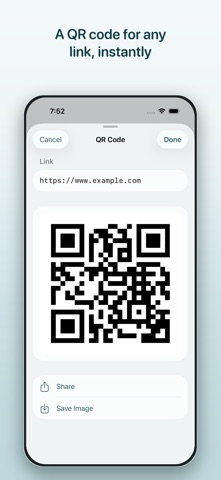
A QR CODE FOR ANY LINK
Generate a QR code for any saved link with one tap. Share it, or save it to Photos. It's the quickest way to get a link onto someone else's phone — the check-in page, the shared album, the menu — without spelling out a URL or making them type anything.
OPEN ANYTHING, NOT JUST WEB PAGES
Tap a saved link and LinkLab hands it to whatever app on your device can open it — a web page to your browser, an address to Maps, an email to Mail. It handles custom app links too, the myapp:// kind that Safari won't touch, which makes it a genuinely useful scratchpad if you build or test apps for a living. If nothing on the device can open a link, LinkLab says so plainly instead of doing nothing.
RUNS ENTIRELY ON YOUR DEVICE
LinkLab has no network code at all. No server, no account, no sign-up, no analytics, no third-party SDK — nothing your links could be sent to, because there is nowhere to send them. QR codes are generated on your device. Photos access is add-only and requested only at the moment you choose to save an image.
For anyone whose links are scattered across too many apps, and for the developers and testers who have been using it as a deep link scratchpad since day one.