

Linkoo: Your Link Library
Linkoo: Your Link Library is made and published by ZIPPERS. AppBrain is an independent app data site and isn't affiliated with ZIPPERS. The app name, icon, screenshots and description belong to ZIPPERS and are shown as published on the App Store.
AppBrain's verdict
- Last updated
- October 28, 2026
Rankings
App Store top chartsApp Store Rankings for Linkoo: Your Link Library
Competitors
Similar apps and more from ZIPPERSAlternatives to Linkoo: Your Link Library


More from ZIPPERS


Releases
Updates seen on the App Store- Version
- 1.1.0
- Launched
- October 2026
No changelog data
User feedback
Ratings and reviews on the App StoreComments on Linkoo: Your Link Library for iOS
We don't have enough comments to show example comments. Please check back later.
Technology
Found in the app by AppBrain- Price
- Free
- App size
- 116.9 MB
- Content rating
- Medium
Technologies used by Linkoo: Your Link Library
About the app and developer
About Linkoo: Your Link Library
Linkoo: Your Link Library is an utilities app developed by ZIPPERS.
User Ratings
The app has no ratings yet.
App Information
Linkoo: Your Link Library is freely available from the App Store. The app size is 116.86 MB. The latest version available is 1.1.0. The last update was on October 28, 2026.
Technical Requirements
The app has a content rating of Medium Maturity. The app has been available on the App Store since October 2026.
Developer information for ZIPPERS
Address:
Store listing
By ZIPPERS, from the App Store


Description by ZIPPERS Written by the developer, not by AppBrain. Click to read.
Social posts, news, shopping, blogs, travel ideas, recipes, and more.
Save scattered links, organize them into folders, and find them quickly whenever you need them.
[Save directly from Share]
Found a link you want to keep?
Tap Share and save it straight to Linkoo.
No need to copy and paste URLs.
[Organize with folders]
Create folders for different topics
and keep your links neatly organized.
・ Name folders your way
・ Choose icons and colors
・ Add titles and tags
・ Save favorites
[Swipe to organize faster]
Swipe a link to quickly add it to Favorites.
Delete links you no longer need
and keep your most useful ones close at hand.
[Browse by date]
Choose a date in the calendar
to see the links you saved that day.
If you remember when you saved it,
you can find it even faster.
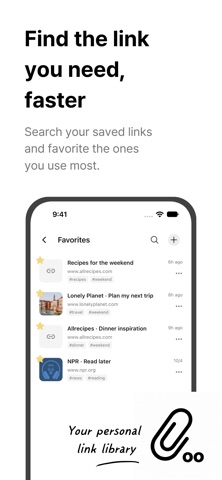
[Search quickly]
Even with lots of saved links,
search, folders, and tags make them easy to find.
Keep frequently used links in Favorites for quick access.
Save the links you want.
Organize, store, and find them all in one place.
Terms of Use (EULA):
https://www.apple.com/legal/internet-services/itunes/dev/stdeula
Privacy Policy:
https://iamheaming.notion.site/Privacy-Policy-3f157bfee36c8078b845dbd0c6ae0090
Account & Data Deletion:
https://iamheaming.notion.site/Account-Data-Deletion-40657bfee36c8000a7d6e4220afe688c