

LinNote - Desktop Note
LinNote - Desktop Note is made and published by 侠光 邢. AppBrain is an independent app data site and isn't affiliated with 侠光 邢. The app name, icon, screenshots and description belong to 侠光 邢 and are shown as published on the App Store.
AppBrain's verdict
- Last updated
- January 5, 2026
Rankings
App Store top chartsApp Store Rankings for LinNote - Desktop Note
Competitors
Similar apps and more from 侠光 邢More from 侠光 邢







Releases
Updates seen on the App Store- Version
- 3.0
- Launched
- March 2022
No changelog data
User feedback
Ratings and reviews on the App StoreComments on LinNote - Desktop Note for iOS
We don't have enough comments to show example comments. Please check back later.
Technology
Found in the app by AppBrain- Price
- Free
- App size
- 1.35 MB
- Content rating
- Everyone
Technologies used by LinNote - Desktop Note
About the app and developer
About LinNote - Desktop Note
LinNote - Desktop Note is a productivity app developed by 侠光 邢.
User Ratings
The app has no ratings yet.
App Information
LinNote - Desktop Note is freely available from the App Store. The app size is 1.35 MB. The latest version available is 3.0. The last update was on January 5, 2026.
Technical Requirements
The app has a content rating of Everyone. The app has been available on the App Store since March 2022.
Developer information for 侠光 邢
Address:
Store listing
By 侠光 邢, from the App Store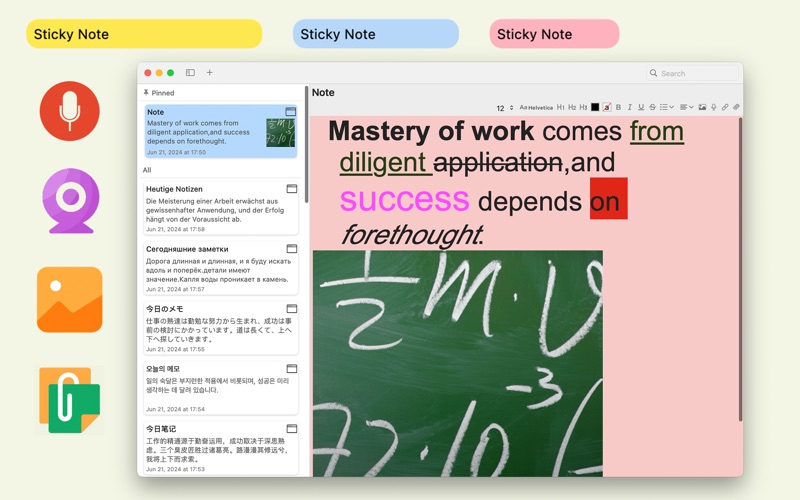

Description by 侠光 邢 Written by the developer, not by AppBrain. Click to read.
Special feature:
- You can easily make transparent sticky notes and change the transparency of sticky notes at will.
- Powerful text editing function, which can easily perform text typesetting and set text styles.
- Supports a variety of sticky note styles.
- You can find and search for notes intelligently.
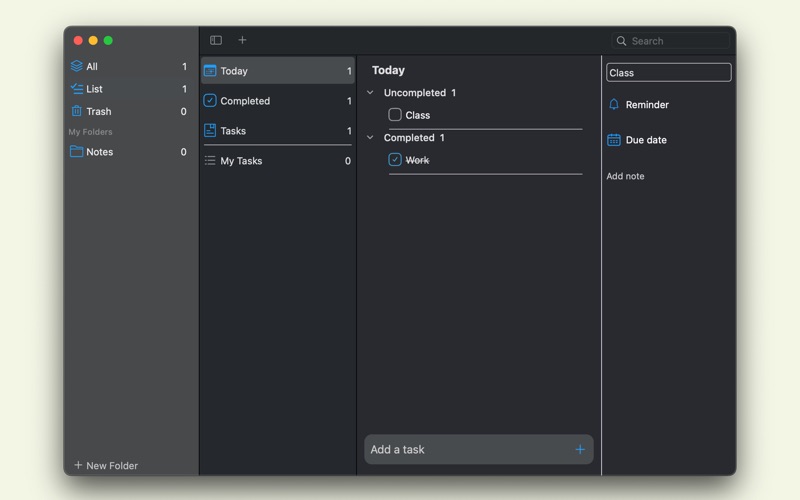
- Conveniently add to-do tasks and set task reminders.
- Support night mode.
LinNote uses iCloud to automatically store data, please turn on iCloud to store data in the system settings of your computer.
Payment will be charged to your iTunes Account at the confirmation of purchase. The yearly subscription automatically renews unless auto-renew is turned off at least 24-hours before the end of the current period. Account will be charged for renewal within 24-hours prior to the end of the current period. You may manage your subscription and turn off auto-renewal by visiting your Account Settings after purchase.
Terms of use:
https://zhuanlan.zhihu.com/p/473643275
Privacy Policy:
https://zhuanlan.zhihu.com/p/141347640