

LinTech Beacon Konfigurator
LinTech Beacon Konfigurator is made and published by LinTech. AppBrain is an independent app data site and isn't affiliated with LinTech. The app name, icon, screenshots and description belong to LinTech and are shown as published on the App Store.
AppBrain's verdict
- Last updated
- December 11, 2025
Rankings
App Store top chartsApp Store Rankings for LinTech Beacon Konfigurator
Competitors
Similar apps and more from LinTechAlternatives to LinTech Beacon Konfigurator





Also available on Google Play

Releases
Updates seen on the App Store- Version
- 2.51
- Launched
- March 2017
No changelog data
User feedback
Ratings and reviews on the App StoreComments on LinTech Beacon Konfigurator for iOS
We don't have enough comments to show example comments. Please check back later.
Technology
Found in the app by AppBrain- Price
- Free
- App size
- 13.4 MB
- Content rating
- Everyone
Technologies used by LinTech Beacon Konfigurator
About the app and developer
About LinTech Beacon Konfigurator
LinTech Beacon Konfigurator is an utilities app developed by LinTech.
User Ratings
The app has no ratings yet.
App Information
LinTech Beacon Konfigurator is freely available from the App Store. The app size is 13.39 MB. The latest version available is 2.51. The last update was on December 11, 2025.
Technical Requirements
The app has a content rating of Everyone. The app has been available on the App Store since March 2017.
Developer information for LinTech
Address:
Store listing
By LinTech, from the App Store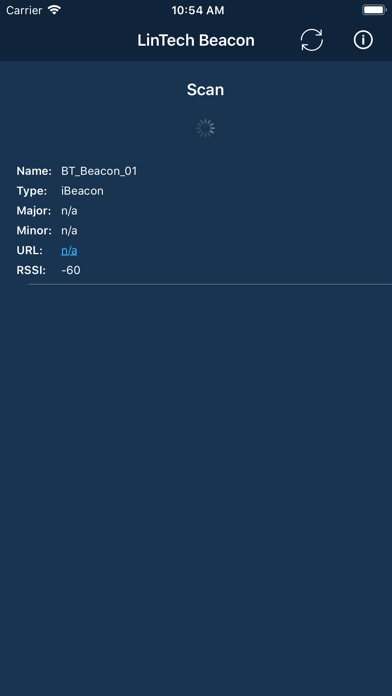
Description by LinTech Written by the developer, not by AppBrain. Click to read.
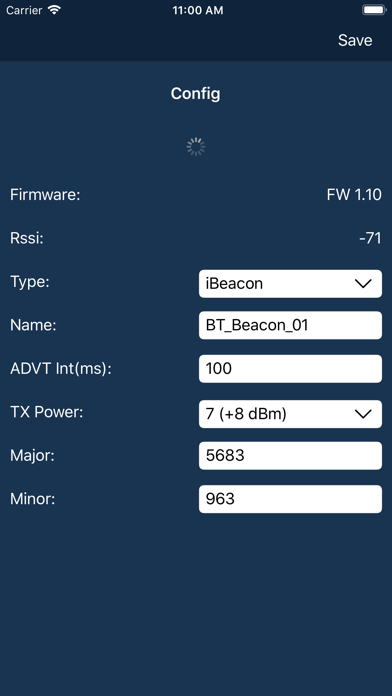
You can change the name:
- change the name with which the beacon appears during the search
- Set the Advertisng Interval
Advertising Interval is the time interval at which the beacon will send its data packet.
it can be set to a minimum of 100 ms. Please note that a frequent advertising packet has an influence on the power consumption of the beacon.
- adjust the transmit power
The higher the power, the higher the range. This setting also influences the power consumption.
- enter the Major- and Minor-ID
These IDs are important for the app. The IDs can be used, for example, to transfer location information such as the branch number or location identifier. These IDs are transmitted in the Advertisng package.
- select the beacon mode
The beacon supports Apple iBeacon, the Google Eddystone and Eddystone URL and its own LinTech beacon mode. The modes differ in the structure of the advertising package. In LinTech Beacon mode, the battery status is also displayed.
information about the LinTech Beacons.
Information on LinTech Beacons can be found on our website at
http://www.lintech.de/produkt/bluetooth-low-energy-beacon.
What is a Beacon?
A Beacon is a small radio transmitter based on Bluetooth Low Energy, which is used in
at configurable intervals sends signals/data packets to the environment. These are received by other smart devices, e.g. smartphones. This way, persons or devices can be localized, the own location can be determined and routes can be evaluated. With the help of Beacon technology you can navigate in rooms.
It is always necessary to have a smartphone app that displays the received information.
is evaluated.
It is not necessary for the smartphone to have a Bluetooth connection
to the beacon. Signals of different beacons can be sent one after the other.
within range of each other.