AppBrain
AppBrain
  • Apps
  • Apps being viewed right now Trending apps today Most popular apps All-time most installed apps Top rated apps iPhone and iPad apps
  • Intelligence ▾
    Intelligence overview → Track any Android app or your whole market
    Track & analyze
    Keyword Tracker & OptimizerTrack & improve Play rankings App Performance ReportOne-off PDF for any app StatisticsFree Android & Play market stats
    Promote your app
    Featured Apps App Links
  • Intelligence
  • Pricing
  • Dashboard
  • Sign up
  • Log in
App Store Apps > Productivity > ListMonger
ListMonger icon

ListMonger

5.0
Inspiretis
4.72
29 reviews
$0.99

ListMonger Screenshot 1 of 7
ListMonger Screenshot 2 of 7
ListMonger Screenshot 3 of 7
ListMonger Screenshot 4 of 7
ListMonger Screenshot 5 of 7
ListMonger Screenshot 6 of 7
ListMonger Screenshot 7 of 7
Screenshots by Inspiretis, from the the App Store listing
View on the App Store

About ListMonger

ListMonger is a productivity app developed by Inspiretis.

What is the rating of ListMonger?

ListMonger is rated 4.72 out of 5 stars, based on 29 ratings.

Is ListMonger free?

ListMonger costs $0.99. The app size is 7.51 MB. The latest version available is 5.0. The last update was on September 28, 2020.

What are the requirements for ListMonger?

The app has a content rating of Everyone. The app has been available on the App Store since before 2010.

ListMonger is made and published by Inspiretis. AppBrain is an independent app data site and isn't affiliated with Inspiretis. The app name, icon, screenshots and description belong to Inspiretis and are shown as published on the App Store.

Description by Inspiretis (from the App Store)
Basic List-Making, On Steroids
(nested sublists • sort on any field • add items at any position • dark mode • backup & restore • search • mail lists between users • more!)

ListMonger provides powerful, quick, and easy list-making in the palm of your hand. Leave the post-it notes and scraps of paper behind, and fire-up ListMonger to conveniently keep track of any kind of list.

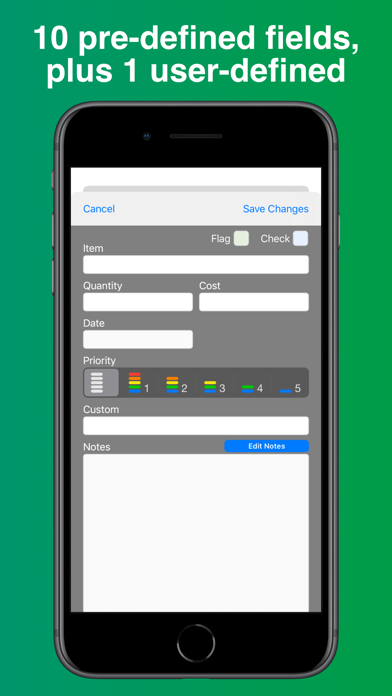
ListMonger provides 11 pre-configured yet flexible fields, making it ready to serve an infinite variety of list-making needs, without any futzing around or complicated set-up each time you start a new list.

Unique, powerful, and thoughtfully-implemented features separate ListMonger from the pack. ListMonger provides the ability to slice and dice your lists, right in hand, in ways that other iOS list-making apps simply can't do.

List lovers rejoice!

ListMonger offers:

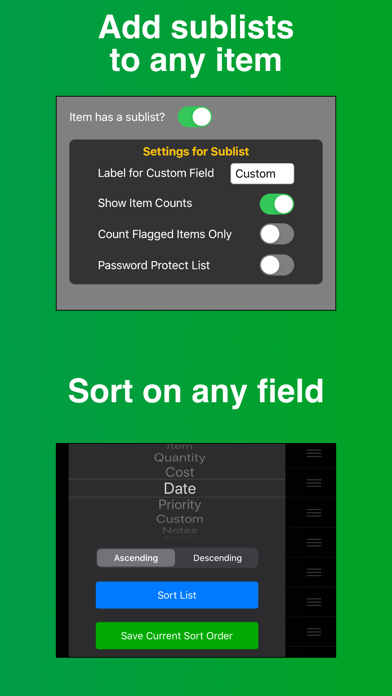
NESTED SUBLISTS
Your list items can have lists of their own! And they can have sublists! And they can have sublists...

ÜBER-SORTING
Touch and hold any column name to sort on that field. Or re-order your items using drag and drop. Or visit the sort menu for more options, including the ability to save and recall a custom sort order.

PUT IT WHERE YOU WANT IT
Identify any list position as the insertion point when adding a new item.

QUANTITY + AND - BUTTONS
Easily increase or decrease the quantity field with + and - buttons.

QUICK-CHANGE COLUMN VIEWS
Quickly change the info shown on-screen using pop-over selection menus.

FLAG ITEMS FOR QUICK FILTERING
Lists can be easily filtered on either the flag or check field, or both. (eg, Flag the items you need from a master grocery list, turn-on the flag filter, and you’ll be left with a filtered list of just your currently needed items. Then use the checkmarks to check-off items as you pick them up.)

SHARE YOUR LISTS
Send a list to anyone via email. Or send your list data to another user, who can open and use it in ListMonger running on their device. (Please note that ListMonger does not sync across devices.)

AUTO DATE-STAMPING OF CHECKED ITEMS
Automatically keep track of when you did stuff.

ENHANCED NOTES FIELD
The notes field can pop into a full-screen view, with phone numbers, email addresses, and URLs auto-formatted as links.

11 FIELDS, 1 USER-DEFINED PER LIST
Item, Quantity, Cost, Priority, Date, Flag, Check, Check Date, Notes, and Color, plus one user-defined field.

BACKUP & RESTORE
Safeguard your lists by copying the ListMonger database between your iOS device and a Mac/PC using App File Sharing / iTunes.

THOUGHTFUL DESIGN
Functions are easy to get at and easy to use.

MORE…
• Dark mode.
• Launch password and/or individual list password protection.
• Flexible item counting options.
• Color-code items.
• Search / filter items within a list.
• Delete, move, or copy multiple items at once.
• No ads, subscriptions, or in-app purchases required.

Thanks for your interest!
Show more Show less

More data about ListMonger

Price $0.99
Rating 4.72 based on 29 ratings
Ranking Not ranked
Version 5.0
App size 7.51 MB
Suitable for Everyone

Alternatives to ListMonger

KwikList Plus icon KwikList Plus
Christopher King
4.6
$2.99
8 ratings
KwikTASK icon KwikTASK
Christopher King
4.4
$0.99
11 ratings
FlexList: A Productivity Tool icon FlexList: A Productivity Tool
New Media Institute
5.0
Free
1 ratings
Ikiru icon Ikiru
James Rhoades
3.9
$4.99
102 ratings
Routines icon Routines
Coopla
3.6
$2.99
8 ratings
List! icon List!
Secret Society Software
4.8
$1.99
243 ratings
Priority Focus icon Priority Focus
Indie Foundry LLC
0.0
Free
Todo list : Planer & Reminder icon Todo list : Planer & Reminder
Prashant Kyada
1.0
Free
1 ratings

Changelog of ListMonger

No changelog data

Developer information for Inspiretis

Inspiretis

Address:

Share ListMonger

Comments on ListMonger for iOS

We don't have enough comments to show example comments. Please check back later.

App Store Rankings for ListMonger

This app is not ranked

Technologies used by ListMonger

Frequently asked questions about ListMonger

Is ListMonger free?

No. ListMonger costs $0.99 on the App Store.

Is ListMonger still available?

Yes. ListMonger is on the App Store, and the last update we saw was on September 28, 2020.

How large is ListMonger?

ListMonger is 7.51 MB.

Is ListMonger suitable for children?

App Store rates the content of ListMonger as suitable for everyone.

How do people rate ListMonger?

ListMonger scores 4.72 out of 5 stars, from 29 ratings on the App Store.

Who made ListMonger?

ListMonger was developed by Inspiretis. It is listed in the productivity category on the App Store.

What are the best alternatives to ListMonger?

People looking at ListMonger also look at these productivity apps: KwikList Plus, KwikTASK, FlexList: A Productivity Tool, Ikiru, Routines.

Apps other people are watching Top new apps Today's trending apps Popular Productivity Apps Price drops on Google Play
KwikList Plus icon KwikList Plus
KwikTASK icon KwikTASK
FlexList: A Productivity Tool icon FlexList: A Productivity Tool
Ikiru icon Ikiru
Routines icon Routines
List! icon List!
Priority Focus icon Priority Focus
Todo list : Planer & Reminder icon Todo list : Planer & Reminder
AppBrain Intelligence premium content

Subscribe now to get full and unlimited access to AppBrain Intelligence. You'll have access to:

  • App Intelligence dashboard (performance timeline, competitor comparison, country rankings, insight cards)
  • Detailed ranking data per app
  • Full timeline per developer
  • Device market shares data per country
  • Unlimited keyword tracking
1 Month

$75/mo
(billed every month)

SAVE 0%
Subscribe
3 Months

$65/mo
($195 billed every 3 months)

SAVE 13%
Subscribe
1 Year

$57.50/mo
($690 billed every year)

SAVE 23%
Subscribe
Each subscription will automatically renew 3 days before the expiration date for the same time period. Subscriptions can be cancelled at any time before the renewal.

AppBrain is an app data site, we track rankings, ratings, installs for all apps and games on Google Play and the App Store. AppBrain doesn't host app files or APKs, all install links go directly to the official store. All trademarks are owned by their respective owners.

More apps

  • Top Android apps being viewed
  • Dino Dig Tycoon
  • Jukeboxy Venue Player
  • GameRoom 777

App statistics

  • Android statistics
  • Google Play Developer stats
  • Trending Android Apps
  • Trending iOS apps
  • Top popular Apps
  • Buy the best Android phone
  • Buy & sell app businesses

About AppBrain

  • Contact
  • Privacy
  • Documentation
  • DMCA takedowns
  • Blog
  • How to improve the earnings of your ad units
© 2010-2026 - AppBrain