

Lite Tools: Smart Utilities
Lite Tools: Smart Utilities is made and published by ZhtaNova Labs. AppBrain is an independent app data site and isn't affiliated with ZhtaNova Labs. The app name, icon, screenshots and description belong to ZhtaNova Labs and are shown as published on the App Store.
AppBrain's verdict
- Best rank
- #27
- Top Grossing, Japan
- Last updated
- October 21, 2026
Rankings
App Store top charts- Highest rank
- #27
- Chart
- Top Grossing
- Utilities
- Country
- Japan
App Store Rankings for Lite Tools: Smart Utilities
Top rankings
| Rank | Country | Category | List |
|---|---|---|---|
| 27 | Japan | Utilities | Top Grossing |
Ranking history in Japan
Releases
Updates seen on the App Store- Version
- 1.4
- Launched
- March 2026
No changelog data
User feedback
Ratings and reviews on the App StoreComments on Lite Tools: Smart Utilities for iOS
We don't have enough comments to show example comments. Please check back later.
Technology
Found in the app by AppBrain- Price
- Free
- App size
- 60.0 MB
- Content rating
- High
Technologies used by Lite Tools: Smart Utilities
About the app and developer
About Lite Tools: Smart Utilities
Lite Tools: Smart Utilities is an utilities app developed by ZhtaNova Labs.
User Ratings
The app has no ratings yet.
App Information
Lite Tools: Smart Utilities is freely available from the App Store. The app size is 60.04 MB. The latest version available is 1.4. The last update was on October 21, 2026.
Technical Requirements
The app has a content rating of High Maturity. The app has been available on the App Store since March 2026.
Developer information for ZhtaNova Labs
Address:
Frequently asked questions about Lite Tools: Smart Utilities
Is Lite Tools: Smart Utilities free?
Yes. Lite Tools: Smart Utilities is free on the App Store.
Is Lite Tools: Smart Utilities still available?
Yes. Lite Tools: Smart Utilities is on the App Store, and the last update we saw was on October 21, 2026.
How large is Lite Tools: Smart Utilities?
Lite Tools: Smart Utilities is 60.04 MB.
Is Lite Tools: Smart Utilities suitable for children?
App Store gives Lite Tools: Smart Utilities a high maturity rating. It is meant for adults.
Who made Lite Tools: Smart Utilities?
Lite Tools: Smart Utilities was developed by ZhtaNova Labs. It is listed in the utilities category on the App Store.
Store listing
By ZhtaNova Labs, from the App Store


Description by ZhtaNova Labs Written by the developer, not by AppBrain. Click to read.
PAPER TO PDF
- Scan a Document: point the camera at a page and its edges are found for you. Rotate or crop each page, add more pages and save everything as one PDF.
- Photo to PDF: pick photos from your library, set their order and choose A4, US Letter or a size that fits each photo.
- Text from Photo: recognize printed text on a photo or screenshot, adjust it, then copy it or save it as a TXT or PDF file.
PDF ESSENTIALS
- Sign PDF: draw your signature once, place and resize it on the page and keep the signed version next to the original.
- Merge PDF: combine several PDFs into a single file in the order you choose.
- Compress PDF: pick a light, medium or strong setting to make a large PDF easier to send.
- Open ZIP: unpack archives, preview what is inside and save only the files you need. Password-protected archives are supported.
- My Documents: every PDF, scan and text you create lives in one list you can search, sort, rename and share from.
PHOTOS & MEDIA
- Docs in Gallery: spots cards, IDs, tickets, QR codes and receipts among your photos and groups them with filters, so sensitive shots are easy to find and review.
- Photo Review: look through similar shots and look-alike copies side by side, keep your favorites and decide what stays.
- Video Compress: create lighter copies of long videos with the quality level you choose.
- Screenshots: browse old screenshots and copy the text you need before you let them go.
- Contacts & Calendar: merge repeated contacts, complete missing details and review past events.
PRIVACY TOOLS
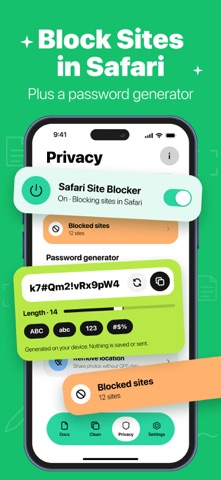
- Safari Site Blocker: keep a list of sites you never want to open in Safari and turn blocking on or off in one place.
- Password Generator: create a password with the length and character types you need and copy it in a tap.
- Remove Location: save copies of your photos without GPS data before you share them.
Download Lite Tools and keep your everyday tools in one place.
SUBSCRIPTION
- Lite Tools Premium unlocks every tool. It is offered as a weekly plan that starts with a 3-day free trial, or as a yearly plan.
- Payment is charged to your Apple ID account when you confirm the purchase or, for the weekly plan, when the free trial ends.
- The subscription renews automatically for the same period unless you cancel it at least 24 hours before the current period ends. The renewal is charged within the 24 hours before the period ends.
- You can manage or cancel the subscription anytime in Settings → [your name] → Subscriptions, or in your App Store account settings.
- Any unused part of a free trial is forfeited when you purchase a subscription.
Terms of Use: https://novizhtaservices.com/termsconditions.html
Privacy Policy: https://novizhtaservices.com/privacy.html