Litho Lab: Learn Optics is an education app developed by chuang lu.
User Ratings
The app has no ratings yet.
App Information
Litho Lab: Learn Optics is freely available from the App Store. The app size is 112.36 MB. The latest version available is 1.0. The last update was on November 2, 2026.
Technical Requirements
The app has a content rating of Everyone. The app has been available on the App Store since November 2026.
Litho Lab: Learn Optics is made and published by
chuang lu.
AppBrain is an independent app data site and isn't affiliated with chuang lu.
The app name, icon, screenshots and description belong to chuang lu and are shown as published on the App Store.
Description by chuang lu(from the App Store)
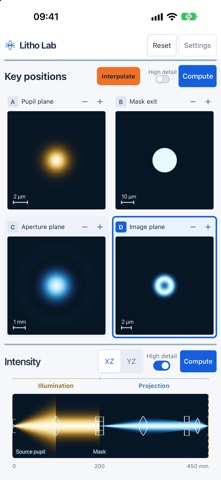
Litho Lab is an educational app that lets you follow light through a lithography-style imaging system, step by step, from the light source to the image plane — the plane where photoresist would sit in a real lithography tool.
WATCH THE IMAGE FORM Light leaves the source, is gathered by a condenser lens, and passes through a patterned mask. Behind the mask it diffracts into many directions. A first lens sorts these directions at the aperture plane, the aperture lets only part of them through, and a second lens brings the remaining light together to form a reduced image of the mask. Drag a single marker along the light path and see, at any position, how the light spreads, diffracts, is filtered and finally comes into focus. Moving the marker in small steps shows the gradual change from the mask pattern to its blurred-but-recognisable image.
CHOOSE WHAT TO EXPLORE • Five ready-made examples: three-line imaging, 4f spatial filtering, circular-aperture diffraction, annular illumination and dipole illumination. • Change the source shape (point, circular, annular, dipole, quadrupole and more), the mask pattern (lines, gratings, circular, square and cross apertures), the projection aperture and its numerical aperture. • Standard mode shows one position and one large image; Expert mode compares several positions side by side and shows intensity along the whole light path. • Interpolate fills in evenly spaced positions between two chosen positions, so you can follow light through focus. • Profile shows the intensity curve across any image.
MADE FOR LEARNING Litho Lab is designed for students, teachers and optics enthusiasts. It uses a simplified scalar-wave teaching model with ideal thin lenses. It does not include polarisation, lens aberrations, resist chemistry or real material effects, and it is not intended to reach the accuracy of professional lithography simulation software. Every equation used is listed in the app (About → Equations and sources) together with its textbook or journal source, including Goodman's Introduction to Fourier Optics, Born & Wolf's Principles of Optics, Mack's Fundamental Principles of Optical Lithography and Collins (1970).
OFFLINE AND PRIVATE Works completely offline, with no account, advertising or tracking. Save an experiment, optionally sync it through your own iCloud, and save or share any image.
Each subscription will automatically renew 3 days before the expiration date for
the same time period. Subscriptions can be cancelled at any time before the renewal.