Live Meeting Control is an overall app developed by iPath System LLC.
Download Statistics
User Ratings
Live Meeting Control is rated 5.00 out of 5 stars. The rating is based on 2 ratings.
App Information
Live Meeting Control is FREE to download. The APK download size is 63.77 MB. The latest version available is 1.5. The last update was on November 8, 2021.
Technical Requirements
The app has a content rating of Everyone. The app has been available on Google Play June 2021.
Description
To use this meeting controller app, please download the Live Control Host server for Windows from our website: www.meetingcontrol.live.
Capture the favorite part of your meeting conveniently with Live Meeting Control. The meeting live recorder app is a unique way to capture screenshots, and control meeting recording video and audio of the remote computer. Use this incredible meeting recorder app to remotely mute and unmute the microphone and speaker, or turn on / off the webcam for the supported meeting app (Zoom video conferencing and Microsoft Teams video conferencing), right on your iPhone!
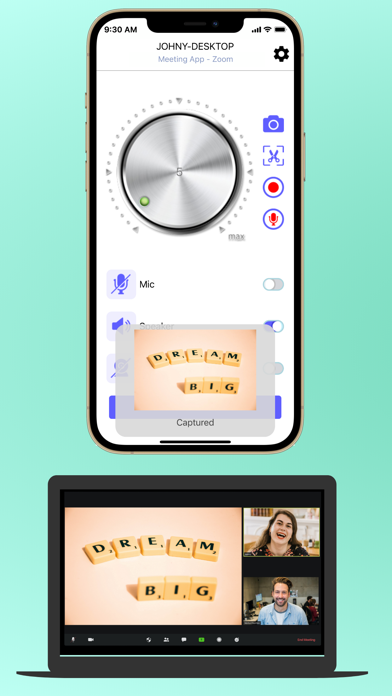
◉ CAPTURE SCREENSHOTS REMOTELY This meeting control app is an awesome live video recorder tool with screen and audio recorder capabilities that lets you capture the screenshots on the remote computer. Our zoom video call recorder with audio app transfers the screenshots to your iPhone, and also saves them into the selected folder of your remote computer.
No more blurred pictures! Just tap the screenshot button to capture the entire screen, or the scissors button to capture the selected area by taping the screen on the remote computer.
◉ CONTROL RECORDING VIDEOS AND AUDIOS REMOTELY With Live Meeting Control you can control the recording of the videos or audios on the remote computer. Here are the key features of our online meeting recorder in our remote meeting control app:
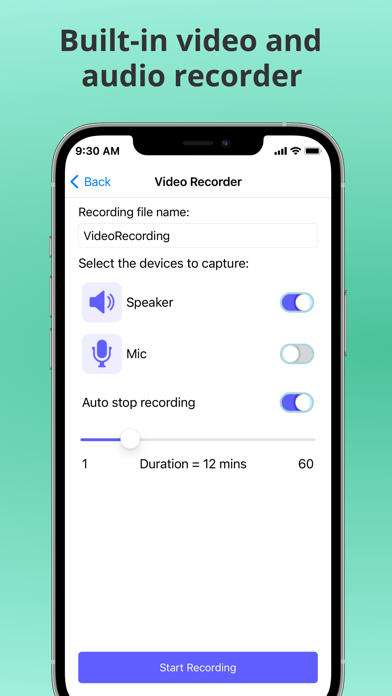
- The video and audio files are stored in the selected folder of your remote computer. - Tap the video recording button to provide the recording file name - Select to capture computer audio, microphone or both, and set the recording duration. - Tap “Start Recording” to start recording the video on the remote computer. A recording icon will show up at the top right corner of the app, indicating a recording session is currently active. - If you no longer want to record the video, you can tap the stop button any time. Similarly, you can tap the audio recording button to initiate the audio recording on the remote computer.
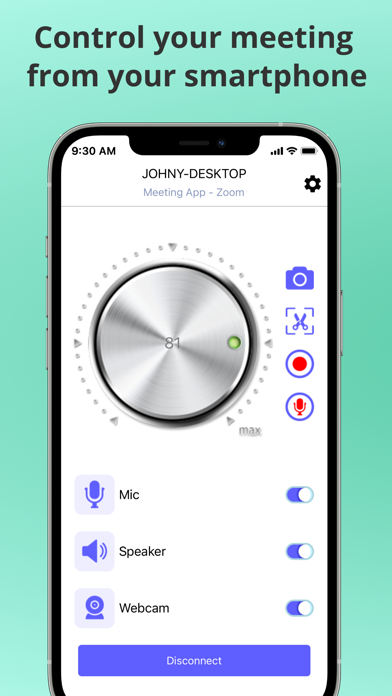
◉ TURN ON / OFF MICROPHONE, SPEAKER, WEBCAM OR ADJUST VOLUME What’s more amazing about this teams recorder and screen recorder zoom meeting app is that it allows you to mute or unmute the microphone and speaker on the remote computer, or turn on / off the webcam when a supported meeting app is running remotely. You can even adjust the remote computer’s volume via an on-screen knob.
◉ LIVE MEETING CONTROL FEATURES ● Connect to the remote computer via a QR code scan from the Live Control Host server ● Capture the entire screen or the selected area on the remote computer ● Control recording the remote computer’s screen, audio and microphone into video files ● Control recording the remote computer’s audio and microphone into audio files ● Adjust the remote computer’s volume easily via an on-screen knob ● Turn on or off the remote computer’s microphone, speaker or webcam via toggle buttons
- - - - - - - - - - - - - - -
► Capture screenshots, and control video and audio recording of the remote computer freely, enjoy a unique meeting control app by downloading it for FREE!
+++++
"Live Meeting Control" subscription provides the following features: - Higher quality of video recording - Unlimited time duration for video and audio recording
Payments and Renewal: Payment will be charged to iTunes Account at confirmation of purchase. Subscription automatically renews unless auto-renew is turned off at least 24-hours before the end of the current period. Account will be charged for renewal within 24-hours prior to the end of the current period. You can manage or turn off auto-renew in your Account settings at any time after purchase No cancellation of the current subscription is allowed during the active period.
Terms of use: https://meetingcontrol.live/terms.html Privacy policy: https://meetingcontrol.live/about.html
Each subscription will automatically renew 3 days before the expiration date for
the same time period. Subscriptions can be cancelled at any time before the renewal.