

LiveCap: Caption & Translate
LiveCap: Caption & Translate is made and published by Daichi Tanabe. AppBrain is an independent app data site and isn't affiliated with Daichi Tanabe. The app name, icon, screenshots and description belong to Daichi Tanabe and are shown as published on the App Store.
AppBrain's verdict
- Rating on App Store
- 3.67
- 3 ratings
- Last updated
- August 15, 2026
- Size
- 1.72 MB
It doesn't have enough ratings yet to judge what users think.
User feedback
Ratings and reviews on the App StoreComments on LiveCap: Caption & Translate for iOS
We don't have enough comments to show example comments. Please check back later.
Store listing
By Daichi Tanabe, from the App Store
Description by Daichi Tanabe Written by the developer, not by AppBrain. Click to read.
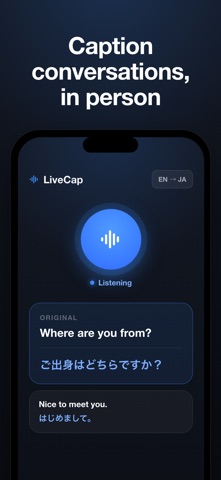
On your Mac, LiveCap captures the system audio from any app: video calls, online meetings, streaming video, podcasts, lectures, and games. On your iPhone, it captures in-person conversations through the microphone. Either way, you get instant captions you can actually follow.
EVERYTHING ON DEVICE Speech recognition and translation run entirely on your device using Apple's built-in engines. Nothing is uploaded, nothing is kept on a server, and it keeps working offline.
KEY FEATURES • Real-time captions for any sound on your Mac (system audio) or your voice on iPhone (microphone) • Instant translation shown next to the original text • On-device and offline — private by design • Floating overlay keeps captions visible over any app (Mac) • Export transcripts to Word, Markdown, or Notion • Optional AI summaries of what was said • Interface in English, Japanese, and Spanish, with a UI language you can switch independently
GREAT FOR • Following meetings and calls in another language • Watching videos, podcasts, and lectures with captions • In-person conversations and travel • Accessibility and note-taking
ONE PURCHASE, ALL YOUR DEVICES Try it free. Unlock unlimited use with a single one-time purchase that works on both iPhone and Mac (Universal Purchase). No subscription.
Capturing system audio on Mac uses ScreenCaptureKit and asks for Screen Recording permission. Microphone capture asks for microphone access. Captions are generated on device.
Safety and technology
Found in the app by AppBrain- Price
- Free
- App size
- 1.72 MB
- Content rating
- Everyone
Technologies used by LiveCap: Caption & Translate
Releases
Updates seen on the App Store- Version
- 1.0.1
- Launched
- June 2026
No changelog data
Alternatives
Similar apps and more from Daichi TanabeAlternatives to LiveCap: Caption & Translate


More from Daichi Tanabe


Rankings
App Store top chartsApp Store Rankings for LiveCap: Caption & Translate
About the app and developer
About LiveCap: Caption & Translate
LiveCap: Caption & Translate is an utilities app developed by Daichi Tanabe.
What is the rating of LiveCap: Caption & Translate?
LiveCap: Caption & Translate is rated 3.67 out of 5 stars, based on 3 ratings.
Is LiveCap: Caption & Translate free?
LiveCap: Caption & Translate is free. The app size is 1.72 MB. The latest version available is 1.0.1. The last update was on August 15, 2026.
What are the requirements for LiveCap: Caption & Translate?
The app has a content rating of Everyone. The app has been available on the App Store since June 2026.
Developer information for Daichi Tanabe
Address:
Frequently asked questions about LiveCap: Caption & Translate
Is LiveCap: Caption & Translate free?
Yes. LiveCap: Caption & Translate is free on the App Store.
Is LiveCap: Caption & Translate still available?
Yes. LiveCap: Caption & Translate is on the App Store, and the last update we saw was on August 15, 2026.
How large is LiveCap: Caption & Translate?
LiveCap: Caption & Translate is 1.72 MB.
Is LiveCap: Caption & Translate suitable for children?
App Store rates the content of LiveCap: Caption & Translate as suitable for everyone.
How do people rate LiveCap: Caption & Translate?
LiveCap: Caption & Translate scores 3.67 out of 5 stars, from 3 ratings on the App Store.
Who made LiveCap: Caption & Translate?
LiveCap: Caption & Translate was developed by Daichi Tanabe. It is listed in the utilities category on the App Store.
What are the best alternatives to LiveCap: Caption & Translate?
People looking at LiveCap: Caption & Translate also look at these utilities apps: Live Captions, Translation, Otua - Live Captions, Offline Translator: Live Voice, Transcape, LasPlayer - Local AI Subtitles.