Download Android Apps and Games
AppBrain
  • Apps
  • Apps being viewed right now Trending apps today Most popular apps All-time most downloaded apps Top rated apps
  • Intelligence ▾
    Intelligence overview → Track any Android app or your whole market
    Track & analyze
    Keyword Tracker & OptimizerTrack & improve Play rankings App Performance ReportOne-off PDF for any app StatisticsFree Android & Play market stats
    Promote your app
    Featured Apps App Links
  • Intelligence
  • Pricing
  • Dashboard
  • Sign up
  • Log in
Last updated on: 2026-06-15
App Store Apps > Utilities > LiveCue Timer
LiveCue Timer icon

LiveCue Timer

4.0.2
StartPort LLC
4.00
1 reviews
Free

LiveCue Timer Screenshot 1 of 7
LiveCue Timer Screenshot 2 of 7
LiveCue Timer Screenshot 3 of 7
LiveCue Timer Screenshot 4 of 7
LiveCue Timer Screenshot 5 of 7
LiveCue Timer Screenshot 6 of 7
LiveCue Timer Screenshot 7 of 7
Download from the App Store

About LiveCue Timer

LiveCue Timer is an overall app developed by StartPort LLC.

Download Statistics

User Ratings

LiveCue Timer is rated 4.00 out of 5 stars. The rating is based on one rating ratings.

App Information

LiveCue Timer is FREE to download. The APK download size is 3.36 MB. The latest version available is 4.0.2. The last update was on May 19, 2026.

Technical Requirements

The app has a content rating of Everyone. The app has been available on Google Play February 2026.

Description
A professional timer for live streaming, stage, and presentations.

External monitor output, PiP, Apple Watch sync, Live Activity, operation lock, and passcode protection. Built around the workflows of real production environments.

---
Designed for event staff, streamers, instructors, hosts, and backstage crews.
Operation lock prevents accidental touches that lose time during live shows. Post-end count-up visualizes overtime in red. Purpose-built presets — every feature is sharpened for actual on-site needs.

At a glance, anyone can see the remaining time, so both hosts and performers can focus on the show without watching the clock.

---
Key features

[Display]
- Full-screen large display — readable from the back of the venue
- External monitor output — supports HDMI adapter / AirPlay
- Multiple themes including light, dark, and high contrast

[Time]
- Switch between count-down, count-up, and clock display
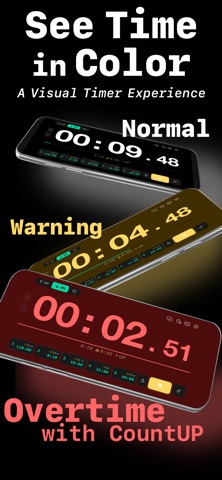
- Post-end count-up — visualizes how many minutes you are over
- Continued [to HH:MM] readout after the timer ends

[Organize]
- Preset storage — 5 presets (Free) / 5 groups × 5 = up to 25 presets (Pro)
- Custom sound import
- Japanese / English UI
- iPhone / iPad support

---
Pro unlocks more capability for on-site needs

[NEW · v4.0.0]
- Preset Groups A–E — manage up to 25 presets across scenes such as live shows, rehearsal, streaming, and recording. Switch groups with one tap.
- Custom group names — name A–E to match your workflow (e.g., "Live," "Stream," "Lecture").
- iPhone landscape preset editing redesigned with a 2-column layout.

[v3.0.0 – v3.2.1]
- SideClock — check the current time while the timer is running, with no effect on the external display.
- Live Activity — show remaining time on the Lock Screen and Dynamic Island.
- Apple Watch sync — control the timer and check remaining time from your wrist.

[On-site safety]
- Operation lock — prevent accidental taps during operation
- Passcode protection — fully block unintended operations during live shows

[Pro-level details]
- Picture-in-Picture (PiP) — show remaining time and the current clock in a corner while using other apps
- ±1 minute buttons during operation for instant adjustment
- Auto-restart after count-down completes
- Create count-up presets
- External display customization (font size, progress bar, and more)

Pro is available as an in-app purchase and can be upgraded at any time.
* As features expand, Pro will increase from 500 yen to 700 yen with the next update.

---
Used in the field for

- Event and conference flow management
- Live streaming / recording segment timing
- Seminars, lectures, and lightning talks
- Stage and performance remaining-time sharing
- Meetings and workshops time-keeping
- Broadcast / MC duration management

---
Compatibility

- iOS / iPadOS (latest version recommended)
- Apple Watch sync: watchOS-compatible model required
- Live Activity: compatible device and OS required
- External display output: compatible adapter / AirPlay environment required

---
Support

For questions or requests, please contact us via the in-app contact form or the developer.
We will continue improving the app based on the voices of professionals in the field.

LiveCue Timer is the timer for everyone who supports flow with time.
Show more Show less

More data about LiveCue Timer

Price Free to download
Rating 4.00 based on a single rating
Ranking Not ranked
Version 4.0.2
App download size 3.36 MB
Suitable for Everyone

Alternative downloads for the LiveCue Timer app

VR-120HD Remote icon VR-120HD Remote
Roland Corporation
0.0
Free
VR-6HD Remote icon VR-6HD Remote
Roland Corporation
5.0
Free
1 ratings
V-80HD Remote icon V-80HD Remote
Roland Corporation
0.0
Free
VenuSet icon VenuSet
Roland Corporation
0.0
Free
OnStage Timer Pro icon OnStage Timer Pro
Andy Arevalo
0.0
Free
V-1HD+ Remote icon V-1HD+ Remote
Roland Corporation
0.0
Free
V-8HD Remote icon V-8HD Remote
Roland Corporation
4.5
Free
4 ratings
Touchless Countdown icon Touchless Countdown
Hideaki Uchikoshi
0.0
Free

More from StartPort LLC

ゆるログ icon ゆるログ
StartPort LLC
0.0
Free
Tracker Reveal icon Tracker Reveal
StartPort LLC
0.0
Free

Changelog of LiveCue Timer

No changelog data

Developer information for StartPort LLC

StartPort LLC

Address:

Share LiveCue Timer

Comments on LiveCue Timer for iOS

We don't have enough comments to show example comments. Please check back later.

App Store Rankings for LiveCue Timer

This app is not ranked

Technologies used by LiveCue Timer

VR-120HD Remote icon VR-120HD Remote
VR-6HD Remote icon VR-6HD Remote
V-80HD Remote icon V-80HD Remote
VenuSet icon VenuSet
OnStage Timer Pro icon OnStage Timer Pro
V-1HD+ Remote icon V-1HD+ Remote
V-8HD Remote icon V-8HD Remote
Touchless Countdown icon Touchless Countdown

Back to top
AppBrain Intelligence premium content

Subscribe now to get full and unlimited access to AppBrain Intelligence. You'll have access to:

  • App Intelligence dashboard (performance timeline, competitor comparison, country rankings, insight cards)
  • Detailed ranking data per app
  • Full timeline per developer
  • Device market shares data per country
1 Month

$75/mo
(billed every month)

SAVE 0%
Subscribe
3 Months

$65/mo
($195 billed every 3 months)

SAVE 13%
Subscribe
1 Year

$57.50/mo
($690 billed every year)

SAVE 23%
Subscribe
Each subscription will automatically renew 3 days before the expiration date for the same time period. Subscriptions can be cancelled at any time before the renewal.

AppBrain is a directory focused on discovering great apps and games. We give statistics, rankings and search options that Google Play and the App Store don't have. All trademarks are owned by their respective owners. AppBrain doesn't offer APKs or binaries, and always lets users install the official version from Google Play or the App Store.

More apps

  • Top Android apps being viewed
  • MRZ/NFC Passport-ID Card Scan
  • Search Quran stats
  • Puzzle Master

Android Statistics

  • Android statistics
  • Google Play Developer stats
  • Trending Android Apps
  • Top popular Apps
  • Buy the best Android phone

About AppBrain

  • Contact
  • Privacy
  • Documentation
  • DMCA takedowns
  • Articles
  • Blog
  • Free App-Ads.Txt Validation
© 2010-2026 - AppBrain