

LiveMotion: Live Wallpaper
LiveMotion: Live Wallpaper is made and published by AccelOcean LLC. AppBrain is an independent app data site and isn't affiliated with AccelOcean LLC. The app name, icon, screenshots and description belong to AccelOcean LLC and are shown as published on the App Store.
AppBrain's verdict
- Rating on App Store
- 5.00
- 3 ratings
- Last updated
- September 29, 2026
- Size
- 72.3 MB
It doesn't have enough ratings yet to judge what users think.
User feedback
Ratings and reviews on the App StoreComments on LiveMotion: Live Wallpaper for iOS
We don't have enough comments to show example comments. Please check back later.
Store listing
By AccelOcean LLC, from the App Store
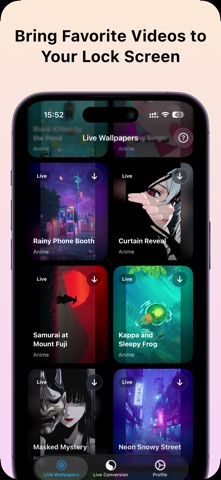



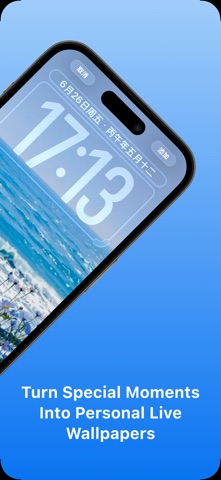
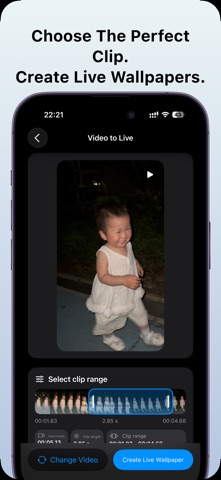
Description by AccelOcean LLC Written by the developer, not by AppBrain. Click to read.
Turn your favorite videos into motion wallpapers for your Lock Screen. Choose a video, select the best moment, preview the motion, and create a Live Wallpaper that saves directly to your Photos library.
You can also explore curated Live Wallpapers inside the app, preview animated styles, and save them as Live Photos. Whether you want a personal video, a travel memory, a pet moment, a portrait clip, or a polished animated wallpaper, LiveMotion helps you make your Lock Screen feel more personal and alive.
### What You Can Do
- Turn videos into Live Wallpapers
- Create Live Photos from your own clips
- Select the best motion range before saving
- Preview your selected video clip before export
- Save Live Wallpapers directly to Photos
- Browse curated animated wallpaper styles
- Export Live Photos as separate photo and video files
- Keep your personal media processed on device
### Built for Personal Wallpapers
LiveMotion is designed for quick, focused wallpaper creation. Import a video, choose the section that looks best on your Lock Screen, and create a Live Wallpaper without a complicated editing timeline.
### Curated Live Wallpaper Gallery
Browse a growing collection of animated lock screen wallpapers. Preview motion styles, pick a favorite, and save it as a Live Photo for your wallpaper setup.
### Premium Features
LiveMotion Premium unlocks the complete live wallpaper collection, video-to-wallpaper creation, and unlimited exports with full output controls.
### How It Works
1. Choose a video or wallpaper style.
2. Preview the motion.
3. Create a Live Wallpaper.
4. Save it to Photos.
5. Set it as your iPhone Lock Screen wallpaper.
LiveMotion gives you a simple way to make your iPhone feel more personal every time you wake the screen.
Terms of Use: https://www.apple.com/legal/internet-services/itunes/dev/stdeula/
Privacy Policy: https://www.accelocean.com/legal/livemotion-privacy/
Safety and technology
Found in the app by AppBrain- Price
- Free
- App size
- 72.3 MB
- Content rating
- Everyone
Technologies used by LiveMotion: Live Wallpaper
Releases
Updates seen on the App Store- Version
- 3.7.0
- Launched
- December 2024
No changelog data
Alternatives
Similar apps and more from AccelOcean LLCAlternatives to LiveMotion: Live Wallpaper


Rankings
App Store top chartsApp Store Rankings for LiveMotion: Live Wallpaper
About the app and developer
About LiveMotion: Live Wallpaper
LiveMotion: Live Wallpaper is a photo & video app developed by AccelOcean LLC.
User Ratings
LiveMotion: Live Wallpaper is rated 5.00 out of 5 stars. The rating is based on 3 ratings.
App Information
LiveMotion: Live Wallpaper is freely available from the App Store. The app size is 72.33 MB. The latest version available is 3.7.0. The last update was on September 29, 2026.
Technical Requirements
The app has a content rating of Everyone. The app has been available on the App Store since December 2024.
Developer information for AccelOcean LLC
Address:
Frequently asked questions about LiveMotion: Live Wallpaper
Is LiveMotion: Live Wallpaper free?
Yes. LiveMotion: Live Wallpaper is free on the App Store.
Is LiveMotion: Live Wallpaper still available?
Yes. LiveMotion: Live Wallpaper is on the App Store, and the last update we saw was on September 29, 2026.
How large is LiveMotion: Live Wallpaper?
LiveMotion: Live Wallpaper is 72.33 MB.
Is LiveMotion: Live Wallpaper suitable for children?
App Store rates the content of LiveMotion: Live Wallpaper as suitable for everyone.
How do people rate LiveMotion: Live Wallpaper?
LiveMotion: Live Wallpaper scores 5.00 out of 5 stars, from 3 ratings on the App Store.
Who made LiveMotion: Live Wallpaper?
LiveMotion: Live Wallpaper was developed by AccelOcean LLC. It is listed in the photo & video category on the App Store.
What are the best alternatives to LiveMotion: Live Wallpaper?
People looking at LiveMotion: Live Wallpaper also look at these photo & video apps: iErase - AI Remove Background, Liveform - Video To Live Photo, PixelShot - Screenshot Finder, Frame Capture - Video to Photo, MyerSplash 2.