LMS GamerMix came out 41 days ago. It doesn't have enough ratings yet to judge what users think.
LMS GamerMix is made and published by
Lookout Mountain Systems LLC.
AppBrain is an independent app data site and isn't affiliated with Lookout Mountain Systems LLC.
The app name, icon, screenshots and description belong to Lookout Mountain Systems LLC and are shown as
published on the App Store.
About LMS GamerMix
LMS GamerMix is an utilities app developed by Lookout Mountain Systems LLC.
What is the rating of LMS GamerMix?
LMS GamerMix is rated 5.00 out of 5 stars, based on 3 ratings.
Is LMS GamerMix free?
LMS GamerMix is free. The app size is 3.79 MB. The latest version available is 1.5. The last update was on October 17, 2026.
What are the requirements for LMS GamerMix?
The app has a content rating of Everyone. The app has been available on the App Store since September 2026.
Description by Lookout Mountain Systems LLC(from the App Store)
LMS GamerMix turns your phone into a wireless microphone and a 16-pad soundboard for your Windows PC.
Your voice and your sound effects travel from the phone to the PC over your own Wi-Fi. On the PC they show up as an ordinary microphone, so any game, voice chat, streaming or recording app can use them. No cables, no mixer, no extra hardware.
IMPORTANT: This is a companion app. It needs the free LMS GamerMix desktop app for Windows 11 (64-bit), which includes the virtual microphone driver. Without it the phone has nothing to connect to. Setup guide and download: lookoutmtsystems.github.io/LMSgamermix/how/
FREE - Full wireless microphone, no time limit - Soundboard pad 1, loaded with your own audio file - Put your own image or GIF on the pad
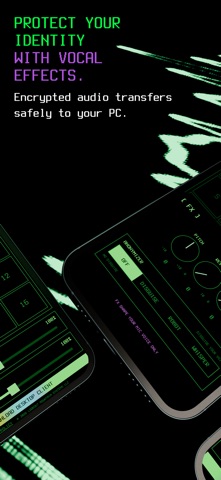
GAMERMIX PRO - All 16 soundboard pads - Voice FX: pitch, reverb and delay - Anonymizer voice modes: disguise, robot and whisper - Save and load your setups as programs - Mic input level and soundboard send level controls
HOW IT WORKS 1. Put the phone and the PC on the same Wi-Fi network. 2. Open the app and tap START. The phone displays its address. 3. Type that address into the desktop app and connect, then choose LMS GamerMix as your microphone in Windows or in your game.
Tap a pad to fire a sound. Hold a pad to load your own audio or artwork. Pads mix directly into what the PC hears, so your team or your audience hears them the moment you do.
The microphone keeps running with the screen locked. It stops when you tap STOP, or when another app takes over audio, such as a phone call or a video.
WHAT YOU NEED - A Windows 11 64-bit PC running the free LMS GamerMix desktop app - Both devices on the same Wi-Fi network. Guest networks, and routers with client isolation or AP isolation enabled, will block the connection.
PRIVACY Audio goes straight from your phone to your PC across your local network, encrypted on the way. Nothing is routed through the internet. There are no accounts to create, we run no servers, and we never receive or store your audio.
SUBSCRIPTION GamerMix Pro is an annual auto-renewing subscription. Payment is charged to your Apple Account at confirmation of purchase. It renews automatically unless auto-renew is turned off at least 24 hours before the end of the current period, and your account is charged for renewal within 24 hours of the end of the current period. You can manage or cancel it in your Apple Account settings. The free microphone and pad 1 remain available whether or not you subscribe.
SUPPORT support@lookoutmtsystems.com Lookout Mountain Systems, LLC
Terms of Use: https://www.apple.com/legal/internet-services/itunes/dev/stdeula/ Privacy Policy: https://lookoutmtsystems.github.io/LMSgamermix/privacy/
Each subscription will automatically renew 3 days before the expiration date for
the same time period. Subscriptions can be cancelled at any time before the renewal.