

Local PDF is made and published by Marco Tini. AppBrain is an independent app data site and isn't affiliated with Marco Tini. The app name, icon, screenshots and description belong to Marco Tini and are shown as published on the App Store.
AppBrain's verdict
- Last updated
- April 26, 2026
- Size
- 874.0 KB
User feedback
Ratings and reviews on the App StoreComments on Local PDF for iOS
We don't have enough comments to show example comments. Please check back later.
Store listing
By Marco Tini, from the App Store


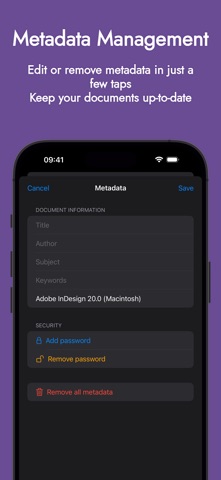
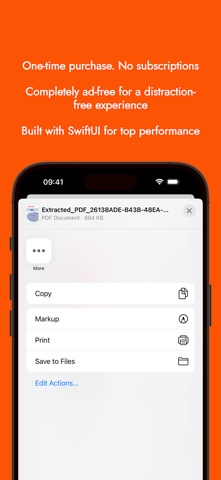
Screenshots by Marco Tini, from the the App Store listing
Description by Marco Tini Written by the developer, not by AppBrain. Click to read.
Local PDF is the ultimate app to manage your PDF documents directly on your iPhone and iPad, with a strong focus on privacy. No servers, no internet required—everything happens locally on your device, ensuring maximum data security.
Key features:
- Page management: rotate, split a PDF into multiple files, or merge several PDFs into one.
- Metadata management: view, edit, or remove metadata from any PDF.
- Password management: protect your PDFs with a password or remove existing ones.
- File compression: reduce PDF size with multiple quality options.
- Advanced preview: zoom in on pages for precise viewing.
- Reorder and export pages: rearrange pages and export only the ones you need.
- Intuitive interface with Dark Mode: a modern, responsive, and easy-to-use design with full dark mode support.
Why choose Local PDF?
- Privacy guaranteed: all operations are performed locally on your device. Your files stay with you.
- Offline functionality: edit your PDFs anywhere, without relying on internet or external servers.
Perfect for professionals, students, and anyone working with PDFs.
Download Local PDF today and experience how easy managing your documents can be!
Key features:
- Page management: rotate, split a PDF into multiple files, or merge several PDFs into one.
- Metadata management: view, edit, or remove metadata from any PDF.
- Password management: protect your PDFs with a password or remove existing ones.
- File compression: reduce PDF size with multiple quality options.
- Advanced preview: zoom in on pages for precise viewing.
- Reorder and export pages: rearrange pages and export only the ones you need.
- Intuitive interface with Dark Mode: a modern, responsive, and easy-to-use design with full dark mode support.
Why choose Local PDF?
- Privacy guaranteed: all operations are performed locally on your device. Your files stay with you.
- Offline functionality: edit your PDFs anywhere, without relying on internet or external servers.
Perfect for professionals, students, and anyone working with PDFs.
Download Local PDF today and experience how easy managing your documents can be!
Safety and technology
Found in the app by AppBrain- Price
- $9.99
- App size
- 874.0 KB
- Content rating
- Everyone
Technologies used by Local PDF
Releases
Updates seen on the App Store- Version
- 1.0.5
- Launched
- January 2025
No changelog data
Alternatives
Similar apps and more from Marco TiniMore from Marco Tini


Rankings
App Store top chartsApp Store Rankings for Local PDF
This app is not ranked
About the app and developer
About Local PDF
Local PDF is a productivity app developed by Marco Tini.
User Ratings
The app has no ratings yet.
App Information
Local PDF costs $9.99. The app size is 874.00 kB. The latest version available is 1.0.5. The last update was on April 26, 2026.
Technical Requirements
The app has a content rating of Everyone. The app has been available on the App Store since January 2025.
Developer information for Marco Tini
Address: