

LocalCloud: Photo Storage P2P
LocalCloud: Photo Storage P2P is made and published by Duong The. AppBrain is an independent app data site and isn't affiliated with Duong The. The app name, icon, screenshots and description belong to Duong The and are shown as published on the App Store.
AppBrain's verdict
- Last updated
- August 26, 2026
Rankings
App Store top chartsApp Store Rankings for LocalCloud: Photo Storage P2P
Competitors
Similar apps and more from Duong The




Releases
Updates seen on the App Store- Version
- 1.2.0
- Launched
- July 2026
No changelog data
User feedback
Ratings and reviews on the App StoreComments on LocalCloud: Photo Storage P2P for iOS
We don't have enough comments to show example comments. Please check back later.
Technology
Found in the app by AppBrain- Price
- Free
- App size
- 21.5 MB
- Content rating
- Everyone
Technologies used by LocalCloud: Photo Storage P2P
About the app and developer
About LocalCloud: Photo Storage P2P
LocalCloud: Photo Storage P2P is an utilities app developed by Duong The.
User Ratings
The app has no ratings yet.
App Information
LocalCloud: Photo Storage P2P is freely available from the App Store. The app size is 21.50 MB. The latest version available is 1.2.0. The last update was on August 26, 2026.
Technical Requirements
The app has a content rating of Everyone. The app has been available on the App Store since July 2026.
Developer information for Duong The
Address:
Frequently asked questions about LocalCloud: Photo Storage P2P
Is LocalCloud: Photo Storage P2P free?
Yes. LocalCloud: Photo Storage P2P is free on the App Store.
Is LocalCloud: Photo Storage P2P still available?
Yes. LocalCloud: Photo Storage P2P is on the App Store, and the last update we saw was on August 26, 2026.
How large is LocalCloud: Photo Storage P2P?
LocalCloud: Photo Storage P2P is 21.50 MB.
Is LocalCloud: Photo Storage P2P suitable for children?
App Store rates the content of LocalCloud: Photo Storage P2P as suitable for everyone.
Who made LocalCloud: Photo Storage P2P?
LocalCloud: Photo Storage P2P was developed by Duong The. It is listed in the utilities category on the App Store.
What are the best alternatives to LocalCloud: Photo Storage P2P?
People looking at LocalCloud: Photo Storage P2P also look at these utilities apps: SignalSeek: WiFi Heatmap, FldMx - GPS Field Area Measure, Ble-Scanner & Bluetooth Finder, Wi-Fi Analyzer & Device Scan, Redwing NFC.
Store listing
By Duong The, from the App Store



Description by Duong The Written by the developer, not by AppBrain. Click to read.
Meanwhile, your laptop has hundreds of gigabytes sitting empty.
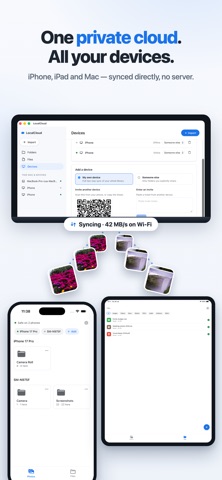
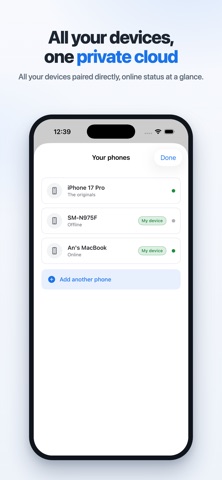
LocalCloud turns the devices you already own into one private cloud. Your phone backs up to your laptop, your laptop to the family PC automatically, encrypted, with no server and no account. Your data never leaves the hardware you own.
HOW IT WORKS
1. Install LocalCloud on two or more of your devices
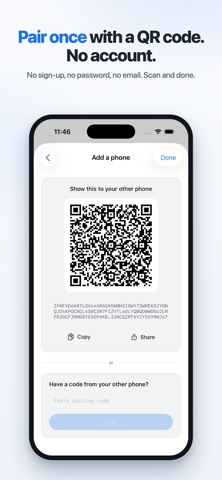
2. Pair them once by scanning a QR code
3. Photos and files stay in sync automatically from then on
"IF I LOSE MY PHONE, I LOSE EVERYTHING"
Not anymore. The "Safe on N devices" indicator shows exactly how many physical copies each photo has. Lose your phone and everything that reached your laptop is still there.
"I DON'T WANT MY PHOTOS ON SOMEONE'S SERVER"
There is no server. Your devices talk directly to each other over end-to-end encrypted connections (QUIC with TLS 1.3). There is nothing to breach and no password to leak.
"UPLOADING TAKES FOREVER"
On your own Wi-Fi, transfers run at local speed — a whole camera roll moves in minutes. When your devices are apart, an encrypted relay keeps them connected without being able to read your data.
"SWITCHING PHONES IS A NIGHTMARE"
Getting a new phone? Pair the old one with the new one and your whole camera roll walks across — no cable, no cloud upload, no per-photo picking.
"WHERE ARE MY FILES, ACTUALLY?"
In real folders. On your computer everything mirrors into a normal folder in Finder; on your phone your files appear in the Files app. Drag files in on one device and they appear on the others.
MORE THAN PHOTOS
Send PDFs, documents and archives from any app with Share to LocalCloud. Files show up on every device with clear type icons and filters.
SHARE ONE FOLDER, KEEP THE REST
Share an album with family and they receive that folder only. Your library stays yours.
HOME BASE MODE
Keep an always-on computer as the house archive, so your phones stay in sync even when they never meet.
NO LOCK-IN
Your files stay in normal folders and normal formats. Stop using LocalCloud any time and you lose nothing.
Support: support@localcloud.work
Privacy: https://localcloud.work/privacy.html