Download Android Apps and Games
AppBrain
  • Apps
  • Apps being viewed right now Trending apps today Most popular apps All-time most downloaded apps Top rated apps iPhone and iPad apps
  • Intelligence ▾
    Intelligence overview → Track any Android app or your whole market
    Track & analyze
    Keyword Tracker & OptimizerTrack & improve Play rankings App Performance ReportOne-off PDF for any app StatisticsFree Android & Play market stats
    Promote your app
    Featured Apps App Links
  • Intelligence
  • Pricing
  • Dashboard
  • Sign up
  • Log in
Last updated on: 2026-09-21
App Store Apps > Productivity > Lock Screen Notes: StickySort
Lock Screen Notes: StickySort icon

Lock Screen Notes: StickySort

1.1.3
N-Verse LLC
5.00
1 reviews
Free

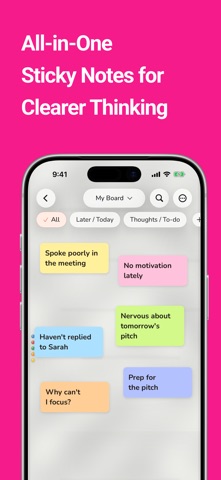
Lock Screen Notes: StickySort Screenshot 1 of 7
Lock Screen Notes: StickySort Screenshot 2 of 7
Lock Screen Notes: StickySort Screenshot 3 of 7
Lock Screen Notes: StickySort Screenshot 4 of 7
Lock Screen Notes: StickySort Screenshot 5 of 7
Lock Screen Notes: StickySort Screenshot 6 of 7
Lock Screen Notes: StickySort Screenshot 7 of 7
Download from the App Store

About Lock Screen Notes: StickySort

Lock Screen Notes: StickySort is a productivity app developed by N-Verse LLC.

What is the rating of Lock Screen Notes: StickySort?

Lock Screen Notes: StickySort is rated 5.00 out of 5 stars, based on one rating ratings.

Is Lock Screen Notes: StickySort free?

Lock Screen Notes: StickySort is free to download. The download size is 95.42 MB. The latest version available is 1.1.3. The last update was on September 17, 2026.

What are the requirements for Lock Screen Notes: StickySort?

The app has a content rating of Everyone. The app has been available on App Store May 2026.

Description
Keep the to-dos and notes you do not want to forget right where you can see them.

StickySort is a colorful sticky note app for the Lock Screen, Home Screen, and Dynamic Island. Capture tasks, shopping lists, plans, and ideas as individual notes, then check or sort them without losing context.

Use a Lock Screen widget for quick access to a note. When you want to see a whole page, start a Live Activity from the page menu. It can display one page at a time for up to 8 hours. On supported iPhones, expand Dynamic Island to view the notes and complete checklist items.

On the Home Screen, choose Page View, Pinned Note, Quick Add, Unsorted Count, Sort Reminder, or Checklist. Lock Screen widgets and controls keep important notes and actions close.

Write first, organize later. Swipe notes left or right using your own rules, such as “Now / Later” or “Important / Let Go”. Use text notes, checklists, and links; customize colors, backgrounds, and fonts; organize with notebooks and pages; and back up with iCloud. Drawings, photos, flashcards, extra sorting axes, and expanded pages are among the advanced features in StickySort PRO.

Premium features are available via App Store auto-renewable subscriptions or a lifetime one-time purchase. Payment is charged to your Apple ID account. Subscriptions renew automatically unless cancelled at least 24 hours before the end of the current period. You can manage and cancel subscriptions in your device Settings > Apple ID > Subscriptions. The lifetime purchase does not renew and does not create future recurring charges.

Terms of Use: https://stickysort.pages.dev/terms
Show more Show less

More data about Lock Screen Notes: StickySort

Price Free to download
Rating 5.00 based on a single rating
Ranking Not ranked
Version 1.1.3
App download size 95.4 MB
Suitable for Everyone

Alternative downloads for the Lock Screen Notes: StickySort app

H-wall : Hidden memo wall icon H-wall : Hidden memo wall
jaeyoon Hwang
0.0
Free
Next Streak – ADHD Next Step icon Next Streak – ADHD Next Step
Innovius
0.0
Free
ADHD Focus - Reset icon ADHD Focus - Reset
Karol Jaworski
0.0
Free
Ivy6: Daily Focus Planner icon Ivy6: Daily Focus Planner
Giuseppe Pignataro
0.0
Free
TableCalc icon TableCalc
LEUNG NICOL
0.0
Free
思考整理カード icon 思考整理カード
SANWA Inc.
0.0
Free
Nudge: ADHD Cleaning & Chores icon Nudge: ADHD Cleaning & Chores
Abhinav Chauhan
3.8
Free
6 ratings
Piggy Knowledge icon Piggy Knowledge
Rolling Pig Studio
0.0
Free

More from N-Verse LLC

Red Sheet-kun: AI Study Sheets icon Red Sheet-kun: AI Study Sheets
N-Verse LLC
0.0
Free

Changelog of Lock Screen Notes: StickySort

No changelog data

Developer information for N-Verse LLC

N-Verse LLC

Address:

Share Lock Screen Notes: StickySort

Comments on Lock Screen Notes: StickySort for iOS

We don't have enough comments to show example comments. Please check back later.

App Store Rankings for Lock Screen Notes: StickySort

This app is not ranked

Technologies used by Lock Screen Notes: StickySort

Frequently asked questions about Lock Screen Notes: StickySort

Is Lock Screen Notes: StickySort free?

Yes. Lock Screen Notes: StickySort is free to download from App Store.

Is Lock Screen Notes: StickySort still available?

Yes. Lock Screen Notes: StickySort is on App Store, and the last update we saw was on September 17, 2026.

How large is the Lock Screen Notes: StickySort download?

Lock Screen Notes: StickySort is 95.42 MB to download.

Is Lock Screen Notes: StickySort suitable for children?

App Store rates the content of Lock Screen Notes: StickySort as suitable for everyone.

How do people rate Lock Screen Notes: StickySort?

Lock Screen Notes: StickySort has one rating of 5.00 stars on App Store.

Who made Lock Screen Notes: StickySort?

Lock Screen Notes: StickySort was developed by N-Verse LLC. It is listed in the productivity category on App Store.

What are the best alternatives to Lock Screen Notes: StickySort?

People looking at Lock Screen Notes: StickySort also look at these productivity apps: H-wall : Hidden memo wall, Next Streak – ADHD Next Step, ADHD Focus - Reset, Ivy6: Daily Focus Planner, TableCalc.

Apps on sale Top new apps Today's trending apps Popular Productivity Apps Apps other people are watching
H-wall : Hidden memo wall icon H-wall : Hidden memo wall
Next Streak – ADHD Next Step icon Next Streak – ADHD Next Step
ADHD Focus - Reset icon ADHD Focus - Reset
Ivy6: Daily Focus Planner icon Ivy6: Daily Focus Planner
TableCalc icon TableCalc
思考整理カード icon 思考整理カード
Nudge: ADHD Cleaning & Chores icon Nudge: ADHD Cleaning & Chores
Piggy Knowledge icon Piggy Knowledge

Back to top
AppBrain Intelligence premium content

Subscribe now to get full and unlimited access to AppBrain Intelligence. You'll have access to:

  • App Intelligence dashboard (performance timeline, competitor comparison, country rankings, insight cards)
  • Detailed ranking data per app
  • Full timeline per developer
  • Device market shares data per country
  • Unlimited keyword tracking
1 Month

$75/mo
(billed every month)

SAVE 0%
Subscribe
3 Months

$65/mo
($195 billed every 3 months)

SAVE 13%
Subscribe
1 Year

$57.50/mo
($690 billed every year)

SAVE 23%
Subscribe
Each subscription will automatically renew 3 days before the expiration date for the same time period. Subscriptions can be cancelled at any time before the renewal.

AppBrain is a directory focused on discovering great apps and games. We give statistics, rankings and search options that Google Play and the App Store don't have. All trademarks are owned by their respective owners. AppBrain doesn't offer APKs or binaries, and always lets users install the official version from Google Play or the App Store.

More apps

  • Top Android apps being viewed
  • Email- Fast, All Inbox Access
  • Titan: Olympus War
  • TubeDown(Video Downloader)

App statistics

  • Android statistics
  • Google Play Developer stats
  • Trending Android Apps
  • Trending iOS apps
  • Top popular Apps
  • Buy the best Android phone

About AppBrain

  • Contact
  • Privacy
  • Documentation
  • DMCA takedowns
  • Articles
  • Blog
  • Tips to improve your Android promotional campaign
© 2010-2026 - AppBrain