




AppBrain's verdict
- Last updated
- November 1, 2026
- Size
- 115.1 MB
User feedback
Ratings and reviews on the App StoreComments on LockIn: App Launcher & Blocker for iOS
We don't have enough comments to show example comments. Please check back later.
Store listing
By Hongsin Aing, from the App StoreDescription by Hongsin Aing Written by the developer, not by AppBrain. Click to read.
BLOCKING
You can block one app, a whole category, or a website. You do it by building focus templates: Deep Work, Study, Sleep, Gym, whatever your week actually contains. Each template keeps its own app list, color and emoji, so switching between them is one tap.
Templates can also start on their own. Set one for weekdays from 9 to 12, or every night at 10, and it runs whether or not you remember.
Strict Mode is for the sessions you actually mean. Once a strict focus starts, ending it early takes three deliberate steps: write down why you are quitting, type the unlock phrase, then press and hold. There is no single tap that gets you out.
Force-quitting LockIn will not release the block either. The blocking plan lives outside the app, so closing it, backgrounding it or crashing it leaves the shields up.
NOTES AND TO-DOS
Your notes and to-do lists live in the same app that blocks your distractions. Before a session, pick the tasks you mean to finish. When it ends, see what you got done and start the next one with whatever is left. Notes come in List, Cards or Grid, and both have their own widgets.
YOUR HOME SCREEN
A launcher is just a list of apps you chose deliberately. You open them straight from the widget without walking past anything else.
There are more than 20 widgets: clock, date, calendar, weather, quote of the day, focus timer, launcher, notes, to-do list and a progress ring, in every size. Lock Screen widgets too, and a Live Activity that keeps a running session visible without unlocking.
Font, weight, design, alignment and time format are all yours to set.
WHAT YOU GET BACK
Reports by day, week, month, or a range you pick, charting every session you have run.
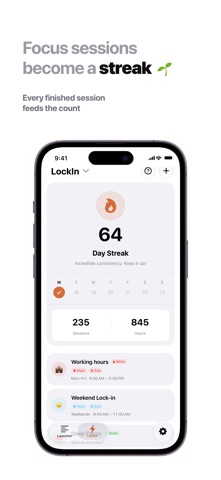
Streaks count the days you actually focused, not the days you opened the app. Achievements cover streaks, consistency, session count, hours and a handful of one-off moments.
There is a new quote each day, and you can share it as a card.
SIRI, SHORTCUTS AND FOCUS FILTERS
Start a focus with your voice, from a Shortcut, from a button on a Home Screen widget, or automatically through an iOS Focus Filter.
PRIVACY
Your Screen Time data stays on your device. There is no account and nothing to sign up for. Backup and sync run through your own iCloud, and you can leave sync switched off entirely.
FREE AND PRO
The free version has no time limit on it. You get 3 launchers, 5 focus templates, 1 schedule, 14 days of history, Strict Mode, unlimited notes, the Inbox plus 2 to-do lists, and every widget, for as long as you keep the app.
LockIn Pro lifts the caps on launchers, templates, schedules, to-do lists and history, then adds pinned and locked notes, week, month and custom reports, iCloud Sync, widget styling and the archive.
$1.99 a month or $9.99 a year, both starting with a 7-day free trial. Lifetime access is $29.99, paid once.
Payment is charged to your Apple Account when you confirm the purchase. Subscriptions renew automatically unless you switch off auto-renew at least 24 hours before the current period ends, and your account is charged within the 24 hours before renewal. Manage or cancel yours in your Apple Account settings.
Terms of Use: https://applockin.vercel.app/terms
Privacy Policy: https://applockin.vercel.app/privacy
Safety and technology
Found in the app by AppBrain- Price
- Free
- App size
- 115.1 MB
- Content rating
- Everyone
Technologies used by LockIn: App Launcher & Blocker
Releases
Updates seen on the App Store- Version
- 1.1.0
- Launched
- September 2026
No changelog data
Alternatives
Similar apps and more from Hongsin AingAlternatives to LockIn: App Launcher & Blocker


More from Hongsin Aing

Rankings
App Store top chartsApp Store Rankings for LockIn: App Launcher & Blocker
About the app and developer
About LockIn: App Launcher & Blocker
LockIn: App Launcher & Blocker is a productivity app developed by Hongsin Aing.
User Ratings
The app has no ratings yet.
App Information
LockIn: App Launcher & Blocker is freely available from the App Store. The app size is 115.09 MB. The latest version available is 1.1.0. The last update was on November 1, 2026.
Technical Requirements
The app has a content rating of Everyone. The app has been available on the App Store since September 2026.
LockIn: App Launcher & Blocker is made and published by Hongsin Aing. AppBrain is an independent app data site and isn't affiliated with Hongsin Aing. The app name, icon, screenshots and description belong to Hongsin Aing and are shown as published on the App Store.
Developer information for Hongsin Aing
Address: