

LockLive-Live WallPaper Tool
LockLive-Live WallPaper Tool is made and published by 长宇 林. AppBrain is an independent app data site and isn't affiliated with 长宇 林. The app name, icon, screenshots and description belong to 长宇 林 and are shown as published on the App Store.
AppBrain's verdict
- Rating on App Store
- 5.00
- 2 ratings
- Last updated
- October 6, 2026
- Size
- 75.5 MB
It doesn't have enough ratings yet to judge what users think.
User feedback
Ratings and reviews on the App StoreComments on LockLive-Live WallPaper Tool for iOS
We don't have enough comments to show example comments. Please check back later.
Store listing
By 长宇 林, from the App Store


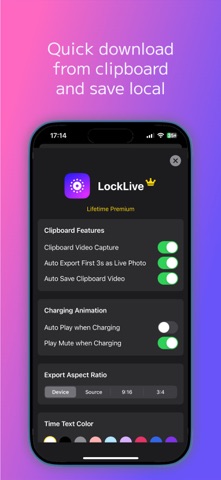


Description by 长宇 林 Written by the developer, not by AppBrain. Click to read.
Precision capture: With the precision capture feature, perfectly freeze any exciting moment in the frame, never missing a single detail.
Smart screen adaptation: Automatically adapts to different screen sizes. No matter what device you use, the wallpaper will fit perfectly, delivering a stunning visual experience.
Easy setup and quick preview: Through convenient and diverse quick setup options, you can quickly preview the final effect and even showcase cool videos while charging.
Portrait depth dynamic lock screen, cool display while charging: Add unique charm to your device with convenient and diverse quick setup options, making your charging time stand out.
Subscription Service Details
1. Subscription Service: Premium features with a 7-day free trial, followed by optional monthly or yearly auto-renewing subscriptions.
2. Subscription Price: Monthly auto-renewing subscription at $9.99/month, yearly auto-renewing subscription at $29.99/year.
3. Payment Method: Upon user confirmation and payment, the fee will be deducted from the iTunes account.
4. The Apple iTunes account will be charged 24 hours before the subscription expires. Upon successful payment, the subscription period will be extended for another term.
5. To cancel a subscription, open "Settings" on your iPhone, go to "iTunes Store & App Store," click on "Apple ID," select "View Apple ID," enter the "Account Settings" page, click "Subscriptions," and select the VIP subscription to cancel. If the subscription is not canceled at least 24 hours before the end of the current period, it will automatically renew.
Terms of Use (End User License Agreement): https://www.apple.com/legal/internet-services/itunes/dev/stdeula/
Privacy Policy: https://70apps.com/blog/privacy/
Safety and technology
Found in the app by AppBrain- Price
- Free
- App size
- 75.5 MB
- Content rating
- Low
Technologies used by LockLive-Live WallPaper Tool
Releases
Updates seen on the App Store- Version
- 26.10.29
- Launched
- March 2025
No changelog data
Alternatives
Similar apps and more from 长宇 林Alternatives to LockLive-Live WallPaper Tool




More from 长宇 林





Rankings
App Store top chartsApp Store Rankings for LockLive-Live WallPaper Tool
About the app and developer
About LockLive-Live WallPaper Tool
LockLive-Live WallPaper Tool is a graphics & design app developed by 长宇 林.
What is the rating of LockLive-Live WallPaper Tool?
LockLive-Live WallPaper Tool is rated 5.00 out of 5 stars, based on 2 ratings.
Is LockLive-Live WallPaper Tool free?
LockLive-Live WallPaper Tool is free. The app size is 75.47 MB. The latest version available is 26.10.29. The last update was on October 6, 2026.
What are the requirements for LockLive-Live WallPaper Tool?
The app has a content rating of Low Maturity. The app has been available on the App Store since March 2025.
Developer information for 长宇 林
Address:
Frequently asked questions about LockLive-Live WallPaper Tool
Is LockLive-Live WallPaper Tool free?
Yes. LockLive-Live WallPaper Tool is free on the App Store.
Is LockLive-Live WallPaper Tool still available?
Yes. LockLive-Live WallPaper Tool is on the App Store, and the last update we saw was on October 6, 2026.
How large is LockLive-Live WallPaper Tool?
LockLive-Live WallPaper Tool is 75.47 MB.
Is LockLive-Live WallPaper Tool suitable for children?
App Store gives LockLive-Live WallPaper Tool a low maturity rating, so it is meant for older children and up.
How do people rate LockLive-Live WallPaper Tool?
LockLive-Live WallPaper Tool scores 5.00 out of 5 stars, from 2 ratings on the App Store.
Who made LockLive-Live WallPaper Tool?
LockLive-Live WallPaper Tool was developed by 长宇 林. It is listed in the graphics & design category on the App Store.
What are the best alternatives to LockLive-Live WallPaper Tool?
People looking at LockLive-Live WallPaper Tool also look at these graphics & design apps: Screenshot Editor - SnapIt, Loopy Live Wallpaper, Launcher x – App Launcher, Charging Animation Lite, Minipaper: Wallpaper Maker.