LockToDo - Lock Screen Tasks is a lifestyle app developed by 晓峰 左.
What is the rating of LockToDo - Lock Screen Tasks?
LockToDo - Lock Screen Tasks is rated 4.35 out of 5 stars, based on 20 ratings.
Is LockToDo - Lock Screen Tasks free?
LockToDo - Lock Screen Tasks is free. The app size is 90.13 MB. The latest version available is 6.7.8. The last update was on November 25, 2026.
What are the requirements for LockToDo - Lock Screen Tasks?
The app has a content rating of Everyone. The app has been available on the App Store since June 2025.
LockToDo - Lock Screen Tasks is made and published by
晓峰 左.
AppBrain is an independent app data site and isn't affiliated with 晓峰 左.
The app name, icon, screenshots and description belong to 晓峰 左 and are shown as published on the App Store.
Description by 晓峰 左(from the App Store)
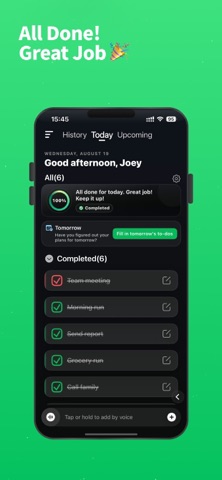
No need to unlock, to-do list is locked on the screen, no longer forgotten. LockToDo is a focused to-do list and daily planner built around today's tasks. It brings your checklist to the Lock Screen, Dynamic Island, Live Activities, and Home Screen widgets, so your priorities are visible the moment you wake your iPhone.
Capture a task by typing or voice before the idea disappears. Break larger work into subtasks, set priorities and dates, create recurring reminders, and organize everything across Today, History, and Future.
KEY FEATURES
• View today's to-do list directly on the Lock Screen • Track daily progress with Live Activities and Dynamic Island • Check and complete tasks from Home Screen widgets • Add tasks quickly with voice input • Organize tasks into Today, History, and Future • Use subtasks, priorities, dates, categories, and recurring tasks • Automatically bring unfinished past tasks into Today • Review completion trends and recent productivity • Hide sensitive content with Lock Screen privacy mode • Personalize task cards with themes and visual styles • Back up and restore your data with iCloud • Refresh today's tasks using Shortcuts automation
LockToDo is made for people who want a simple task manager, fewer steps to check reminders, and a clear view of what matters today. Use it for work plans, study lists, daily routines, personal goals, or quick notes and ideas.
Keep important things where you can always see them.
SUBSCRIPTION INFORMATION
Plan and price: Subscription prices depend on the membership plan you choose. The amount shown in the app and on the App Store payment screen applies.
Renewal: Payment will be charged to your Apple ID account within 24 hours before the end of the current subscription period. Subscriptions renew automatically unless canceled.
Cancellation: Cancel at least 24 hours before the end of the current period. Open Settings, tap your name, choose Subscriptions, select the subscription, and follow the instructions.
Each subscription will automatically renew 3 days before the expiration date for
the same time period. Subscriptions can be cancelled at any time before the renewal.