

Logbook Pro Flight Logbook
Logbook Pro Flight Logbook is made and published by NC Software, Inc. AppBrain is an independent app data site and isn't affiliated with NC Software, Inc. The app name, icon, screenshots and description belong to NC Software, Inc. and are shown as published on the App Store.
AppBrain's verdict
EstablishedLoved by users- Rating on App Store
- 4.58
- 1,740 ratings
- Last updated
- July 17, 2026
Users love it: 4.6 stars from 1,740 ratings.
Rankings
App Store top chartsApp Store Rankings for Logbook Pro Flight Logbook
Competitors
Similar apps and more from NC Software, Inc.Alternatives to Logbook Pro Flight Logbook






More from NC Software, Inc.

Releases
Updates seen on the App Store- Version
- 11.1.0
- Launched
- December 2010
No changelog data
User feedback
Ratings and reviews on the App StoreComments on Logbook Pro Flight Logbook for iOS
We don't have enough comments to show example comments. Please check back later.
Technology
Found in the app by AppBrain- Price
- Free
- App size
- 110.8 MB
- Content rating
- Everyone
Technologies used by Logbook Pro Flight Logbook
About the app and developer
About Logbook Pro Flight Logbook
Logbook Pro Flight Logbook is an utilities app developed by NC Software, Inc.
User Ratings
Logbook Pro Flight Logbook is rated 4.58 out of 5 stars. The rating is based on 1.7 thousand ratings.
App Information
Logbook Pro Flight Logbook is freely available from the App Store. The app size is 110.84 MB. The latest version available is 11.1.0. The last update was on July 17, 2026.
Technical Requirements
The app has a content rating of Everyone. The app has been available on the App Store since December 2010.
Developer information for NC Software, Inc.
Address:
Store listing
By NC Software, Inc., from the App Store




Description by NC Software, Inc. Written by the developer, not by AppBrain. Click to read.
Features:
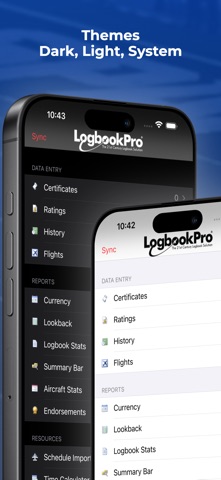
* Dark and Light themes. Manual selection or follow OS
* Endorsements with signature support for all data areas, synced to the cloud
* Efficient user interface with easy to read color scheme
* Log Certificates, Ratings, History Items (Medicals, Flight Reviews, etc.)
* Log actual and sim flights
* View when expiring events (History Items) expire instantly on your device
* Calculate duration from OUT-IN or TAKEOFF-LAND times with the tap of a button
* View powerful and comprehensive reports generated by Logbook Pro Desktop edition right on your device
* View aircraft stats such as date type was last flown, hours in type, etc.
* Show currency status with colored marker flags indicating current or expired
* View your details summary bar report
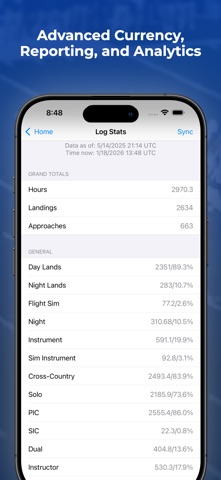
* Analyze complete logbook statistics with both totals and percentages
* View FAR 121/135 limitations with colored markers (requires Logbook Pro Professional Edition or higher)
* Auto-enter the duration value in other time fields with a single tap
* Customizable cascading time entries for Out, Takeoff, Landing, and In making flight entry quick and easy
* New flight entries can default with prior flight entry data for rapid flight log entry
* Customize the layout to declutter display showing only fields you need
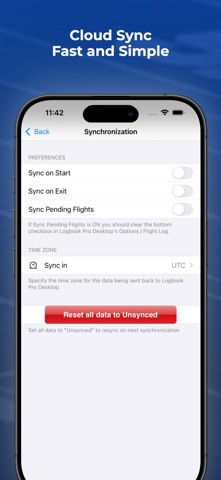
* Fast synchronization
* Device uses colors to identify current and overdue, synchronized or not. No need to purge, the device manages your data smartly
* Instant filter in each data area to show: All Data, Not Yet Synchronized, Synchronized
* Free-form route entry allows a single entry for the entire day; no hassle with picking or searching for airports.
* AutoFill makes populating common time fields a breeze
* Log multiple approaches of each type for each flight
* Log "By Leg" or "By Day" allowing you to collate your entire day into a single flight log entry
* Import Airline Schedules from over 200 airline and trip formats with proper time zone handling
* Import Airline Schedules from Flight Crew View
* Integrate with your device's calendar and sync with your other calendars
* Social networking integration with affiliate support to earn commissions on referrals. Post to Facebook or Twitter.
* App Time Zone and Sync Time Zone support for Local, UTC, or a custom selected "domicile" time zone.
* Check weather quickly on multiple destinations (METAR and TAF)
* Quick increment buttons to easily add/subtract values for fields such as landings, approaches, etc.
* Study airports your flying into with the Sky View airport viewer
* Extremely customizable with a plethora of options to make the app into what you need
* Protect app access with app security options in Settings
Notes & Requirements:
-This app is not a stand-alone logbook, it is designed to work in tandem with Logbook Pro Desktop (activation/purchase NOT required to evaluate)
-A Logbook Pro Mobile subscription is required to enable synchronization features
-A Schedule Importer subscription is required to use the airline schedule importer features
Subscriptions do not auto-renew. In-app purchases will be charged to your iTunes Account. Subscription terms and pricing may be found in the My Account area within the app.
Privacy Policy: https://nc-software.com/privacy
Terms of Use: https://nc-software.com/tos
Logbook Pro is a registered trademark of NC Software, Inc.