

Logic Circuits Simulator
Logic Circuits Simulator is made and published by Abdulhakim Aloraini. AppBrain is an independent app data site and isn't affiliated with Abdulhakim Aloraini. The app name, icon, screenshots and description belong to Abdulhakim Aloraini and are shown as published on the App Store.
AppBrain's verdict
- Last updated
- July 9, 2026
Rankings
App Store top chartsApp Store Rankings for Logic Circuits Simulator
Competitors
Similar apps and more from Abdulhakim AlorainiMore from Abdulhakim Aloraini

Releases
Updates seen on the App Store- Version
- v3.0.1
- Launched
- July 2025
No changelog data
User feedback
Ratings and reviews on the App StoreComments on Logic Circuits Simulator for iOS
We don't have enough comments to show example comments. Please check back later.
Technology
Found in the app by AppBrain- Price
- $0.99
- App size
- 3.18 MB
- Content rating
- Everyone
Technologies used by Logic Circuits Simulator
About the app and developer
About Logic Circuits Simulator
Logic Circuits Simulator is an education app developed by Abdulhakim Aloraini.
User Ratings
The app has no ratings yet.
App Information
Logic Circuits Simulator costs $0.99. The app size is 3.18 MB. The latest version available is v3.0.1. The last update was on July 9, 2026.
Technical Requirements
The app has a content rating of Everyone. The app has been available on the App Store since July 2025.
Developer information for Abdulhakim Aloraini
Address:
Frequently asked questions about Logic Circuits Simulator
Is Logic Circuits Simulator free?
No. Logic Circuits Simulator costs $0.99 on the App Store.
Is Logic Circuits Simulator still available?
Yes. Logic Circuits Simulator is on the App Store, and the last update we saw was on July 9, 2026.
How large is Logic Circuits Simulator?
Logic Circuits Simulator is 3.18 MB.
Is Logic Circuits Simulator suitable for children?
App Store rates the content of Logic Circuits Simulator as suitable for everyone.
Who made Logic Circuits Simulator?
Logic Circuits Simulator was developed by Abdulhakim Aloraini. It is listed in the education category on the App Store.
Store listing
By Abdulhakim Aloraini, from the App Store


Description by Abdulhakim Aloraini Written by the developer, not by AppBrain. Click to read.
Build circuits with IEEE-standard gates, sequential logic, Karnaugh maps, and reusable chips, all with schematic-quality wire routing that looks like the diagrams in your textbook.
Rebuilt from the ground up for Version 3.
COMBINATIONAL LOGIC
Design with the full set of IEEE-standard gates: AND, OR, NOT, NAND, NOR, XOR, XNOR. Grow any gate from 2 to 8 inputs as your designs scale. Drop in constant rails, Ground and VCC, for clean schematic structure. Every gate auto-labels with its Boolean expression, complete with proper overlines for negation.
SEQUENTIAL LOGIC
Build counters, registers, and state machines that simulate live. Adjustable-speed clock with pause and single-pulse control. D, T, and JK flip-flops. SR latches. Every memory element exposes both Q and Q' outputs, the way your textbook draws them.
SCHEMATIC-QUALITY WIRE ROUTING
Wires route themselves with orthogonal paths, rounded corners, hop bridges over crossings, and junction dots at branches. Your circuits look like real schematics, not tangled diagrams.
KARNAUGH MAPS & MINIMIZATION
Flip any truth table into a Gray-coded Karnaugh map for 2-4 variables. See covering groups in color and the minimized sum-of-products expression, generated with Quine-McCluskey, the same algorithm your textbook uses.
REUSABLE CHIPS
Package any combinational circuit as a custom IC with named pins. Stamp instances like real chips, U1, U2, U3, into bigger designs. Build a full adder once, then drop four instances into a 4-bit ripple-carry adder. Your chip library syncs across devices via iCloud.
TRUTH TABLES
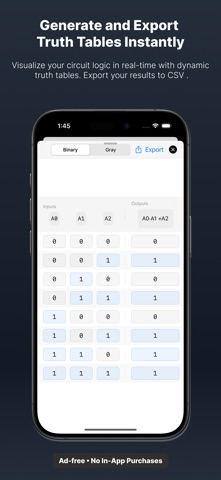
Generate truth tables for any circuit with up to 8 inputs. Intermediate gate columns show the signal flow, not just the answer. Export to CSV for your lab reports.
7-SEGMENT DISPLAY
Drive a 7-segment display with 4 binary inputs to show hexadecimal digits, perfect for visualizing counters, decoders, and arithmetic circuits.
BUILT-IN EXAMPLES
Open working classics with one tap: half adder, full adder, 2-to-1 multiplexer, 2-to-4 decoder, NOR-gate SR latch, 2-bit ripple counter. Examples open as editable copies, learn, modify, and save your own version.
ICLOUD SYNC
Your saved circuits and custom chips sync across iPhone and iPad via iCloud. Start a design on iPad, finish it on iPhone. On-device-only mode available in Settings.
SHARE YOUR WORK
Export circuits as .lcs files to share via Mail, Messages, or Files. Embedded chips travel with the file, recipients see your design exactly as you built it. Export PNG snapshots and CSV truth tables for reports.
WHY V3 IS DIFFERENT
Logic Circuits Simulator V3 is a ground-up rewrite. New canvas, new tools, new everything. Circuits saved in 2.x migrate automatically the first time you open V3.
Built by an engineering student, for engineering students. Always ad-free. No in-app purchases. No subscriptions.
HAVE FEEDBACK?
Email hkem.moh.ar@gmail.com. V3 was shaped by feedback from users like you, and the next version will be too.