

Logsuke is made and published by Mowof, Inc. AppBrain is an independent app data site and isn't affiliated with Mowof, Inc. The app name, icon, screenshots and description belong to Mowof, Inc. and are shown as published on the App Store.
AppBrain's verdict
- Last updated
- August 19, 2026
Rankings
App Store top chartsApp Store Rankings for Logsuke
Competitors
Similar apps and more from Mowof, Inc.Alternatives to Logsuke





More from Mowof, Inc.


Releases
Updates seen on the App Store- Version
- 1.0.4
- Launched
- December 2024
No changelog data
User feedback
Ratings and reviews on the App StoreComments on Logsuke for iOS
We don't have enough comments to show example comments. Please check back later.
Technology
Found in the app by AppBrain- Price
- Free
- App size
- 46.1 MB
- Content rating
- Everyone
Technologies used by Logsuke
About the app and developer
About Logsuke
Logsuke is a navigation app developed by Mowof, Inc.
What is the rating of Logsuke?
Logsuke has no ratings yet.
Is Logsuke free?
Logsuke is free. The app size is 46.11 MB. The latest version available is 1.0.4. The last update was on August 19, 2026.
What are the requirements for Logsuke?
The app has a content rating of Everyone. The app has been available on the App Store since December 2024.
Developer information for Mowof, Inc.
Address:
Frequently asked questions about Logsuke
Is Logsuke free?
Yes. Logsuke is free on the App Store.
Is Logsuke still available?
Yes. Logsuke is on the App Store, and the last update we saw was on August 19, 2026.
How large is Logsuke?
Logsuke is 46.11 MB.
Is Logsuke suitable for children?
App Store rates the content of Logsuke as suitable for everyone.
Who made Logsuke?
Logsuke was developed by Mowof, Inc. It is listed in the navigation category on the App Store.
What are the best alternatives to Logsuke?
People looking at Logsuke also look at these navigation apps: Ramen Rader, GPS Logger - Route Tracker, TRAILINX - GPS Tracker, 車どこ停めた?, PlaceVisit.
Store listing
By Mowof, Inc., from the App Store
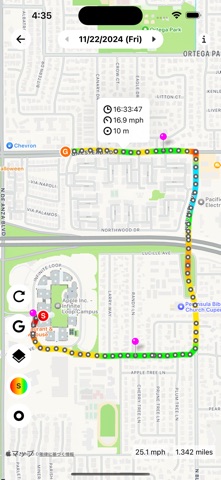

Description by Mowof, Inc. Written by the developer, not by AppBrain. Click to read.
[Features]
- Records by day. Saves in the app.
- Records in the background and offline. (Even without a SIM)
- Map display is Apple Maps and Google Maps.
- Displays total distance. Speed and altitude gradation.
- Add pins to current location and log points. Add titles to pins.
- Export and import in CSV. (All data and daily data)
- Add star marks and notes to daily list.
- View history of nearby pins from any pin.
[Speed and altitude gradation display]
You can also check the maximum speed point and the highest and lowest altitude points. If an abnormal value is displayed due to GPS accuracy, delete the point and the calculation will be recalculated.
[Export and import in CSV]
Can be used when you want to move data to another device. Export to iCloud Drive, etc. and import on another device.
It may be a good idea to export it occasionally as a backup.
[View nearby pin history from any pin]
If you pin a destination that you visit repeatedly, you can see how often you have visited it.