

Lomdim is made and published by Amir Sekely. AppBrain is an independent app data site and isn't affiliated with Amir Sekely. The app name, icon, screenshots and description belong to Amir Sekely and are shown as published on the App Store.
AppBrain's verdict
- Last updated
- October 8, 2026
Rankings
App Store top chartsApp Store Rankings for Lomdim
Competitors
Similar apps and more from Amir SekelyAlternatives to Lomdim


Releases
Updates seen on the App Store- Version
- 1.5
- Launched
- September 2026
No changelog data
User feedback
Ratings and reviews on the App StoreComments on Lomdim for iOS
We don't have enough comments to show example comments. Please check back later.
Technology
Found in the app by AppBrain- Price
- Free
- App size
- 3.61 MB
- Content rating
- Everyone
Technologies used by Lomdim
About the app and developer
About Lomdim
Lomdim is an education app developed by Amir Sekely.
User Ratings
The app has no ratings yet.
App Information
Lomdim is freely available from the App Store. The app size is 3.61 MB. The latest version available is 1.5. The last update was on October 8, 2026.
Technical Requirements
The app has a content rating of Everyone. The app has been available on the App Store since September 2026.
Developer information for Amir Sekely
Address:
Store listing
By Amir Sekely, from the App Store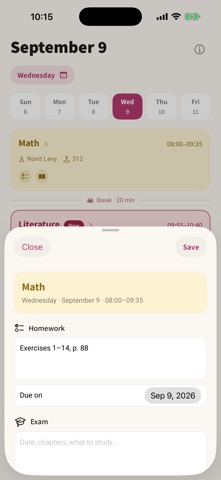


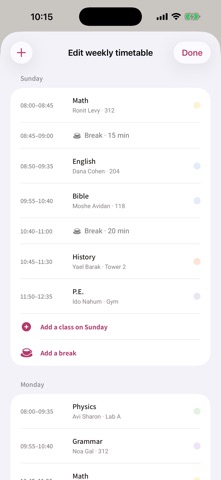
Description by Amir Sekely Written by the developer, not by AppBrain. Click to read.
One message, the whole class's timetable
Every student in a class has the same timetable, and every one of them types it in from scratch. In Lomdim one person enters it and shares it on WhatsApp; everyone else adds it with one tap. The sender picks which days and classes go out, the receiver picks what to take — a whole day or a single class — and sees beforehand what will be added and what would be replaced. No account, no server, nothing uploaded.
Build your timetable once
Add each regular class — subject, teacher, room and times — and it repeats automatically every week. Five, six or seven days: days you don't have class simply don't appear.
See the class you're in right now
The lesson happening at this moment is marked live on the home screen, with a progress bar and how much time is left in it.
Add work where it was given
Tap a class in the daily view and add homework, an exam, or notes on what was covered. Everything files itself under the right subject and date, and shows up in the Homework, Exams and Notes tabs.
Never miss a deadline
• Three automatic reminders before every exam: a week, three days, and a day before.
• Your own custom reminder on any exam or homework item.
• Add any exam or due date straight to Apple Calendar or Google Calendar.
Exams, organised
Upcoming exams sorted by date with a countdown. Past exams keep the grade you got, including your average.
Your lock screen knows what's on
During school hours a Live Activity appears on the lock screen and in the Dynamic Island: which class is running, how many minutes are left, and what comes next — without opening the app. There's a home-screen widget with the next class too.
Import a timetable from a photo (optional)
Photograph your printed timetable and the app reads it for you. You can always build the timetable by hand — every other part of the app works offline.
Private by design
Everything is stored on your device. No account, no sign-in, no tracking.
The single exception is "Import from a photo": if you choose to use it, the photos you pick are sent to Google Gemini solely to read the timetable, using your own free key that you create yourself. Full details in the in-app privacy policy.
For school and university students who want order without the complexity.