Long Exposure: Slow Shutter is made and published by
Bahtiyar Polat.
AppBrain is an independent app data site and isn't affiliated with Bahtiyar Polat.
The app name, icon, screenshots and description belong to Bahtiyar Polat and are shown as
published on the App Store.
About Long Exposure: Slow Shutter
Long Exposure: Slow Shutter is a photo & video app developed by Bahtiyar Polat.
What is the rating of Long Exposure: Slow Shutter?
Long Exposure: Slow Shutter has no ratings yet.
Is Long Exposure: Slow Shutter free?
Long Exposure: Slow Shutter is free. The app size is 5.13 MB. The latest version available is 1.0. The last update was on August 27, 2026.
What are the requirements for Long Exposure: Slow Shutter?
The app has a content rating of Everyone. The app has been available on the App Store since August 2026.
Description by Bahtiyar Polat(from the App Store)
Long exposure photography, without the guesswork.
An iPhone shutter physically cannot stay open for thirty seconds. So this app does what a long exposure actually is: it stacks hundreds of live frames on the GPU and blends them in linear light, the way the physics wants it done. The result is a real long exposure — and you watch it form on screen while it happens.
THREE WAYS TO STACK
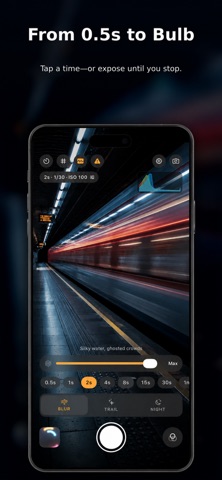
Motion Blur — averages every frame into smooth, flowing movement. Waterfalls turn to mist. Clouds smear across the sky. Crowds become ghosts.
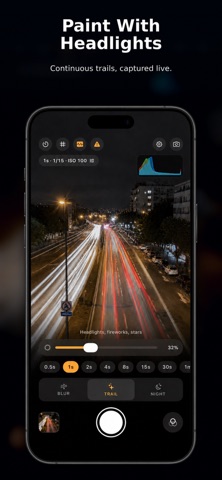
Light Trail — keeps the brightest pixel from each frame. Headlights draw ribbons through traffic, sparklers write in the air, stars arc across the night sky.
Low Light — adds frames together to gather light a single shot could never collect. The more frames land, the further noise falls away, and dark scenes come back clean instead of grainy.
STOP WHEN IT LOOKS RIGHT
Most long exposure tools ask you to commit to a duration up front, then leave you waiting blind. Here the exposure builds live in front of you. Watch the trails grow, watch the water go silky, and end the shot the moment it looks right.
Not there yet? Pick the exposure back up and keep stacking from exactly where you left off. Nothing is thrown away until you say so.
TOOLS THAT TELL YOU THE TRUTH
• Live histogram that updates as the exposure builds • Zebra clipping warning marks blown highlights before you lose them • Running frame count and total exposure time, always on screen • Review the finished frame full size before anything is saved
SEVEN SCENE PRESETS
Waterfall, Traffic, Star Trails, Fireworks, Light Painting, Night Scene, and Empty the Street — the last one averages a busy scene until the people walking through it simply disappear, leaving the street to itself.
Every preset is a starting point, not a cage. Adjust anything after loading one.
MANUAL CONTROL WHEN YOU WANT IT
• Lock exposure, white balance and focus so brightness and color never drift mid-stack • Manual ISO, or let the app work it out from the scene • Set exposure length, or hold the shutter open and decide by eye • 3 and 10 second self-timer for tripod work
BUILT PROPERLY
• 16-bit float accumulation, so nothing bands or clips partway through the stack • sRGB is linearized before blending and re-encoded afterwards — highlights stay honest instead of turning to grey mush • Saved to your photo library as HEIC with real EXIF: total exposure time, ISO, capture mode, and the exact number of frames stacked • Full resolution. No watermark. No account. • iPhone and iPad
WHAT IT IS GOOD AT
Silky waterfalls and coastlines. Car light trails on a night road. Star trails and the Milky Way. Fireworks caught as complete bursts instead of fragments. Writing in the air with a torch. City streets after dark, without pushing ISO until the noise eats the shot. Clearing tourists out of a landmark photo.
A tripod or a steady surface will always give you the cleanest result — that is true of every long exposure ever taken, on any camera.
Each subscription will automatically renew 3 days before the expiration date for
the same time period. Subscriptions can be cancelled at any time before the renewal.