

Loomstone is made and published by Ed Caspersen. AppBrain is an independent app data site and isn't affiliated with Ed Caspersen. The app name, icon, screenshots and description belong to Ed Caspersen and are shown as published on the App Store.
AppBrain's verdict
- Last updated
- August 19, 2026
Rankings
App Store top chartsApp Store Rankings for Loomstone
Competitors
Similar apps and more from Ed CaspersenAlternatives to Loomstone




More from Ed Caspersen


Releases
Updates seen on the App Store- Version
- 1.0.2
- Launched
- August 2026
No changelog data
User feedback
Ratings and reviews on the App StoreComments on Loomstone for iOS
We don't have enough comments to show example comments. Please check back later.
Technology
Found in the app by AppBrain- Price
- Free
- App size
- 171.0 MB
- Content rating
- Everyone
Technologies used by Loomstone
About the app and developer
About Loomstone
Loomstone is a games app developed by Ed Caspersen.
User Ratings
The app has no ratings yet.
App Information
Loomstone is freely available from the App Store. The app size is 171.04 MB. The latest version available is 1.0.2. The last update was on August 19, 2026.
Technical Requirements
The app has a content rating of Everyone. The app has been available on the App Store since August 2026.
Developer information for Ed Caspersen
Address:
Frequently asked questions about Loomstone
Is Loomstone free?
Yes. Loomstone is free on the App Store.
Is Loomstone still available?
Yes. Loomstone is on the App Store, and the last update we saw was on August 19, 2026.
How large is Loomstone?
Loomstone is 171.04 MB.
Is Loomstone suitable for children?
App Store rates the content of Loomstone as suitable for everyone.
Who made Loomstone?
Loomstone was developed by Ed Caspersen. It is listed in the games category on the App Store.
What are the best alternatives to Loomstone?
People looking at Loomstone also look at these games apps: Cooking Jam - 3D Sort & Match, The Catapult: stick man game, Pixicade - Game Creator, Bubble Witch 2 Saga, Angry Birds Journey.
Store listing
By Ed Caspersen, from the App Store


Description by Ed Caspersen Written by the developer, not by AppBrain. Click to read.
Every board is an old carving that has come loose. All the stones are still there. They are just facing the wrong way. Turn them back, and the pattern closes and lights up.
Tap a stone to turn it a quarter turn. Press and hold to turn it the other way. That is the whole of it. No lives, no energy bar, nothing asking you to come back in four hours. Most of the game is untimed, so a board takes exactly as long as you want to give it.
FOUR WAYS TO RESTORE
• Loop. Close every strand into a loop, no loose ends left anywhere. The harder carvings weave several loops at once, and some cross right through a shared stone.
• Path. Anchor stones sit somewhere in the carving. Connect them with one unbroken line. The anchors turn like any other stone, which is easy to forget, and on the biggest boards the line can fork toward a third anchor.
• Loom. Threads pass over and under one another on shared stones. Turn each crossing so that every thread keeps its own color from one end to the other. This one takes a while before you can really see it.
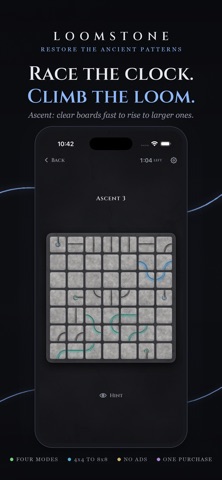
• Ascent. The timed one, and the only one that is. Clear a board with time to spare and you rise to a larger one. Let the clock reach zero and the run is over. You choose where you begin and how fast it counts down.
FOUR DEGREES OF DIFFICULTY
Difficulty raises two things at once: how intricate the carving is, and how few turns you are given to restore it.
• Novice is a simple pattern and generous moves, with room to wander.
• Adept busies the carving up.
• Artisan packs the board and leaves you barely enough turns to plan with.
• Master gives you the most intricate pattern in the game and exactly as many moves as a perfect solution takes. Not one more.
The harder tiers also carve stranger stones: some bolted in place, and some bound in pairs that turn together whether you like it or not.
In Ascent, those same four names set the speed of the clock instead, from a roomy countdown to the fastest a person can reasonably keep up with.
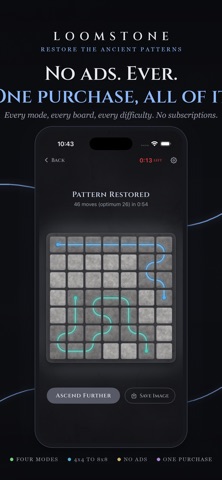
Restore a board well, and the work is graded. Elegant Restoration, Masterwork, or Flawless, which means you found the optimum. Master accepts nothing less.
Boards run from a gentle 4x4 up to a 12x12 that fills the whole screen with stones. Pinch to bring the small ones close.
WHAT ELSE IS IN HERE
• Every board is built from a number. Share yours with a friend and they play the exact same carving.
• When a pattern is whole, you can save a picture of it.
• Statistics, if you want to know how you are doing.
• A soundtrack you can browse, scrub, and mute, with a different album for each mode.
• Hints, when a board has you stuck.
HOW IT IS SOLD
• Loomstone is free to play, and a fair amount of it stays free forever: the whole of Loop on Novice, and a good spread of Path, Loom, and the harder tiers besides.
• One purchase, made once, unlocks every mode, every board size, and every difficulty for good. There are no ads. There are no subscriptions. There is no second purchase waiting behind the first.
• There is also no account to make, no tracking, no analytics, and nothing sent anywhere. The app has no idea who you are and does not want to know. It works on a plane.
MADE TO BE LOOKED AT
• The stone is carved rather than drawn. Every tile face is cut from a photographed slab, so the light in the grooves stays put while the stone turns under it. Strands glow as they link, and a finished pattern lights up whole.
• There is a high-contrast mode, a colorblind palette, reduced motion, adjustable glow, and separate volumes for music and effects. Pinch the board to bring the carving in close, for busy boards and tired eyes alike. It reads properly at larger text sizes. On iPad, a hardware keyboard works.
Turn the stones. Mend the pattern. Take as long as you like.