

Loot: Video Color Grading
Loot: Video Color Grading is made and published by Loot Video. AppBrain is an independent app data site and isn't affiliated with Loot Video. The app name, icon, screenshots and description belong to Loot Video and are shown as published on the App Store.
AppBrain's verdict
- Rating on App Store
- 5.00
- 2 ratings
- Last updated
- August 26, 2026
- Size
- 225.5 MB
It doesn't have enough ratings yet to judge what users think.
User feedback
Ratings and reviews on the App StoreComments on Loot: Video Color Grading for iOS
We don't have enough comments to show example comments. Please check back later.
Store listing
By Loot Video, from the App Store

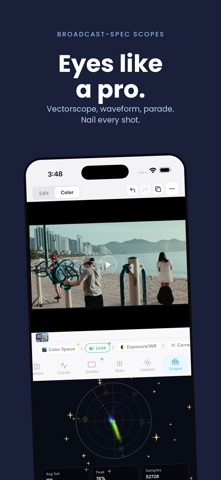
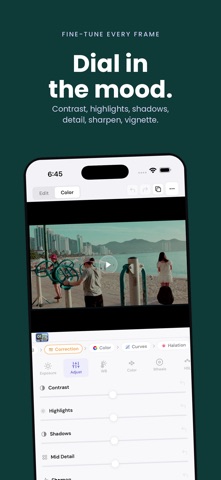


Description by Loot Video Written by the developer, not by AppBrain. Click to read.
CINEMA IN THREE TAPS
- Import a video or photo
- Choose from 60+ cinematic looks
- Export the finished result to Photos
PRO COLOR TOOLS
Go beyond one-tap filters with lift, gamma, and gain wheels, HSL controls, per-channel curves, exposure, contrast, white balance, saturation, and vibrance.
FILM EMULATION
Build an organic finish with professional LUTs, film-stock emulations, adjustable grain, and highlight halation. Import your own .cube LUT files when you want to bring an existing look with you.
TRUE LOG WORKFLOWS
Transform Apple Log, Sony S-Log3, and ARRI LogC footage with proper color space transforms designed to preserve the range in your source.
NODE-BASED GRADING
Stack correction, color, curves, LUT, grain, and halation nodes in a flexible, non-destructive pipeline. Reorder or revisit any part of the grade without starting over.
CAPTURE IN LOOT
Shoot inside Loot with your chosen look previewing live, then grade and export on the same device. Stabilization helps smooth handheld footage before delivery.
LOOT PRO
Unlock premium looks, save custom presets, and export your own presets with a monthly subscription. Cancel anytime.
Questions or feature requests? Email hello@loot.video.
Terms: https://loot.video/terms
Privacy: https://loot.video/privacy
Safety and technology
Found in the app by AppBrain- Price
- Free
- App size
- 225.5 MB
- Content rating
- Everyone
Technologies used by Loot: Video Color Grading
Releases
Updates seen on the App Store- Version
- 1.122
- Launched
- April 2026
No changelog data
Alternatives
Similar apps and more from Loot VideoAlternatives to Loot: Video Color Grading


Rankings
App Store top chartsApp Store Rankings for Loot: Video Color Grading
About the app and developer
About Loot: Video Color Grading
Loot: Video Color Grading is a photo & video app developed by Loot Video.
User Ratings
Loot: Video Color Grading is rated 5.00 out of 5 stars. The rating is based on 2 ratings.
App Information
Loot: Video Color Grading is freely available from the App Store. The app size is 225.50 MB. The latest version available is 1.122. The last update was on August 26, 2026.
Technical Requirements
The app has a content rating of Everyone. The app has been available on the App Store since April 2026.
Developer information for Loot Video
Address:
Frequently asked questions about Loot: Video Color Grading
Is Loot: Video Color Grading free?
Yes. Loot: Video Color Grading is free on the App Store.
Is Loot: Video Color Grading still available?
Yes. Loot: Video Color Grading is on the App Store, and the last update we saw was on August 26, 2026.
How large is Loot: Video Color Grading?
Loot: Video Color Grading is 225.50 MB.
Is Loot: Video Color Grading suitable for children?
App Store rates the content of Loot: Video Color Grading as suitable for everyone.
How do people rate Loot: Video Color Grading?
Loot: Video Color Grading scores 5.00 out of 5 stars, from 2 ratings on the App Store.
Who made Loot: Video Color Grading?
Loot: Video Color Grading was developed by Loot Video. It is listed in the photo & video category on the App Store.
What are the best alternatives to Loot: Video Color Grading?
People looking at Loot: Video Color Grading also look at these photo & video apps: Toniq - AI Photo Color Grading, CineGrade - Film Looks, CineSnap AI: Photo Editor, Filmtone: Film LUT Editor, CameraPick.