

Loupe: Live Screen Translator
Loupe: Live Screen Translator is made and published by 泽政 邱. AppBrain is an independent app data site and isn't affiliated with 泽政 邱. The app name, icon, screenshots and description belong to 泽政 邱 and are shown as published on the App Store.
AppBrain's verdict
- Last updated
- October 23, 2026
Rankings
App Store top chartsApp Store Rankings for Loupe: Live Screen Translator
Competitors
Similar apps and more from 泽政 邱Alternatives to Loupe: Live Screen Translator


Releases
Updates seen on the App Store- Version
- 1.6.1
- Launched
- September 2026
No changelog data
User feedback
Ratings and reviews on the App StoreComments on Loupe: Live Screen Translator for iOS
We don't have enough comments to show example comments. Please check back later.
Technology
Found in the app by AppBrain- Price
- Free
- App size
- 17.1 MB
- Content rating
- Everyone
Technologies used by Loupe: Live Screen Translator
About the app and developer
About Loupe: Live Screen Translator
Loupe: Live Screen Translator is an utilities app developed by 泽政 邱.
User Ratings
The app has no ratings yet.
App Information
Loupe: Live Screen Translator is freely available from the App Store. The app size is 17.06 MB. The latest version available is 1.6.1. The last update was on October 23, 2026.
Technical Requirements
The app has a content rating of Everyone. The app has been available on the App Store since September 2026.
Developer information for 泽政 邱
Address:
Frequently asked questions about Loupe: Live Screen Translator
Is Loupe: Live Screen Translator free?
Yes. Loupe: Live Screen Translator is free on the App Store.
Is Loupe: Live Screen Translator still available?
Yes. Loupe: Live Screen Translator is on the App Store, and the last update we saw was on October 23, 2026.
How large is Loupe: Live Screen Translator?
Loupe: Live Screen Translator is 17.06 MB.
Is Loupe: Live Screen Translator suitable for children?
App Store rates the content of Loupe: Live Screen Translator as suitable for everyone.
Who made Loupe: Live Screen Translator?
Loupe: Live Screen Translator was developed by 泽政 邱. It is listed in the utilities category on the App Store.
What are the best alternatives to Loupe: Live Screen Translator?
People looking at Loupe: Live Screen Translator also look at these utilities apps: Live Translate: Video & Voice, Live Screen & Voice Translate, Veya: Screen Translator, Hono - Live Video Translator, Gotcha Screen Translator.
Store listing
By 泽政 邱, from the App Store


Description by 泽政 邱 Written by the developer, not by AppBrain. Click to read.
Speech captions turn what's said in videos, live streams, online classes and podcasts, or by the people around you, into subtitles in your language. Screen translation shows the text of any app translated right where it is.
On iPhone and iPad, entirely on your device.
SPEECH CAPTIONS (NEW)
• Switch to Speech at the top of Home and choose an Audio Source. Phone Audio captions what other apps play: pick the spoken language, tap Start Captions and go back to your video. It doesn't use the microphone or read the screen, so room noise stays out.
• Nearby Speech uses the microphone to caption the people around you: conversations, talks, guided tours. No screen sharing needed. Tap Start Listening for large live captions; switch apps and they keep going in Picture in Picture.
• Recognition runs on your device. Audio is never recorded, saved or uploaded. Each language's speech model is downloaded once by iOS, after you confirm.
• Pick the window's shape and text size; show the translation, both lines, or the original only.
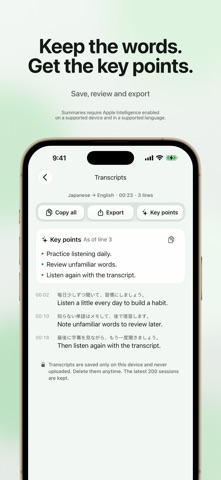
• Change the spoken language mid-session. Transcripts are saved on your device to review, copy or export as TXT, SRT or Markdown.
• Recognizes English, Chinese, Japanese, Korean, Spanish, French, German and more. You choose the spoken language; it isn't detected automatically.
SCREEN TRANSLATION
1. Download a language pack once. Loupe detects the language on screen.
2. Tap Start Loupe, then Start Sharing.
3. Switch to any app. A Picture in Picture window shows that part of the screen, translated in place.
Four reading scopes: Near the window, Whole screen, Fixed area (a region you mark, like a game's dialogue box), and LAN Live (the translated screen in a browser on another device on the same Wi-Fi).
SCREEN SUBTITLES (LOUPE PRO)
Instead of in place, screen translations can appear as numbered large-type cards in the original's colors, with the source text alongside, a corner guide to where each line is on screen, and right-to-left order for manga.
ON IPAD
With Windowed Apps or Stage Manager, the Loupe window itself becomes the lens: put it beside the app or video.
PRIVATE BY DESIGN
• Recognition and translation happen on your device, using Apple's on-device frameworks.
• Your screen and audio are never sent to us or saved. Caption transcripts stay only on your device, and you can delete them anytime.
• LAN Live, only when you choose it, sends the translation just to devices on your local network that open your link.
• No account, no ads, no tracking. Works offline once languages are downloaded.
LANGUAGES
Loupe comes in 14 languages: English, 简体中文, 繁體中文, 日本語, 한국어, Tiếng Việt, Español, Français, Deutsch, Português (Brasil), Türkçe, Bahasa Indonesia, العربية and ไทย. It translates from Japanese, Korean, Chinese, English and other languages supported by Apple's translation.
FREE AND LOUPE PRO
• Free: screen translation with all four scopes, and speech captions, for 5 minutes a day in total.
• Loupe Pro: no daily time limit in either mode, plus Screen Subtitles. Monthly, yearly, or a one-time lifetime purchase.
• Payment is charged to your Apple Account when you confirm the purchase. Subscriptions renew automatically unless canceled at least 24 hours before the end of the current period. Manage or cancel anytime in your Apple Account settings.
GOOD TO KNOW
• Requires iOS 26 or iPadOS 26 or later.
• Language packs come from Apple, about 140–440 MB each. Loupe asks before any download.
• Content an app protects from screen recording can't be read, and some apps mute their audio while the screen is shared.
Terms of Use (EULA): https://www.apple.com/legal/internet-services/itunes/dev/stdeula/
Privacy Policy: https://loupe-translator.pages.dev/privacy