

Low Poly Synth
Low Poly Synth is made and published by Alexander Zolotov. AppBrain is an independent app data site and isn't affiliated with Alexander Zolotov. The app name, icon, screenshots and description belong to Alexander Zolotov and are shown as published on the App Store.
AppBrain's verdict
- Rating on App Store
- 4.74
- 19 ratings
- Last updated
- December 14, 2025
- Size
- 6.29 MB
It doesn't have enough ratings yet to judge what users think.
User feedback
Ratings and reviews on the App StoreComments on Low Poly Synth for iOS
We don't have enough comments to show example comments. Please check back later.
Store listing
By Alexander Zolotov, from the App Store
Description by Alexander Zolotov Written by the developer, not by AppBrain. Click to read.
The app is built on modified synthesis algorithms from Fractal Bits, Relic Waves, and Relic Flow, with the addition of pure tone generation code.
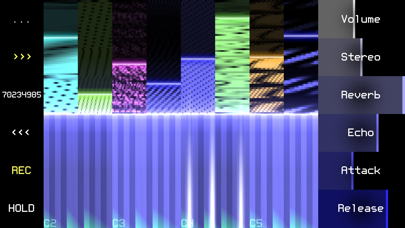
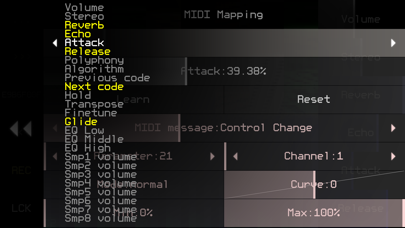
The sound space is divided into 4294967296 presets, each corresponding to a set of 8 sample textures. The volume of an individual sample can be adjusted in the top panel or via MIDI (Settings -> MIDI Mapping). The bottom panel is a classic musical keyboard that sets the note for the sounds in the set. Each note triggers all 8 samples at once - together they form a complex harmonic pattern that almost never repeats over time due to the different lengths of the looped fragments.
Features:
* search for new sounds with three buttons: next random set, edit code, previous set; each set of 8 sounds corresponds to a code of 8 characters (you can save/copy/paste it as plain text);
* three types of keyboards for live performing: on-screen, PC keyboard, MIDI input; for the on-screen keyboard, you can set the number of displayed octaves and scale;
* 20+ parameters can be controlled via MIDI or directly through the app interface: Settings -> MIDI Mapping;
* real-time audio recording to WAV (32-bit);
* export to: WAV (one file or a set), SunVox (samples + effects in one file), text clipboard;
* the LCK button freezes individual samples - they will not change during the search for new sets;
* Audio Unit Extension (AUv3), Wi-Fi export/import.
Double clicking on a parameter opens a window for setting the exact value.
If you enable the Hold option, the notes will play endlessly, without reacting to key release (noteOff) events; turning the note on again works like turning it off; there are two ways to enable this option:
1) using the Hold parameter in the "MIDI Mapping" window;
2) by pressing the HOLD button, which appears in place of LCK while playing the musical keyboard: press HOLD, release the desired notes - then the released notes will continue to play.
Safety and technology
Found in the app by AppBrain- Price
- $1.99
- App size
- 6.29 MB
- Content rating
- Everyone
Technologies used by Low Poly Synth
Releases
Updates seen on the App Store- Version
- 1.0
- Launched
- December 2025
No changelog data
Alternatives
Similar apps and more from Alexander ZolotovMore from Alexander Zolotov


Rankings
App Store top chartsApp Store Rankings for Low Poly Synth
About the app and developer
About Low Poly Synth
Low Poly Synth is a music app developed by Alexander Zolotov.
User Ratings
Low Poly Synth is rated 4.74 out of 5 stars. The rating is based on 19 ratings.
App Information
Low Poly Synth costs $1.99. The app size is 6.29 MB. The latest version available is 1.0. The last update was on December 14, 2025.
Technical Requirements
The app has a content rating of Everyone. The app has been available on the App Store since December 2025.
Developer information for Alexander Zolotov
Address:
Frequently asked questions about Low Poly Synth
Is Low Poly Synth free?
No. Low Poly Synth costs $1.99 on the App Store.
Is Low Poly Synth still available?
Yes. Low Poly Synth is on the App Store, and the last update we saw was on December 14, 2025.
How large is Low Poly Synth?
Low Poly Synth is 6.29 MB.
Is Low Poly Synth suitable for children?
App Store rates the content of Low Poly Synth as suitable for everyone.
How do people rate Low Poly Synth?
Low Poly Synth scores 4.74 out of 5 stars, from 19 ratings on the App Store.
Who made Low Poly Synth?
Low Poly Synth was developed by Alexander Zolotov. It is listed in the music category on the App Store.