

Lucida Cam: Trace Projector
Lucida Cam: Trace Projector is made and published by ihor Romanenko. AppBrain is an independent app data site and isn't affiliated with ihor Romanenko. The app name, icon, screenshots and description belong to ihor Romanenko and are shown as published on the App Store.
AppBrain's verdict
- Last updated
- October 8, 2026
- Size
- 2.36 MB
User feedback
Ratings and reviews on the App StoreComments on Lucida Cam: Trace Projector for iOS
We don't have enough comments to show example comments. Please check back later.
Store listing
By ihor Romanenko, from the App Store


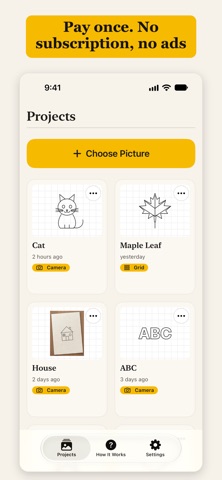
Description by ihor Romanenko Written by the developer, not by AppBrain. Click to read.
HOW IT WORKS
Put the iPhone on a stack of books, screen up, so the end with the camera sticks out over the paper. Put a small book on top to hold it. Slide your hand with a pencil under the phone, look at the screen and follow the lines you see. A phone stand works too. The phone stays still, so the picture stays in place while you draw.
Lucida Cam is a trace projector and AR drawing tool in the spirit of the camera lucida, the optical aid artists used long before phones.
WHAT YOU CAN DO
• Trace a photo, a sketch or one of the built-in sample pictures onto paper.
• Set how visible the picture is, so you see both the lines and your pencil.
• Turn a photo into clean lines with the Outline, Sketch and Black & White filters.
• Choose black, white or yellow lines. White lines work well on dark paper.
• Mirror the picture when you need a flipped copy, for example for a stamp.
• Lock the screen so a stray touch can’t move the picture.
• Adjust size, rotation and position with buttons, in small or large steps.
• Turn on the flashlight when the room is dim.
GRID MODE, NO CAMERA NEEDED
Draw square by square, the classic way. Lucida Cam puts a labeled grid over your picture and shares the picture with the grid so you can print it. Draw the same squares on paper and copy one square at a time.
WHO IT IS FOR
• Hobby artists and students who want the reference right on the page.
• Parents and kids tracing pictures together.
• Tattoo artists preparing a stencil drawing on paper.
• Anyone who wants to copy a picture by hand and learn to draw along the way.
SIMPLE AND PRIVATE
• Pictures and projects stay on your iPhone. The app works offline and has no server.
• The camera view is never recorded.
• Every project is saved with its position, size and settings.
• Works with large text and VoiceOver.
GOOD TO KNOW
Lucida Cam does not project light onto the paper and does not use ARKit or AI. You look at the screen and draw on the paper under the phone. For a sharp view keep the phone about 20 cm (8 in) above the page. iPhone models with a close-focus camera can sit much lower.
Pay once and keep it.
Safety and technology
Found in the app by AppBrain- Price
- $9.99
- App size
- 2.36 MB
- Content rating
- Everyone
Technologies used by Lucida Cam: Trace Projector
Releases
Updates seen on the App Store- Version
- 1.0
- Launched
- October 2026
No changelog data
Alternatives
Similar apps and more from ihor RomanenkoMore from ihor Romanenko


Rankings
App Store top chartsApp Store Rankings for Lucida Cam: Trace Projector
About the app and developer
About Lucida Cam: Trace Projector
Lucida Cam: Trace Projector is a graphics & design app developed by ihor Romanenko.
User Ratings
The app has no ratings yet.
App Information
Lucida Cam: Trace Projector costs $9.99. The app size is 2.36 MB. The latest version available is 1.0. The last update was on October 8, 2026.
Technical Requirements
The app has a content rating of Everyone. The app has been available on the App Store since October 2026.
Developer information for ihor Romanenko
Address:
Frequently asked questions about Lucida Cam: Trace Projector
Is Lucida Cam: Trace Projector free?
No. Lucida Cam: Trace Projector costs $9.99 on the App Store.
Is Lucida Cam: Trace Projector still available?
Yes. Lucida Cam: Trace Projector is on the App Store, and the last update we saw was on October 8, 2026.
How large is Lucida Cam: Trace Projector?
Lucida Cam: Trace Projector is 2.36 MB.
Is Lucida Cam: Trace Projector suitable for children?
App Store rates the content of Lucida Cam: Trace Projector as suitable for everyone.
Who made Lucida Cam: Trace Projector?
Lucida Cam: Trace Projector was developed by ihor Romanenko. It is listed in the graphics & design category on the App Store.