



AppBrain's verdict
- Rating on App Store
- 3.40
- 68 ratings
- Last updated
- September 27, 2026
- Size
- 4.81 MB
It doesn't have enough ratings yet to judge what users think.
User feedback
Ratings and reviews on the App StoreComments on Lumbernatics - Woodwork Design for iOS
We don't have enough comments to show example comments. Please check back later.
Store listing
By Aidaluu Inc., from the App StoreDescription by Aidaluu Inc. Written by the developer, not by AppBrain. Click to read.
Two Powerful Editors for All Your Woodworking Project Needs
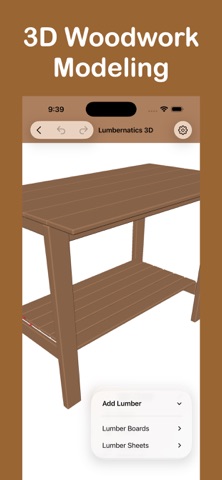
- 3D Editor: Create realistic 3D models that you can pan, rotate, and view from any angle. The 3D Editor allows you to visualize your project in a fully interactive environment, making it easier to understand how each piece fits together. Start quickly with 3D build examples for common projects like picture frames, garden planters, end tables, and more. These examples can be customized to suit your needs, helping you learn how to use the tools while creating practical designs.
- 2D Isometric Editor: Quickly put together a wood project design using the 2D isometric editor. This editor is ideal for sketching out ideas in a simpler, two-dimensional format while still conveying depth through isometric projection. It's perfect for creating straightforward plans without the complexity of full 3D modeling.
Easy Interface: Enjoy a simple and user-friendly design that makes it accessible for beginners and efficient for experienced users. The intuitive layout ensures that all tools and features are easily reachable, so you can focus on planning your project without any hassle.
Custom Sizes: Choose from common lumber sizes or set your own custom dimensions to match the materials you have or plan to purchase. This flexibility ensures that your designs are accurate and tailored to your specific project requirements.
Export Options: Export your design as an images or print out physical copies. You can also save and print your detailed lumber list, which includes all the pieces you'll need with their dimensions. This makes shopping for materials and organizing your build much more straightforward.
Save Projects: Save your designs and re-import them later for further editing. This feature allows you to work on projects over multiple sessions and make adjustments as needed without starting from scratch.
Quick Duplication: Easily duplicate lumber pieces to expand your design without repetitive manual input. If your project requires multiple identical pieces, like table legs or fence posts, you can create copies quickly to save time and maintain consistency.
Alignment Tools: Automatically align multiple pieces for uniform spacing and dimensions. This is especially useful when arranging elements like shelves, slats, or any components that need to be evenly distributed. It helps maintain symmetry and balance in your design.
Lumber Numbering: Number your lumber pieces for easy identification during the building process. Each piece in your design is assigned a unique number, which corresponds to the lumber list you can print. This makes it easier to keep track of parts, reducing confusion and mistakes when cutting and assembling.
Note: Free mode limits the number of lumber pieces and adds watermarks. Upgrade with an in-app purchase to remove these limitations, unlock all features and build examples.
When you purchase a subscription, payment will be charged to your Apple ID Account upon confirmation of purchase. The subscription will renew automatically unless you cancel it at least 24 hours prior to the end of the current subscription period. You can manage and cancel your subscriptions by going to your account settings on the App Store after purchase.
Privacy Policy
https://www.aidaluu.com/privacy/Lumbernatics.html
Terms of Use
https://www.aidaluu.com/tos/Lumbernatics.html
Safety and technology
Found in the app by AppBrain- Price
- Free
- App size
- 4.81 MB
- Content rating
- Everyone
Technologies used by Lumbernatics - Woodwork Design
Releases
Updates seen on the App Store- Version
- 4.4.1
- Launched
- August 2024
No changelog data
Alternatives
Similar apps and more from Aidaluu Inc.More from Aidaluu Inc.


Rankings
App Store top chartsApp Store Rankings for Lumbernatics - Woodwork Design
About the app and developer
About Lumbernatics - Woodwork Design
Lumbernatics - Woodwork Design is a graphics & design app developed by Aidaluu Inc.
User Ratings
Lumbernatics - Woodwork Design is rated 3.40 out of 5 stars. The rating is based on 68 ratings.
App Information
Lumbernatics - Woodwork Design is freely available from the App Store. The app size is 4.81 MB. The latest version available is 4.4.1. The last update was on September 27, 2026.
Technical Requirements
The app has a content rating of Everyone. The app has been available on the App Store since August 2024.
Lumbernatics - Woodwork Design is made and published by Aidaluu Inc. AppBrain is an independent app data site and isn't affiliated with Aidaluu Inc. The app name, icon, screenshots and description belong to Aidaluu Inc. and are shown as published on the App Store.
Developer information for Aidaluu Inc.
Address:
Frequently asked questions about Lumbernatics - Woodwork Design
Is Lumbernatics - Woodwork Design free?
Yes. Lumbernatics - Woodwork Design is free on the App Store.
Is Lumbernatics - Woodwork Design still available?
Yes. Lumbernatics - Woodwork Design is on the App Store, and the last update we saw was on September 27, 2026.
How large is Lumbernatics - Woodwork Design?
Lumbernatics - Woodwork Design is 4.81 MB.
Is Lumbernatics - Woodwork Design suitable for children?
App Store rates the content of Lumbernatics - Woodwork Design as suitable for everyone.
How do people rate Lumbernatics - Woodwork Design?
Lumbernatics - Woodwork Design scores 3.40 out of 5 stars, from 68 ratings on the App Store.
Who made Lumbernatics - Woodwork Design?
Lumbernatics - Woodwork Design was developed by Aidaluu Inc. It is listed in the graphics & design category on the App Store.