

Lumen - AI Camera
Lumen - AI Camera is made and published by Mario Steenbergen. AppBrain is an independent app data site and isn't affiliated with Mario Steenbergen. The app name, icon, screenshots and description belong to Mario Steenbergen and are shown as published on the App Store.
AppBrain's verdict
- Last updated
- October 9, 2026
Rankings
App Store top chartsApp Store Rankings for Lumen - AI Camera
Competitors
Similar apps and more from Mario SteenbergenAlternatives to Lumen - AI Camera


More from Mario Steenbergen


Releases
Updates seen on the App Store- Version
- 1.1.6
- Launched
- May 2026
No changelog data
User feedback
Ratings and reviews on the App StoreComments on Lumen - AI Camera for iOS
We don't have enough comments to show example comments. Please check back later.
Technology
Found in the app by AppBrain- Price
- Free
- App size
- 16.8 MB
- Content rating
- Everyone
Technologies used by Lumen - AI Camera
About the app and developer
About Lumen - AI Camera
Lumen - AI Camera is a photo & video app developed by Mario Steenbergen.
User Ratings
The app has no ratings yet.
App Information
Lumen - AI Camera is freely available from the App Store. The app size is 16.85 MB. The latest version available is 1.1.6. The last update was on October 9, 2026.
Technical Requirements
The app has a content rating of Everyone. The app has been available on the App Store since May 2026.
Developer information for Mario Steenbergen
Address:
Store listing
By Mario Steenbergen, from the App Store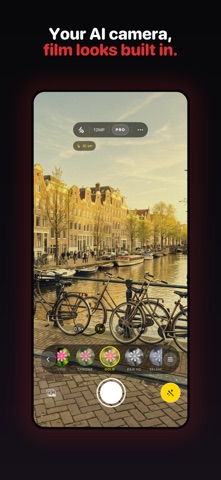




Description by Mario Steenbergen Written by the developer, not by AppBrain. Click to read.
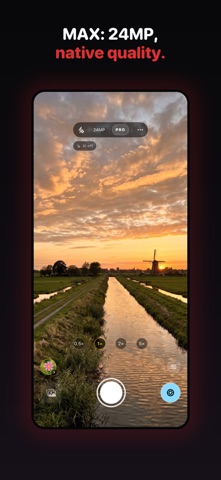
TWO MODES
• AI · 12MP: scene-aware processing plus your chosen film look. The preview is WYSIWYG, so what you see is what you get.
• MAX (Pro): the largest photo size iOS offers for your lens (24MP on iPhone 17 Pro) with the phone's native processing. Lumen's AI finishing and film looks are not applied in MAX.
AI CAPTURE: QUALITY OR SPEED
In the ··· menu you choose how AI mode balances processing and waiting time. Quality is the default; Speed asks iOS to trade a little processing for a shorter wait after the shutter.
FILM LOOKS
14 looks (including Off), inspired by classic analog film: from neutral and soft to warm golden tones, high-contrast black & white, silvery monochrome and sepia, plus punchy street looks like Hard Light and Midnight Glow. Off, Standard and Classic are free; the other looks come with Lumen Pro. Swipe the strip to compare.
MACRO, BUILT IN (Pro)
Macro switches to the ultra-wide lens itself instead of digitally cropping the main camera. Focus Peaking colors the sharpest edges as you shoot, so you always know what's in focus once depth of field gets razor-thin. Turn on Focus Stacking and Lumen shoots a few frames at different focus distances and merges them into one photo, sharp from front to back, entirely on your iPhone. Best with a steady hand or a small tripod.
FOCUS TRIGGER (free)
Tap a small detail, hold the shutter and rock the phone gently. Lumen watches that exact spot and fires the moment it's sharp.
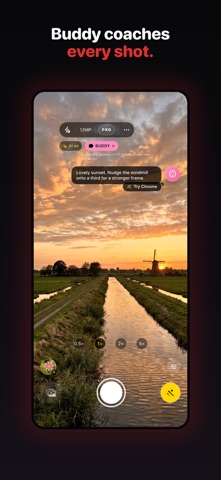
LUMEN BUDDY (Pro)
A small mascot watches the live view and gives short, friendly tips on sharpness, keeping the horizon level and framing. When it recognizes your subject it may suggest a film look. Buddy only advises; it never touches the shutter or your settings.
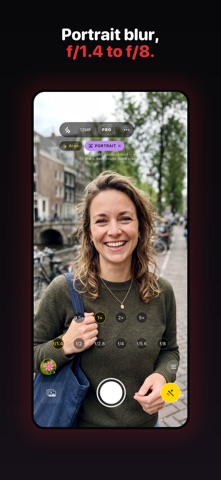
PORTRAIT (Pro, LiDAR devices)
Background blur built on your iPhone's LiDAR depth data. Choose an f-stop from f/1.4 to f/8 and Lumen scales both the blur and the depth-of-field zone. Requires iPhone 12 Pro or later Pro models.
LOW-LIGHT (Pro)
Not Apple's Night mode: Lumen allows exposures of up to half a second so the sensor can use a lower ISO, then adds noise reduction and gentle shadow recovery. Hold steady after the shutter click.
PRO MANUAL AND RAW (Pro)
Control shutter speed, ISO, white balance and focus by hand, and shoot a DNG alongside the JPEG for editing in Lightroom, Darkroom or any RAW editor.
BUILT FOR SPEED AND CONTROL
• Tap to focus and meter anywhere, with an exposure slider next to the focus box.
• Zoom presets that follow your iPhone's lenses, plus pinch.
• Camera Control on iPhone 16 and 17: click to shoot, swipe to zoom.
• Responsive Capture where your iPhone supports it, so you can keep shooting while the previous photo finishes processing.
• Full EXIF preserved; photos are saved to your Photos library in a dedicated album.
FREE AND LUMEN PRO
Free: AI mode, the Off, Standard and Classic looks, tap-to-focus, zoom, flash and Focus Trigger. Lumen Pro is a one-time purchase, no subscription, and unlocks all film looks, MAX, Pro manual with RAW, Portrait, Low-Light, Macro with focus stacking, Focus Peaking and Buddy.
PRIVATE BY DESIGN
Everything runs on your device. No accounts, no servers, no analytics, no tracking. Your photos never leave your phone unless you share them.