Lumi Clock: Flip Desk Clock is made and published by
Appnics, LLC.
AppBrain is an independent app data site and isn't affiliated with Appnics, LLC.
The app name, icon, screenshots and description belong to Appnics, LLC and are shown as
published on the App Store.
About Lumi Clock: Flip Desk Clock
Lumi Clock: Flip Desk Clock is an utilities app developed by Appnics, LLC.
User Ratings
The app has no ratings yet.
App Information
Lumi Clock: Flip Desk Clock is freely available from the App Store. The app size is 6.55 MB. The latest version available is 1.0.0. The last update was on October 20, 2026.
Technical Requirements
The app has a content rating of Everyone. The app has been available on the App Store since October 2026.
Description by Appnics, LLC(from the App Store)
Lumi Clock turns your iPhone or iPad into a clock you want to keep out on the desk. Fifteen styles, from a flip clock to nixie tubes, neon, an analog face and scenes that move behind the time, and every one of them keeps moving a little. At night only the digits stay, dim and quiet, so the clock does not light the room. No ads, no account. A pomodoro and a timer measure your focus at the desk. There is no alarm that rings at a set time.
FIFTEEN MOVING STYLES - Flip: a card folds down each time the minute changes - LED: seven-segment digits that glow - Analog: a glowing ring with hands; the minute hand steps and settles with a small bounce - Glass: digits of glass that catch the light of the sky - Nixie: orange cathodes glowing in glass tubes, rolling through every digit at the top of the hour - Neon: neon tubes on a brick wall - Vapor: a purple sky, a striped sun and a moving grid - Code: the time held in a falling rain of digits - VFD: a blue-green vacuum fluorescent display behind a fine mesh; fading segments leave an afterglow - Dots: a board of 5 by 7 dots that change column by column - Drum: the number drums of a mechanical counter turning to the next digit - Minimal: thin, large digits over a slowly drifting dark gradient - Dew: glass beads run slowly down a vivid pane of color while a broad band of light drifts over it - Pearl: a thin film of rainbow colors swirls and drains slowly across the screen - Gel: glowing neon goo spread over the screen, with lumps and air bubbles drifting through it In Dew, Pearl and Gel the digits are clear glass that bends the picture behind them. Swipe to change the style; each has its own colors.
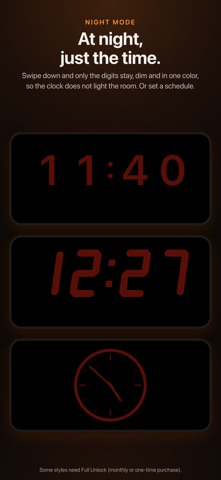
AT NIGHT, JUST THE TIME - Swipe down for night mode: the digits alone, dim and in one color - Set a schedule and night mode comes on by itself - Dim the screen itself too
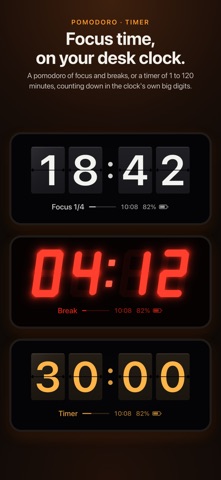
POMODORO AND TIMER - Pomodoros of 25/5, 50/10 or 90/20 minutes: four rounds of focus and a long break, then back to the clock - A timer of 1 to 120 minutes - What is left shows large in the style's own digits, with the stage, how far through and the time small underneath - The end comes with a sound and a vibration, and with notifications allowed, it reaches you with the screen off too
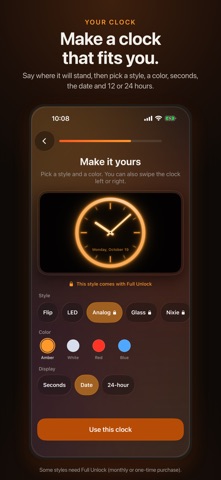
MADE TO STAND ON A DESK - The screen stays on while the app is open - The picture shifts a little now and then to guard against burn-in - On iPhone, turn the clock to landscape or portrait without turning the phone, and it stays that way - Made for standing on its side while it charges. With a Shortcuts automation, it can open by itself when you plug in the charger - Seconds, the date, 12 or 24 hours, and the battery's charge - Six typefaces for the digits and the date - Upright, the time sits in two rows or one - Works on iPad
A CLOCK THAT FITS YOU The first time you open it, Lumi Clock asks where the clock will stand and what bothers you about the clocks you have, then helps you make yours.
FULL UNLOCK (MONTHLY OR ONE-TIME) Without buying anything you get the Flip and LED styles, night mode, the pomodoro and timer, the battery's charge and the display settings (all but the style changing by itself and the chime). Full Unlock adds thirteen styles: Analog, Glass, Nixie, Neon, Vapor, Code, VFD, Dots, Drum, Minimal, Dew, Pearl and Gel, the style changing by itself every 15, 30 or 60 minutes, and a soft chime on the hour. The monthly plan and the one-time purchase unlock the same things. The one-time purchase supports Family Sharing.
The monthly plan is an auto-renewing subscription. It renews every month and is charged to your Apple Account unless you cancel at least 24 hours before the end of the current period. Manage or cancel it in your Apple Account settings after purchase.
Terms of Use: https://appnics.io/lumiclock/terms Apple's standard EULA: https://www.apple.com/legal/internet-services/itunes/dev/stdeula/ Privacy Policy: https://appnics.io/lumiclock/privacy Support: https://appnics.io/lumiclock/support
AppBrain offers valuable information about your app and those of your competitors. Join AppBrain for free and claim this app to view more ranking data, view history etc.
Each subscription will automatically renew 3 days before the expiration date for
the same time period. Subscriptions can be cancelled at any time before the renewal.