

Lusid: Screen Time App
Lusid: Screen Time App is made and published by Autonomous Self. AppBrain is an independent app data site and isn't affiliated with Autonomous Self. The app name, icon, screenshots and description belong to Autonomous Self and are shown as published on the App Store.
AppBrain's verdict
New- Rating on App Store
- 4.22
- 9 ratings
- Last updated
- October 5, 2026
Lusid: Screen Time App came out 56 days ago. It doesn't have enough ratings yet to judge what users think.
Rankings
App Store top chartsApp Store Rankings for Lusid: Screen Time App
Competitors
Similar apps and more from Autonomous SelfAlternatives to Lusid: Screen Time App


More from Autonomous Self

Releases
Updates seen on the App Store- Version
- 2.0
- Launched
- August 2026
No changelog data
User feedback
Ratings and reviews on the App StoreComments on Lusid: Screen Time App for iOS
We don't have enough comments to show example comments. Please check back later.
Technology
Found in the app by AppBrain- Price
- Free
- App size
- 37.5 MB
- Content rating
- Medium
Technologies used by Lusid: Screen Time App
About the app and developer
About Lusid: Screen Time App
Lusid: Screen Time App is a productivity app developed by Autonomous Self.
User Ratings
Lusid: Screen Time App is rated 4.22 out of 5 stars. The rating is based on 9 ratings.
App Information
Lusid: Screen Time App is freely available from the App Store. The app size is 37.45 MB. The latest version available is 2.0. The last update was on October 5, 2026.
Technical Requirements
The app has a content rating of Medium Maturity. The app has been available on the App Store since August 2026.
Developer information for Autonomous Self
Address:
Store listing
By Autonomous Self, from the App Store




Description by Autonomous Self Written by the developer, not by AppBrain. Click to read.
Lusid helps you spend less time automatically checking your phone and scrolling, and more of it on focused work, meaningful goals, restful downtime, and the people around you.
Instead of depending on willpower at the exact moment an app is calling your name, Lusid lets you create boundaries in advance and add exactly as much friction as you need to follow through.
Whether you want one focused hour, a recurring daily boundary, or stronger protection from your most distracting apps, Lusid helps put you back in control of your time.
Additionally, you can earn your screen time with "Complete Habits". Describe an activity, choose which apps or websites to block, and decide how much access you earn. Use your camera to let AI check your progress, then unlock your selected apps when your activity is complete.
BENEFITS
• Reclaim time from reflexive checking and scrolling
• Protect focused work, study, and personal time
• Stay present without relying on willpower alone
• Follow through on the limits you set for yourself
• Make distracting apps less automatic to open
• Build a calmer, more intentional relationship with your phone
• Perform desired habits by using screen time as a reward
HOW LUSID WORKS
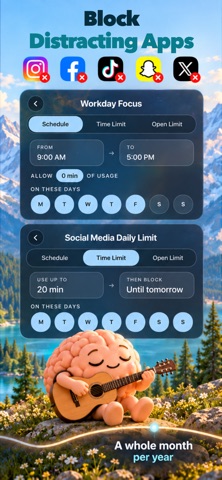
Choose distracting apps, categories, and websites, then create Blocks that activate immediately, on a schedule, or after a usage allowance.
When you want access, Lusid can add intentional friction through a configurable waiting period, number challenges, or by scanning a QR code. You decide in advance how difficult it should be to override the boundary you created.
"Complete Habits" supercharges Lusid by allowing you to block apps, perform a desired habit confirmed by AI camera verification, and unblock those selected apps as a reward.
LUSID FREE APP BLOCKER FEATURES
• Block selected apps, categories, and websites
• Create immediate, scheduled, and usage-based Blocks
• Add friction with wait periods, number challenges, or QR Code scans
• Start temporary Focus sessions
• Group apps into BlockLists/AllowLists
• Filter adult websites
• Prevent simple workarounds like app deletion and disabling in settings
• Receive local notifications about important Block events
• Customize the text displayed on blocked screens
• Keep your configurations and selections on your device
• Completely free, forever
COMPLETE HABITS FEATURES
• Describe your desired activities and habits
• Choose which apps or websites you unlock by completing them
• Use AI camera verification to check your progress, which can verify ANY activity
• Set how much screen time each completed activity earns
• Choose a timed unlock, a usage allowance, or access for the rest of the day
• Set schedules for your habit restrictions
PRIVATE BY DESIGN
Lusid contains no advertising or third-party analytics and does not track you across other companies’ apps or websites. Your Screen Time selections and blocking configurations stay on your device. Lusid uses Apple's Screen Time API to select apps and apply restrictions, and setup is quick and easy.
Complete Habits uses online services for account management, subscriptions, and AI verification. Activity descriptions and selected camera images are sent through our service to OpenAI for planning and progress checks. Lusid does not store these camera images; OpenAI’s retention policies apply. Our service retains account, purchase, and usage records as described in our Privacy Policy.
PRIVACY POLICY
Read on https://atnself.com/lusid/privacy-policy