

LynxPDF: Enterprise PDF Editor
LynxPDF: Enterprise PDF Editor is made and published by Kdan Mobile Software LTD. AppBrain is an independent app data site and isn't affiliated with Kdan Mobile Software LTD. The app name, icon, screenshots and description belong to Kdan Mobile Software LTD and are shown as published on the App Store.
AppBrain's verdict
- Rating on App Store
- 5.00
- 1 ratings
- Last updated
- May 25, 2026
It doesn't have enough ratings yet to judge what users think.
Rankings
App Store top chartsApp Store Rankings for LynxPDF: Enterprise PDF Editor
Competitors
Similar apps and more from Kdan Mobile Software LTDMore from Kdan Mobile Software LTD







Releases
Updates seen on the App Store- Version
- 1.1.0
- Launched
- April 2026
No changelog data
User feedback
Ratings and reviews on the App StoreComments on LynxPDF: Enterprise PDF Editor for iOS
We don't have enough comments to show example comments. Please check back later.
Technology
Found in the app by AppBrain- Price
- Free
- App size
- 132.0 MB
- Content rating
- Low
Technologies used by LynxPDF: Enterprise PDF Editor
About the app and developer
About LynxPDF: Enterprise PDF Editor
LynxPDF: Enterprise PDF Editor is a business app developed by Kdan Mobile Software LTD.
User Ratings
LynxPDF: Enterprise PDF Editor is rated 5.00 out of 5 stars. The rating is based on one rating ratings.
App Information
LynxPDF: Enterprise PDF Editor is freely available from the App Store. The app size is 131.96 MB. The latest version available is 1.1.0. The last update was on May 25, 2026.
Technical Requirements
The app has a content rating of Low Maturity. The app has been available on the App Store since April 2026.
Developer information for Kdan Mobile Software LTD
Address:
Store listing
By Kdan Mobile Software LTD, from the App Store






Description by Kdan Mobile Software LTD Written by the developer, not by AppBrain. Click to read.
Edit, annotate, convert, and manage PDF documents on your iPhone or iPad with an intuitive mobile experience. With built-in OCR, document security, and flexible file management, LynxPDF helps teams handle documents faster and more efficiently anywhere.
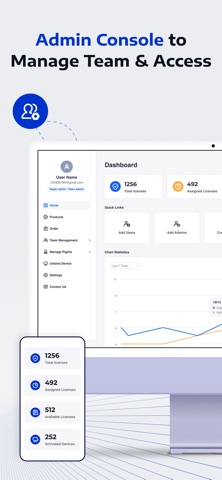
ADMIN CONSOLE
Assign and remove license for your team
• Assign licenses to organization users
• Revoke licenses from offboarded users
• Add and manage team members
• Monitor overall license usage and allocation
POWERFUL PDF EDITING
Make changes to PDFs directly on your device.
• Edit PDF text and images
• Add new text and images
• Change fonts, colors, and formatting
• Rotate, crop, replace, or export images
• Quickly correct mistakes or update documents
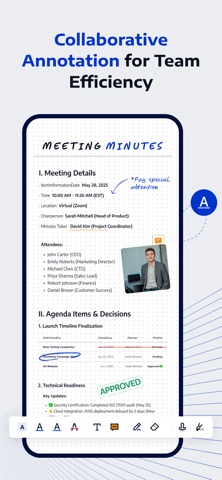
ADVANCED ANNOTATION TOOLS
Review and collaborate on documents with a full set of markup tools.
• Highlight, underline, strikeout, and draw
• Add comments and sticky notes
• Insert shapes and stamps
• Sign documents with handwritten or image signatures
• Add audio comments and hyperlinks
CONVERT PDFS
Convert PDFs offline while preserving formatting.
Export PDF files to:
• Word (DOCX)
• Excel (XLSX)
• PowerPoint (PPTX)
• HTML / Text / RTF / CSV
• Images, etc.
You can also convert images into PDF files.
OCR FOR SCANNED DOCUMENTS
Recognize and extract text from scanned documents and images.
• Recognize text from scanned PDFs
• Extract text from images
• Save results as PDF or TXT
• Scan documents directly with your camera
ORGANIZE AND MANAGE FILES EASILY
Manage documents with powerful file tools.
• Merge multiple PDFs into one file
• Compress large PDF documents
• Split or extract pages
• Extract images from PDFs
• Rename, move, duplicate, and share files
• Manage documents in grid or list view
FLEXIBLE PAGE MANAGEMENT
Edit and organize PDF pages quickly.
• Rearrange page order
• Insert or delete pages
• Rotate pages
• Extract selected pages into new files
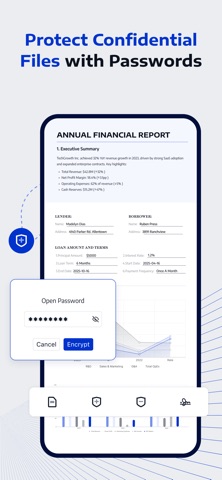
SECURE DOCUMENTS
Protect confidential files with built-in security.
• Encrypt PDFs with passwords
• Store files in a private folder
• Control document access and protection
BUILT FOR MOBILE PRODUCTIVITY
Access and manage your files anywhere.
• Import files from iCloud Drive
• Open email attachments directly
• Import images from Photo Library
• Transfer documents between apps
Privacy Policy
https://www.lynxpdf.com/privacy-policy
Terms of Service
https://www.lynxpdf.com/terms-of-service
Official Website
https://www.lynxpdf.com/
LynxPDF helps professionals and teams stay productive with secure and powerful PDF tools on mobile.
If you need any assistance, please contact our customer support at sales@lynxpdf.com