

MacroBar: AI Macro Tracker
MacroBar: AI Macro Tracker is made and published by Alexander Mack. AppBrain is an independent app data site and isn't affiliated with Alexander Mack. The app name, icon, screenshots and description belong to Alexander Mack and are shown as published on the App Store.
AppBrain's verdict
- Rating on App Store
- 5.00
- 2 ratings
- Last updated
- June 28, 2026
It doesn't have enough ratings yet to judge what users think.
Rankings
App Store top chartsApp Store Rankings for MacroBar: AI Macro Tracker
Releases
Updates seen on the App Store- Version
- 1.5.5
- Launched
- February 2026
No changelog data
User feedback
Ratings and reviews on the App StoreComments on MacroBar: AI Macro Tracker for iOS
We don't have enough comments to show example comments. Please check back later.
Technology
Found in the app by AppBrain- Price
- Free
- App size
- 80.5 MB
- Content rating
- Everyone
Technologies used by MacroBar: AI Macro Tracker
About the app and developer
About MacroBar: AI Macro Tracker
MacroBar: AI Macro Tracker is a health & fitness app developed by Alexander Mack.
User Ratings
MacroBar: AI Macro Tracker is rated 5.00 out of 5 stars. The rating is based on 2 ratings.
App Information
MacroBar: AI Macro Tracker is freely available from the App Store. The app size is 80.46 MB. The latest version available is 1.5.5. The last update was on June 28, 2026.
Technical Requirements
The app has a content rating of Everyone. The app has been available on the App Store since February 2026.
Developer information for Alexander Mack
Address:
Frequently asked questions about MacroBar: AI Macro Tracker
Is MacroBar: AI Macro Tracker free?
Yes. MacroBar: AI Macro Tracker is free on the App Store.
Is MacroBar: AI Macro Tracker still available?
Yes. MacroBar: AI Macro Tracker is on the App Store, and the last update we saw was on June 28, 2026.
How large is MacroBar: AI Macro Tracker?
MacroBar: AI Macro Tracker is 80.46 MB.
Is MacroBar: AI Macro Tracker suitable for children?
App Store rates the content of MacroBar: AI Macro Tracker as suitable for everyone.
How do people rate MacroBar: AI Macro Tracker?
MacroBar: AI Macro Tracker scores 5.00 out of 5 stars, from 2 ratings on the App Store.
Who made MacroBar: AI Macro Tracker?
MacroBar: AI Macro Tracker was developed by Alexander Mack. It is listed in the health & fitness category on the App Store.
Store listing
By Alexander Mack, from the App Store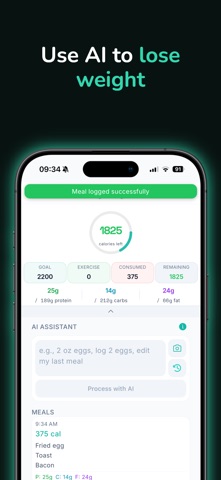


Description by Alexander Mack Written by the developer, not by AppBrain. Click to read.
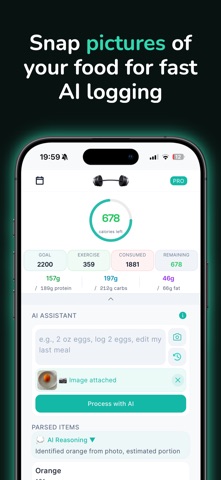
Snap a photo of your meal, type in plain English, scan a barcode, or photograph a recipe — our advanced AI instantly recognizes food, estimates accurate portions, and logs exact calories + macros in seconds. No searching databases. No guessing. Just real results.
Whether you’re building muscle, losing fat, or simply eating healthier, MacroBar makes tracking effortless so you can focus on your goals instead of your keyboard.
Why MacroBar is the smartest way to hit your macros:
• AI Photo Scanner — Point your camera at any plate (restaurant, home-cooked, or takeout) and get instant calorie & macro breakdown.
• Natural Language Logging — Simply type what you ate in plain English (“grilled chicken breast with rice and broccoli, about two cups”) — AI understands the description and logs it perfectly.
• Barcode Scanner — Scan packaged foods for precise nutrition in one tap.
• Recipe Scanner — Photograph any recipe from a cookbook, website, or screen — AI calculates per-serving macros automatically.
• AI Workout Logger — Describe your session and let AI estimate calories burned and log it to your day.
• Works Offline — Track anywhere, even on a plane or in the gym with no signal.
Built for real life:
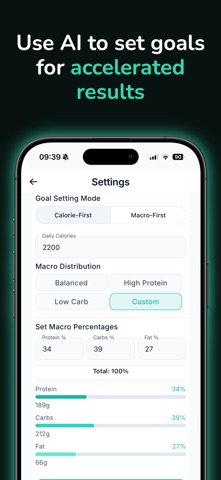
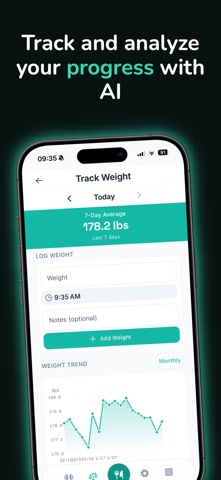
MacroBar adapts to your goals with smart insights, custom macro targets, and progress tracking. Start with the free plan (3 AI logs daily) and upgrade to Pro for unlimited logging, advanced breakdowns, priority AI improvements, and deeper insights.
Real users are already seeing life-changing results.
Ready to make nutrition tracking actually enjoyable?
Download MacroBar now and try your first 3 AI logs in under 5 minutes. You’ll never go back to old-school tracking again.
Terms of use: https://www.apple.com/legal/internet-services/itunes/dev/stdeula/