MadFocus: Screen Time Blocker is a productivity app developed by 翼 张.
User Ratings
The app has no ratings yet.
App Information
MadFocus: Screen Time Blocker is freely available from the App Store. The app size is 70.81 MB. The latest version available is 1.1.0. The last update was on September 8, 2026.
Technical Requirements
The app has a content rating of Everyone. The app has been available on the App Store since July 2026.
Description by 翼 张(from the App Store)
If you can't control one phone, what part of your life do you actually control?
"Just five minutes" turns into an hour. Your work is right in front of you, but your thumb keeps scrolling. MadFocus is the app blocker built for that exact moment.
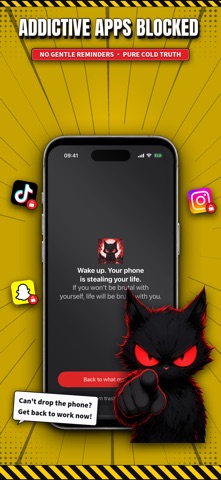
MadFocus locks distracting social, short-video, and gaming apps, stops you when you try to open them, and replaces easy-to-ignore reminders with a brutally honest push back to your goals. Use it for screen time control, digital detox, studying, fitness, deep work, and breaking procrastination.
KEY FEATURES
■ Block distracting apps Choose individual apps or entire categories. When focus mode is active, blocked apps stay out of reach until you complete an unlock challenge.
■ Get called out, not coddled The block screen gives you direct, goal-aware messages instead of another gentle notification to dismiss.
■ 11 hard-to-ignore unlock challenges Want temporary access? Complete the challenge you draw: · Read Aloud: face the front camera, read the assigned line, match at least 50% of the text, and reach the volume threshold · Confession Contract: type a reflection word for word · Face Yourself: look at yourself through the front camera and confront the impulse · Life Countdown: watch your remaining time tick away · Motivation Video: finish a discipline video before continuing · Hold Your Promise: focus on the goal you wrote for yourself · Face-Down Reset: place your phone screen-down for five minutes · Walk 50 Steps: get up and move before unlocking · 10 Squats: complete ten squats with on-device pose recognition · Window Photo: walk to a window and photograph daylight and the outdoor scene · Challenge Roulette: let MadFocus randomly choose your next penalty
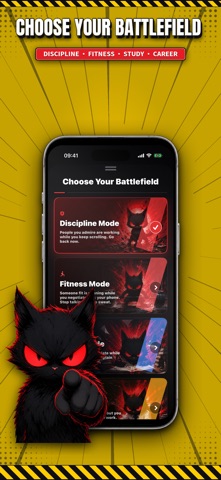
■ Four focus modes Discipline, Fitness, Study, and Hustle modes tailor the experience to what you are trying to achieve.
■ Screen time accountability Review blocked attempts by day, week, month, and year. See how often distraction wins, then take that time back.
WHO IT'S FOR · Students preparing for exams who lose study time to quick checks · People building a fitness habit but getting stuck scrolling · Professionals and creators fighting procrastination · Anyone doomscrolling late at night and trying to rebuild self-control
Freedom comes from discipline. Turn on blocking, stop mindless scrolling, and put your attention back where it belongs.
Terms, Privacy Policy, and Technical Support: https://media.zyi1024.com/madfocus/legal-support.html Apple Standard EULA: https://www.apple.com/legal/internet-services/itunes/dev/stdeula/
Each subscription will automatically renew 3 days before the expiration date for
the same time period. Subscriptions can be cancelled at any time before the renewal.