

Maestro is made and published by Patrick Q. Kelly. AppBrain is an independent app data site and isn't affiliated with Patrick Q. Kelly. The app name, icon, screenshots and description belong to Patrick Q. Kelly and are shown as published on the App Store.
AppBrain's verdict
Established- Rating on App Store
- 4.79
- 57 ratings
- Last updated
- March 12, 2023
- Size
- 12.8 MB
It doesn't have enough ratings yet to judge what users think.
User feedback
Ratings and reviews on the App StoreComments on Maestro for iOS
We don't have enough comments to show example comments. Please check back later.
Store listing
By Patrick Q. Kelly, from the App Store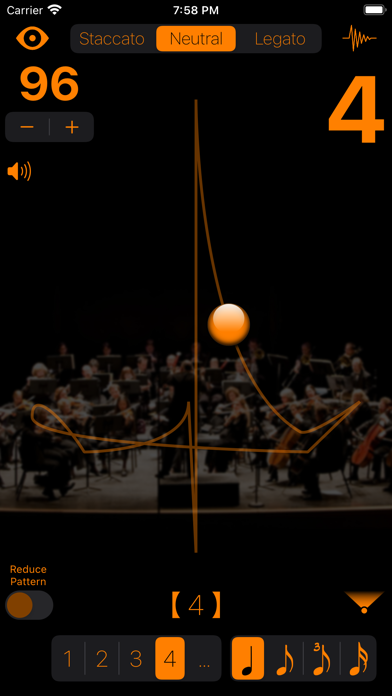




Description by Patrick Q. Kelly Written by the developer, not by AppBrain. Click to read.
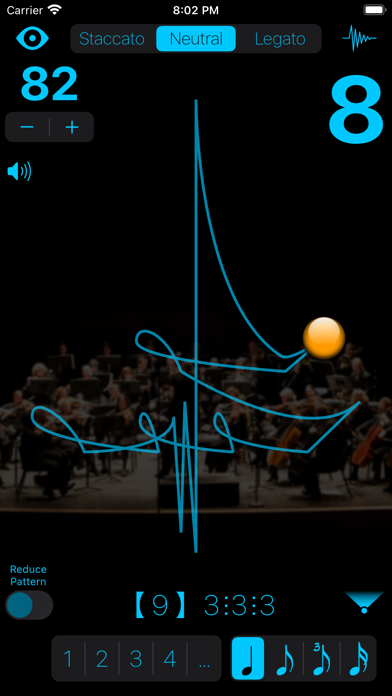
Be able to practice without the click, while keeping to a strict tempo. Always know where you are INSIDE the beat with the traditional musical beat patterns developed over ages of musical performance practice, not an arbitrary circle or side to side motion for all meters and styles.
This metronome is an invaluable learning tool for conductors when using the Conductor's Point of View.
All the conducting patterns are based on Max Rudolf's "Grammar of Conducting" and my professional conducting experience of 20+ years.
Instructions:
Double tap to start. Swipe horizontally or pinch to stop.
Long Press triggers Tap Tempo, tap anywhere more than twice to set the tempo. Then wait and it will start conducting.
Apple Watch Support:
On the Apple Watch, view animations from 1 through 12 beats (time signatures). Adjust the tempo with the crown or by sliding on the animating pattern or the setting tempo bar.
Features:
• Adjust the tempo, 16 to 256 bpm, by dragging up/down anywhere, using the + and - buttons, or by tapping it via Tap Tempo
• 48 different beat patterns (meters): 1 through 12(3+3+3+3)
• Staccato, Neutral, Legato, and Reduced (see below) pattern styles
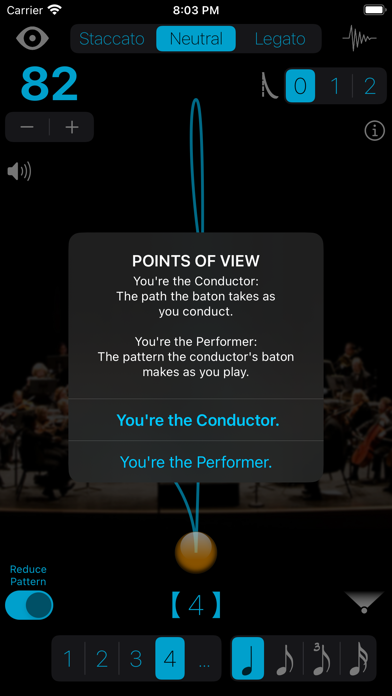
• Patterns are displayed from the Performer's or Conductor's Point of View
• Optional 2, 3, or 4 subdivisions of the beat
• Set 0, 1, or 2 'pick-up' beats (get playing quicker)
Preferences:
• Choose from 16 pairs of 'tick and 'tock' sounds
• Customizable colors of the baton, pattern and texts
• Customizable transparencies of the beat pattern and background image
A note about pattern variations and reductions:
A 5/4 bar can be divided either 3+2 or 2+3 depending on the music.
The 'Reduced' style:
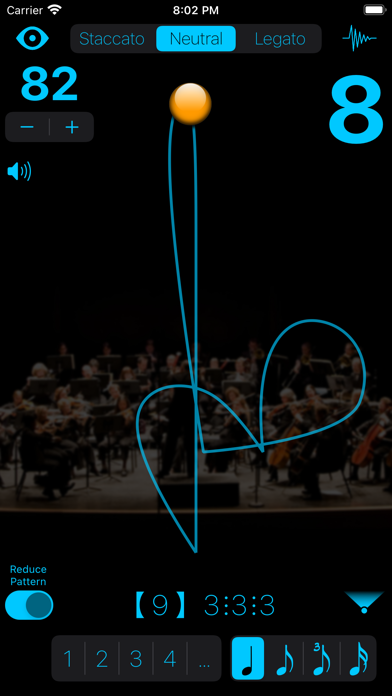
At faster tempos, a legato 3 pattern turns into a one pattern while still clicking the three beats. A 6(2+2+2) changes into 3 while a 6(3+3) changes into 2 while still clicking 6 beats.
The Automatic Reduction setting automatically adjusts the pattern when the tempo reaches a level that requires it. Switching the Reduced Pattern switch on, forces the reduced pattern at all tempos.
Conductor's Point of View - automatically flips the beat pattern for conductors to learn and practice the patterns. This mode shows you the path the tip of your baton should take while conducting.
Performer’s Point of View - the conductor’s beat pattern as seen from the ensemble musicians. Recommended view while practicing your instrument.
Supports all orientations for easier use while plugged in.
Safety and technology
Found in the app by AppBrain- Price
- $2.99
- App size
- 12.8 MB
- Content rating
- Everyone
Technologies used by Maestro
Releases
Updates seen on the App Store- Version
- 7.0
- Launched
- before 2010
No changelog data
Alternatives
Similar apps and more from Patrick Q. KellyAlternatives to Maestro







More from Patrick Q. Kelly




Rankings
App Store top chartsApp Store Rankings for Maestro
About the app and developer
About Maestro
Maestro is a music app developed by Patrick Q. Kelly.
What is the rating of Maestro?
Maestro is rated 4.79 out of 5 stars, based on 57 ratings.
Is Maestro free?
Maestro costs $2.99. The app size is 12.84 MB. The latest version available is 7.0. The last update was on March 12, 2023.
What are the requirements for Maestro?
The app has a content rating of Everyone. The app has been available on the App Store since before 2010.
Developer information for Patrick Q. Kelly
Address:
Frequently asked questions about Maestro
Is Maestro free?
No. Maestro costs $2.99 on the App Store.
Is Maestro still available?
Yes. Maestro is on the App Store, and the last update we saw was on March 12, 2023.
How large is Maestro?
Maestro is 12.84 MB.
Is Maestro suitable for children?
App Store rates the content of Maestro as suitable for everyone.
How do people rate Maestro?
Maestro scores 4.79 out of 5 stars, from 57 ratings on the App Store.
Who made Maestro?
Maestro was developed by Patrick Q. Kelly. It is listed in the music category on the App Store.
What are the best alternatives to Maestro?
People looking at Maestro also look at these music apps: Taktnome, OnKey - Scale Practice, FlexBeat Metronome, Intonalogy, Voice Metronome - Multilingual.