

Magic Security: Web Protection
Magic Security: Web Protection is made and published by PaemApps. AppBrain is an independent app data site and isn't affiliated with PaemApps. The app name, icon, screenshots and description belong to PaemApps and are shown as published on the App Store.
AppBrain's verdict
- Last updated
- May 1, 2026
Rankings
App Store top chartsApp Store Rankings for Magic Security: Web Protection
Releases
Updates seen on the App Store- Version
- 1.2
- Launched
- August 2025
No changelog data
User feedback
Ratings and reviews on the App StoreComments on Magic Security: Web Protection for iOS
We don't have enough comments to show example comments. Please check back later.
Technology
Found in the app by AppBrain- Price
- Free
- App size
- 24.0 MB
- Content rating
- High
Technologies used by Magic Security: Web Protection
About the app and developer
About Magic Security: Web Protection
Magic Security: Web Protection is an utilities app developed by PaemApps.
User Ratings
The app has no ratings yet.
App Information
Magic Security: Web Protection is freely available from the App Store. The app size is 24.03 MB. The latest version available is 1.2. The last update was on May 1, 2026.
Technical Requirements
The app has a content rating of High Maturity. The app has been available on the App Store since August 2025.
Developer information for PaemApps
Address:
Frequently asked questions about Magic Security: Web Protection
Is Magic Security: Web Protection free?
Yes. Magic Security: Web Protection is free on the App Store.
Is Magic Security: Web Protection still available?
Yes. Magic Security: Web Protection is on the App Store, and the last update we saw was on May 1, 2026.
How large is Magic Security: Web Protection?
Magic Security: Web Protection is 24.03 MB.
Is Magic Security: Web Protection suitable for children?
App Store gives Magic Security: Web Protection a high maturity rating. It is meant for adults.
Who made Magic Security: Web Protection?
Magic Security: Web Protection was developed by PaemApps. It is listed in the utilities category on the App Store.
Store listing
By PaemApps, from the App Store
Description by PaemApps Written by the developer, not by AppBrain. Click to read.
Forget about distractions, trackers, or unwanted access to your personal data. Magic Security is designed to give you freedom online and privacy offline - all in one easy-to-use app.
Key Features:
Web Protection
- Block Ads - remove banners and pop-ups
- Block Tracking - stop websites from following you
- Block Scripts - disable unnecessary website code
- Block Adult Sites - filter out 18+ content
- Block Gambling Sites - block betting platforms
- Block Custom Fonts - make browsing faster
- Block Social Buttons - hide share & like widgets
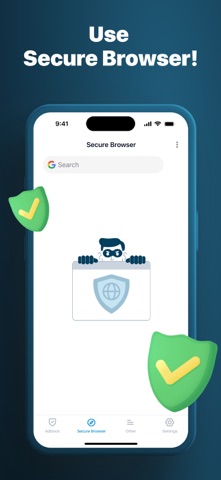
Secure Browser
- Private Browsing Mode - surf with no history or cookies
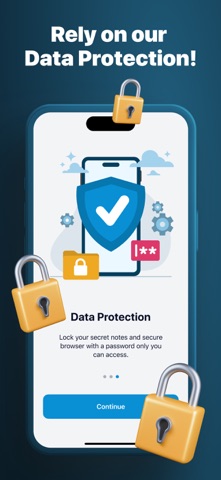
- Password Lock - protect browser access with PIN/Password
- Quick Erase - clear all tabs and history instantly
- Whitelist - allow trusted sites
- Blacklist - block unwanted sites
- Auto HTTPS - always connect securely
- Tabs Protection - keep your sessions safe
Secret Notes
- Password Lock - protect your notes with PIN/Password
- Encrypted Storage - keep your data safe
- Quick Add - create notes in one tap
- Local Storage - nothing is uploaded online
- Easy-to-use - clear and convenient interface
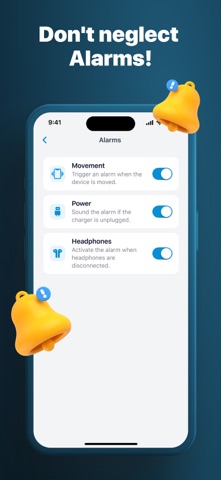
Alarms
- Movement Alarm - protect your phone against unauthorized handling. The alarm is instantly triggered if your device is moved.
- Power Alarm - stay in control even when charging. The alarm activates if someone unplugs your charger or power bank.
- Headphones Alarm - keep your music private. The alarm will sound if your headphones are disconnected without permission.
- Volume Trigger - goes off if volume changes
- Lock Mode - screen stays locked during alarm
Why Magic Security?
It’s a light yet powerful app designed to protect your digital life, combining privacy tools, ad-blocking, and secure storage - all in one place.
Subscription Information:
Subscriptions can be managed by the user and auto-renewal can be turned off by going to the Account Settings:
- Open the Settings app.
- Tap your name.
- Tap Subscriptions.
- Tap the subscription that you want to manage.
Subscription Details:
- Payment will be charged to iTunes Account at confirmation of purchase
- Subscription automatically renews unless auto-renew is turned off at least 24-hours before the end of the current period
- Account will be charged for renewal within 24-hours prior to the end of the current period, and identify the cost of the renewal
- No cancellation of the current subscription is allowed during active subscription period
- Any unused portion of a free trial period, if offered, will be forfeited when the user purchases a subscription to that publication, where applicable
Privacy Policy: https://paema.dev/policy.html
Terms of Use: https://paema.dev/terms.html