

Magical Mixing Console
Magical Mixing Console is made and published by Matias Barrios. AppBrain is an independent app data site and isn't affiliated with Matias Barrios. The app name, icon, screenshots and description belong to Matias Barrios and are shown as published on the App Store.
AppBrain's verdict
- Last updated
- June 26, 2026
Rankings
App Store top chartsApp Store Rankings for Magical Mixing Console
Competitors
Similar apps and more from Matias BarriosAlternatives to Magical Mixing Console


Also available on Google Play

Releases
Updates seen on the App Store- Version
- 2.2.0
- Launched
- July 2025
No changelog data
User feedback
Ratings and reviews on the App StoreComments on Magical Mixing Console for iOS
We don't have enough comments to show example comments. Please check back later.
Technology
Found in the app by AppBrain- Price
- Free
- App size
- 16.3 MB
- Content rating
- Everyone
Technologies used by Magical Mixing Console
About the app and developer
About Magical Mixing Console
Magical Mixing Console is a music app developed by Matias Barrios.
What is the rating of Magical Mixing Console?
Magical Mixing Console has no ratings yet.
Is Magical Mixing Console free?
Magical Mixing Console is free. The app size is 16.30 MB. The latest version available is 2.2.0. The last update was on June 26, 2026.
What are the requirements for Magical Mixing Console?
The app has a content rating of Everyone. The app has been available on the App Store since July 2025.
Developer information for Matias Barrios
Address:
Store listing
By Matias Barrios, from the App Store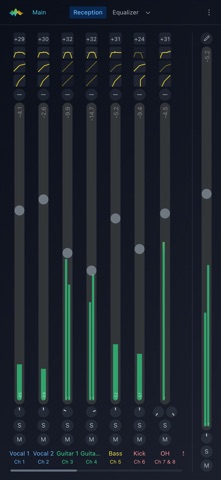



Description by Matias Barrios Written by the developer, not by AppBrain. Click to read.
FULL REMOTE CONTROL
MMC gives you deep access to your desk, not just volume sliders. Mix live with the same power you expect from X Air Edit on a laptop, redesigned for touch and small screens:
• Channel, aux, main, monitor, line, and FX return buses
• Input gain, polarity, stereo link, and source assignment
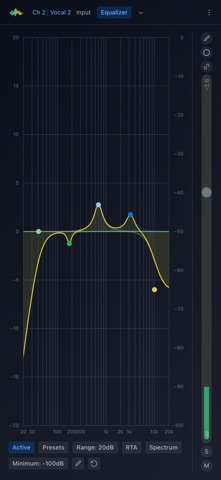
• 4-band parametric EQ, gate, and compressor on every bus
• FX processors and effect routing
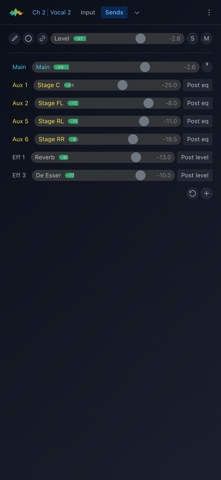
• Sends and reception — see who feeds a bus and where it sends next
• DCAs, mute groups, and automix
• Physical outputs — mains, phones, aux, USB, Ultranet
• Device scenes (on the mixer) and app scenes (saved locally)
BUILT FOR LIVE SOUND ON MOBILE
Whether you run sound at church, in a band, at a small venue, or for rehearsals, MMC is a live mixing app designed for real gigs on imperfect networks:
• Vertical bus layout on phones — faders-first wireless mixing for one-handed portrait use
• UI scale — enlarge text, faders, knobs, and buttons together for dim stage lighting and accurate touch
• Dark theme and adjustable accent colors
• Active scene in the header — see and save your live desk scene without digging through menus
• Processing previews — gate, EQ, and compressor at a glance from the bus strip
• Clear connect screen with readable UDP error messages when something goes wrong
• English, Spanish, and German
SETUP FASTER — LEARN AS YOU GO
MMC lowers the learning curve without dumbing down the mixer:
• Setup wizard — configure vocals, kick, snare, bass, keys, and stage monitors with sensible starting points for EQ, gate, and compression
• Fresh Start — reset buses, levels, routing, and processing for a new show while keeping saved scenes, device name, and your app presets
• Built-in Help — plain-language guide to buses, inputs, outputs, sends, and signal flow
• Vault — save compressor and gate presets and app scenes for recall later
• Demo mode — explore the iPad and iPhone mixer app without hardware connected
SUPPORTED MIXERS
Behringer X Air family: X18, XR18, XR16, and v2 variants (X18V2, XR18V2)
Midas M Air family: MR18, MR12, and v2 variants (MR18V2)
Connection uses the same local network (Wi‑Fi) protocol as the official Behringer and Midas apps. Your iPhone or iPad and the mixer must be on the same network.
WHO MMC IS FOR
• Sound volunteers and beginners who want a clearer mobile mixer app than the factory UI
• Bands and worship teams who mix from an iPad or iPhone while moving around the venue
• Anyone who owns an X Air or M Air desk and wants wireless remote mixing with full processing and routing control
WHO MMC IS NOT FOR
MMC does not support Yamaha, Allen & Heath, Soundcraft, or other mixer brands. It is not a DAW, recorder, or offline audio editor — it remotely controls your physical X Air / M Air hardware over the network.
WHY CHOOSE MAGICAL MIXING CONSOLE?
If the official X Air app feels dense on a phone, or you want onboarding tools, presets, and built-in explanations alongside full mixer control, MMC is built for you. Same desk. Same network. An interface designed so your digital mixer feels manageable in your pocket — without hiding what you need at show time.
Download Magical Mixing Console — the Behringer and Midas X Air remote app for iPhone and iPad.
Learn more: magicalmixingconsole.com