AppBrain
AppBrain
  • Apps
  • Apps being viewed right now Trending apps today Most popular apps All-time most downloaded apps Top rated apps iPhone and iPad apps
  • Intelligence ▾
    Intelligence overview → Track any Android app or your whole market
    Track & analyze
    Keyword Tracker & OptimizerTrack & improve Play rankings App Performance ReportOne-off PDF for any app StatisticsFree Android & Play market stats
    Promote your app
    Featured Apps App Links
  • Intelligence
  • Pricing
  • Dashboard
  • Sign up
  • Log in
Last updated on: 2026-10-02
App Store Apps > Photo & Video > MagiCam: AI Photo Editor
App profile · Photo & Video · Data updated 2026-10-02
MagiCam: AI Photo Editor icon

MagiCam: AI Photo Editor

by 晶雷 端 · Free · Version 2.1
Availability On the App Store since January 2025
Rating on App Store
–
Rating
–
0 reviews
Best rank
–
not in the top lists
Last updated
August 30, 2026
2.1

MagiCam: AI Photo Editor is made and published by 晶雷 端. AppBrain is an independent app data site and isn't affiliated with 晶雷 端. The app name, icon, screenshots and description belong to 晶雷 端 and are shown as published on the App Store.

About MagiCam: AI Photo Editor

MagiCam: AI Photo Editor is a photo & video app developed by 晶雷 端.

User Ratings

The app has no ratings yet.

App Information

MagiCam: AI Photo Editor is freely available from the App Store. The app size is 175.48 MB. The latest version available is 2.1. The last update was on August 30, 2026.

Technical Requirements

The app has a content rating of Everyone. The app has been available on the App Store since January 2025.

Description by 晶雷 端 (from the App Store)
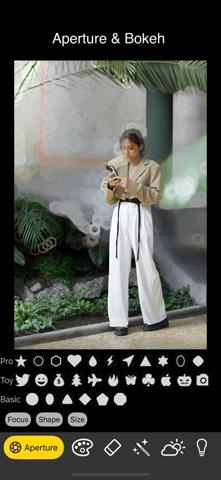
- Black magic: Take the photo first, then focus. Background blurring and various professional and fun bokeh effects. It can handle the depth of field in Apple's portrait mode photos, and can also generate depth of field using AI models.
- You can transfer the colors of one template photo to another photo, and AI will do the job. Carefully choosing the color template photo can achieve amazing and interesting effects.
- Remove unwanted objects by brushing over them.
- Intelligently enhance the image quality of blurred photos.
- A photography tip: Many people always take dark photos with their mobile phones. This is because they always use the default automatic exposure of the mobile phone, which will dim the brighter environment. With our AI HDR, there is no such trouble. You can use this function on existing photos, so that the photos have a wide range of vivid light and dark details. Create HDR effects for a single photo, and adjust the exposure, contrast, highlights and shadows, saturation, brightness, sharpness and other parameters later to make the effect perfect. There are multiple sets of different HDR effects to choose from. You can also adjust the edge darkening effect. The default is 0x edge darkening, and you can also adjust the edge darkening multiple before using HDR. Edge darkening can control the shadow effect. You can choose 2x, 1x, 0x.
- Process photos taken at night to make the night scene details clear. You can also adjust multiple parameters later.
Show more Show less
Price Free
Rating No ratings
Ranking Not ranked
Version 2.1
App size 175.5 MB
Suitable for Everyone

Screenshots

MagiCam: AI Photo Editor Screenshot 1 of 6
MagiCam: AI Photo Editor Screenshot 2 of 6
MagiCam: AI Photo Editor Screenshot 3 of 6
MagiCam: AI Photo Editor Screenshot 4 of 6
MagiCam: AI Photo Editor Screenshot 5 of 6
MagiCam: AI Photo Editor Screenshot 6 of 6
Screenshots by 晶雷 端, from the the App Store listing
Official page on the App Store

More from 晶雷 端

Videotoon - video to cartoon icon Videotoon - video to cartoon
晶雷 端
3.5
Free
6 ratings
Oilbook - Fluid Painting icon Oilbook - Fluid Painting
晶雷 端
4.2
Free
5 ratings
Monet - photo to pastel icon Monet - photo to pastel
晶雷 端
2.3
Free
3 ratings
VideoAnime: Video to anime icon VideoAnime: Video to anime
晶雷 端
0.0
$0.99
Vincent Art icon Vincent Art
晶雷 端
0.0
Free
Magic Shooting - angry bots icon Magic Shooting - angry bots
晶雷 端
0.0
Free

Changelog of MagiCam: AI Photo Editor

No changelog data

Developer information for 晶雷 端

晶雷 端

Address:

Share MagiCam: AI Photo Editor

Comments on MagiCam: AI Photo Editor for iOS

We don't have enough comments to show example comments. Please check back later.

App Store Rankings for MagiCam: AI Photo Editor

This app is not ranked

Technologies used by MagiCam: AI Photo Editor

Price drops on Google Play Today's trending apps Popular Photo & Video Apps Apps other people are watching Top new apps
More hot apps 🔥
Overview Reviews Rankings Technology
AppBrain Intelligence premium content

Subscribe now to get full and unlimited access to AppBrain Intelligence. You'll have access to:

  • App Intelligence dashboard (performance timeline, competitor comparison, country rankings, insight cards)
  • Detailed ranking data per app
  • Full timeline per developer
  • Device market shares data per country
  • Unlimited keyword tracking
1 Month

$75/mo
(billed every month)

SAVE 0%
Subscribe
3 Months

$65/mo
($195 billed every 3 months)

SAVE 13%
Subscribe
1 Year

$57.50/mo
($690 billed every year)

SAVE 23%
Subscribe
Each subscription will automatically renew 3 days before the expiration date for the same time period. Subscriptions can be cancelled at any time before the renewal.

AppBrain is an app data site, we track rankings, ratings, installs for all apps and games on Google Play and the App Store. AppBrain doesn't host app files or APKs, all install links go directly to the official store. All trademarks are owned by their respective owners.

More apps

  • Top Android apps being viewed
  • Cooking Chicken Parmesan: Holi
  • Baby Tracker Parenting: Bheeli
  • View Uni — Parenting Tutor

App statistics

  • Android statistics
  • Google Play Developer stats
  • Trending Android Apps
  • Trending iOS apps
  • Top popular Apps
  • Buy the best Android phone
  • Buy & sell app businesses

About AppBrain

  • Contact
  • Privacy
  • Documentation
  • DMCA takedowns
  • Articles
  • Blog
  • Free webpage for your Android app
© 2010-2026 - AppBrain