

MagicResize
MagicResize is made and published by Yoshinobu Sonoda. AppBrain is an independent app data site and isn't affiliated with Yoshinobu Sonoda. The app name, icon, screenshots and description belong to Yoshinobu Sonoda and are shown as published on the App Store.
AppBrain's verdict
Established- Rating on App Store
- 4.20
- 89 ratings
- Last updated
- September 28, 2026
It doesn't have enough ratings yet to judge what users think.
Rankings
App Store top chartsApp Store Rankings for MagicResize
Competitors
Similar apps and more from Yoshinobu SonodaAlternatives to MagicResize






More from Yoshinobu Sonoda

Releases
Updates seen on the App Store- Version
- 3.2.2
- Launched
- December 2015
No changelog data
User feedback
Ratings and reviews on the App StoreComments on MagicResize for iOS
We don't have enough comments to show example comments. Please check back later.
Technology
Found in the app by AppBrain- Price
- Free
- App size
- 7.14 MB
- Content rating
- Everyone
Technologies used by MagicResize
About the app and developer
About MagicResize
MagicResize is a photo & video app developed by Yoshinobu Sonoda.
What is the rating of MagicResize?
MagicResize is rated 4.20 out of 5 stars, based on 89 ratings.
Is MagicResize free?
MagicResize is free. The app size is 7.14 MB. The latest version available is 3.2.2. The last update was on September 28, 2026.
What are the requirements for MagicResize?
The app has a content rating of Everyone. The app has been available on the App Store since December 2015.
Developer information for Yoshinobu Sonoda
Address:
Store listing
By Yoshinobu Sonoda, from the App Store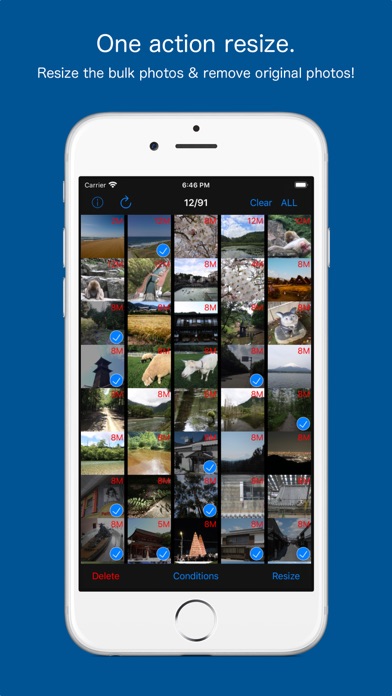
Description by Yoshinobu Sonoda Written by the developer, not by AppBrain. Click to read.
Also it is to be able to remove bulk original photo at the same time!
Savings capacity of the device is also easy.
The camera app, you can use your favorite apps.
After you have taken with your favorite camera app, collectively, you can batch resize.
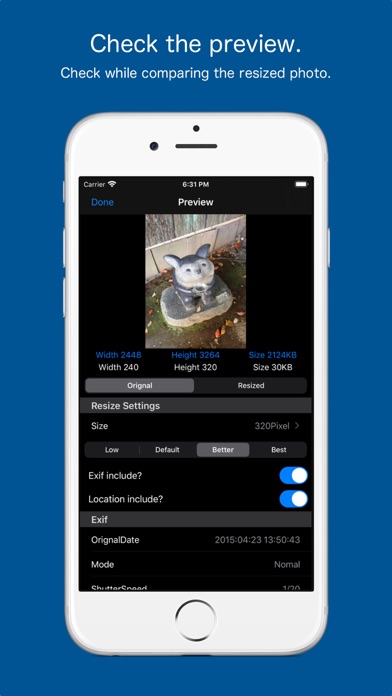
Press and hold a photo in Photo List preview screen is displayed, you can check the photo after resizing.
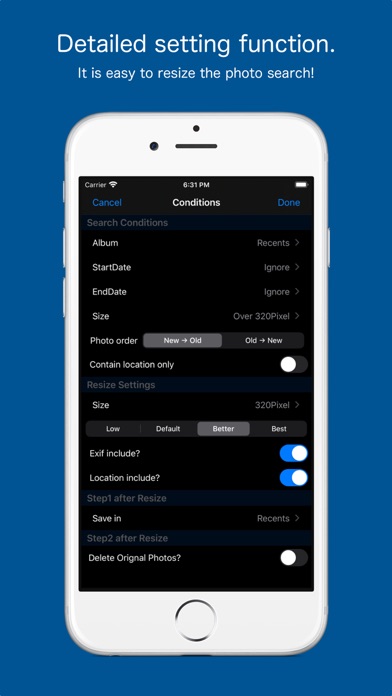
In search feature, and photos taken today, you can find easily, such as photos of more than 800 million pixels.
You can leave the Exif in the resized photo, and you can delete.
Delete location information is also possible.
The deleted photos, has been moved to the "Recently Deleted" of the "Photos app".
You can restore from a photo app be deleted by mistake.
If you want to remove completely, please delete in the Photos app.