

Magniscope
Magniscope is made and published by Go Yoshida. AppBrain is an independent app data site and isn't affiliated with Go Yoshida. The app name, icon, screenshots and description belong to Go Yoshida and are shown as published on the App Store.
AppBrain's verdict
Established- Rating on App Store
- 4.22
- 65 ratings
- Last updated
- July 9, 2023
- Size
- 19.7 MB
It doesn't have enough ratings yet to judge what users think.
User feedback
Ratings and reviews on the App StoreComments on Magniscope for iOS
We don't have enough comments to show example comments. Please check back later.
Store listing
By Go Yoshida, from the App Store



Description by Go Yoshida Written by the developer, not by AppBrain. Click to read.
Basic Functions:
- Magnifies up to 10x
- Autofocus specially tuned for reading
- Continuously adjusted exposure
- Video stabilization (Shake reduction)
- Pause and Save the screen
- Full Screen mode
- Dimmable torch light
- Magnifies the loaded photos
PRO Tools:
- Night Vision for use in dark places
- Switches to the front-facing camera (Mirror mode)
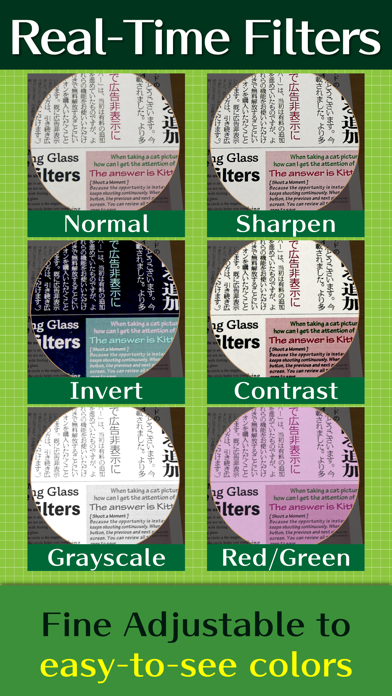
- Sharpens images to help reading
- Saturation, Brightness, Contrast adjustment
- Color Inversion
- Grayscale and Monochrome filters
- Red and Green balance adjustment
Others:
- Quick launch from Widget
- Changes magnifying glass size
- Suitable for AirPlay
- Compatible with VoiceOver
[Not Just a Magnifying Glass]
Magniscope features special live filters to make it easier to see the magnified image. You can turn on the sharpening filter to display text clearly. It is also possible to easily distinguish colors by using various color filters such as contrast adjustment, inversion, and monochrome.
All operations can be performed in real time with the "PRO Tools" at the top of the screen. While checking the actual image, find the setting that best suits your eyes.
[Usability is Important]
Magniscope supports your vision with its intuitive user interface. You can start using it without any complicated settings. Handy when reading hard-to-read things like books printed in small letters, menus in restaurants, labels on the medicine bottles, etc.
The magnification can be adjusted smoothly up to 10x. A circle is displayed in the center of the screen, and the magnified image is displayed inside it. The circle can be moved to any position or displayed in full screen.
This app is equipped with autofocus specially tuned for reading. It always works to focus on the center of the circle. The brightness of the image is also adjusted to the optimum state by automatic exposure. And video stabilization reduces the blur associated with the motion of the device.
[In Various Situations]
- In dark places, you can adjust the brightness of the torch light. If you don't want to turn on the light, try Night Vision.
- Paused screen is useful for displaying newspapers, maps, pamphlets, etc. When the entire area you want to see is displayed, tap the circle. You can then zoom in anywhere on the screen without moving the device.
- You can use this app with AirPlay on Apple TV to turn a big TV screen into a magnifying glass. In this case, it is good to set the interface orientation to landscape.
- When using with VoiceOver, you can move the circle by swiping with three fingers after selecting the circle.
[FAQ]
Why is it free?
- You can download this app for free because ads are displayed on part of the screen.
- Ads can be removed later by purchasing an add-on. Purchase is optional.
What models are supported?
- To use all the functions of this app, a model equipped with Apple A8 or later graphics hardware is required. (iPhone 6 or later, iPad Air 2 or later, and iPad mini 4 or later)
- If you are using a model without Focus Pixels, the focus may not be adjusted automatically. In this case, shake the device lightly to focus.
- Even if you're not sure if your device is compatible, you can try this app for free.
*disclaimer: This app is intended for use as a digital magnifying glass. We are not responsible for any claims, damages or other liability arising from the use of our products, especially those deviating from that purpose.
Safety and technology
Found in the app by AppBrain- Price
- Free
- App size
- 19.7 MB
- Content rating
- Everyone
Technologies used by Magniscope
Releases
Updates seen on the App Store- Version
- 5.2.9
- Launched
- November 2012
No changelog data
Alternatives
Similar apps and more from Go YoshidaAlternatives to Magniscope





More from Go Yoshida


Rankings
App Store top chartsApp Store Rankings for Magniscope
About the app and developer
About Magniscope
Magniscope is a health & fitness app developed by Go Yoshida.
User Ratings
Magniscope is rated 4.22 out of 5 stars. The rating is based on 65 ratings.
App Information
Magniscope is freely available from the App Store. The app size is 19.72 MB. The latest version available is 5.2.9. The last update was on July 9, 2023.
Technical Requirements
The app has a content rating of Everyone. The app has been available on the App Store since November 2012.
Developer information for Go Yoshida
Address: